
Why does my full-size timer background look lower quality?
Last updated
Countdown timers are GIFs, and a GIF can only use 256 colors. When you use a full-size background image, the photo or gradient has to share those 256 colors with the timer's digits, labels and their smooth edges. A detailed image needs far more colors than that, so some shades get merged together.
You might notice:
- Visible stripes (banding) in smooth gradients like skies or sunsets.
- Blotchy patches in photos, especially in skin tones and shadows.
- Colors that look slightly different from your original image.
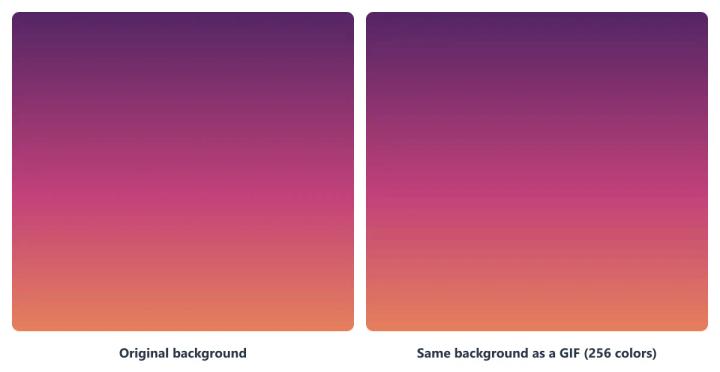
This is a limit of the GIF format, not your image. GIF is the animated format that works in the widest range of email clients, which is why timers use it. The tips below keep your background looking as close to the original as possible.
How to get a sharper full-size background
Use flat colors and simple artwork. Logos, shapes, illustrations and text in a few solid colors fit easily into 256 colors and stay crisp.
Avoid large gradients, soft shadows and glows. These need many shades of the same color and are where banding shows most.
Keep photos out of the timer. Place the photo as a normal image in your email, directly above or below the timer, and give the timer a solid background in a matching color. Normal email images aren't GIFs, so they keep their full quality.
Use fewer colors in the timer itself. Every digit, label and outline color takes space in the palette, leaving fewer colors for the background.
Test before you send. Send yourself a test email and check the timer at 100% zoom, on both desktop and mobile.
If you still need a photo behind the timer
Pick a photo with large areas of similar color and few fine details, and crop it to just the area behind the timer. The fewer distinct colors the image has, the better it survives the 256-color limit.
To learn more about email countdown timers, see our Email Countdown Timer page.
Related
- How to use your own background image on a timer
- Why is my transparent background countdown timer blurry?
- Countdown timer customization options
Was this article helpful?
Thanks for your feedback!