
How to change the language of your widgets
Last updated
Countdown timers and weather widgets can show their labels (like "Days" and "Hours", or the days of the week) in 47 languages. You can also write your own labels, or use one timer for subscribers who speak different languages.
Countdown timers
- Open your timer and expand Text and Labels.
- Choose a language from Language.
- Click Save.
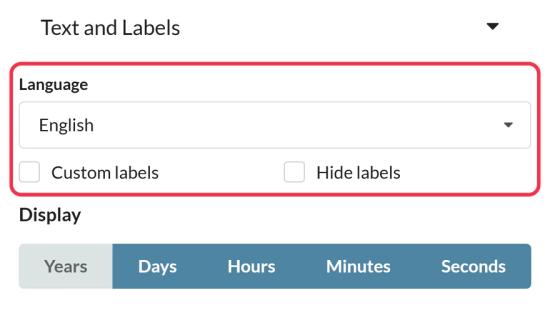
Write your own labels
On paid plans, tick Custom labels and type your own text for each unit, for example "Dagen" instead of "Days". Or tick Hide labels to show only the numbers.
One timer for several languages (Enterprise)
Turn on Multi-language timer and the timer shows each subscriber's language based on a language tag in the code: add ?lang= followed by the language code to the end of the timer's image link, usually using a merge tag from your platform that holds the subscriber's language. For example, ?lang=fr shows French labels.
Most codes are the standard two letters (en, fr, de, es), but a few are different. Use Full list of language tags in the editor for the exact code. For example, Korean is kn, Croatian is cro, Simplified Chinese is csl, Norwegian is no and Filipino is tl.
Weather widgets
Open the widget's Settings tab and choose a Language. Day and month names and the header change to that language. The short weather description (like "light rain") comes from our weather data provider and is in English for a few languages: Estonian, Kazakh, Malay, Swahili, Filipino and Uzbek.
Supported languages
Albanian, Arabic, Azerbaijani, Basque, Bulgarian, Catalan, Croatian, Czech, Danish, Dutch, English, Estonian, Filipino, Finnish, French, Galician, German, Greek, Hebrew, Hindi, Hungarian, Icelandic, Indonesian, Italian, Japanese, Kazakh, Korean, Latvian, Lithuanian, Macedonian, Malay, Norwegian, Polish, Portuguese, Romanian, Russian, Serbian, Simplified Chinese, Slovak, Slovenian, Spanish, Swahili, Swedish, Turkish, Ukrainian, Uzbek and Vietnamese.
To learn more about email countdown timers, see our Email Countdown Timer page.
Related
- Countdown timer customization options
- How to create a weather widget
- How to use merge tags in Sendtric widgets
Was this article helpful?
Thanks for your feedback!