
How to see your widget views in Analytics
Last updated
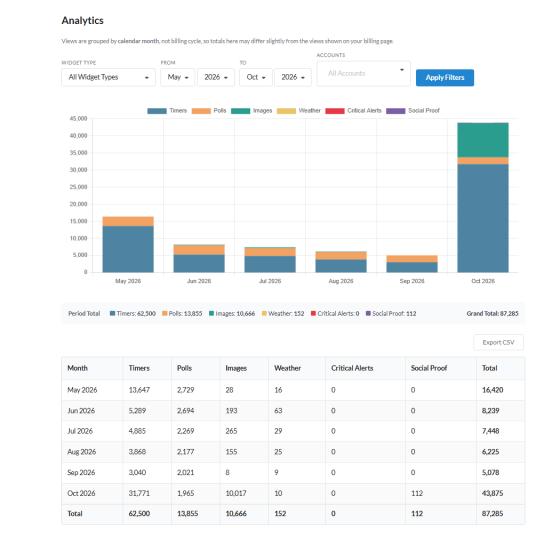
Analytics shows how many views your widgets had each month, so you can compare campaigns and keep track of your usage.
View your analytics
- Click Analytics in the top menu.
- Choose a Widget Type, or keep All Widget Types.
- Optionally pick a single Widget (once you've chosen a type).
- Set From and To (month and year).
- Enterprise owners can also choose Accounts.
- Click Apply Filters.
You'll see a total per widget type, a grand total, and a table of views by month.
Export
Click Export CSV to download the table for the filters you've chosen.
Good to know
- Analytics groups views by calendar month, while your billing views count from your billing date, so the numbers can differ a little.
- Free, Micro and Standard plans can see the last 6 months. Power, Enterprise and API plans can see their full history.
- If you see "Analytics are disabled", turn the breakdown back on in Settings > Account settings > Analytics. Months when it was off can't be filled in later.
Related
- How are widget views counted?
- How to manage your account settings
- How to see poll results and download reports
Was this article helpful?
Thanks for your feedback!