
How to upgrade or change your plan
Last updated
You can upgrade or change your plan yourself in the dashboard. Compare what each plan includes on our pricing page.
Change your plan
- Open Settings and expand Plan & Billing.
- Click Upgrade Plan to jump to the plans, or scroll down to them.
- Choose monthly or annual billing (annual saves up to 10%). Prices show in euros if you're in Europe, and in US dollars elsewhere.
- Click the plan you want.
- First purchase: enter your billing address and Tax ID if you have one, then complete checkout. Already have a card on file: confirm the change in Plan Confirmation. Your current card is used.
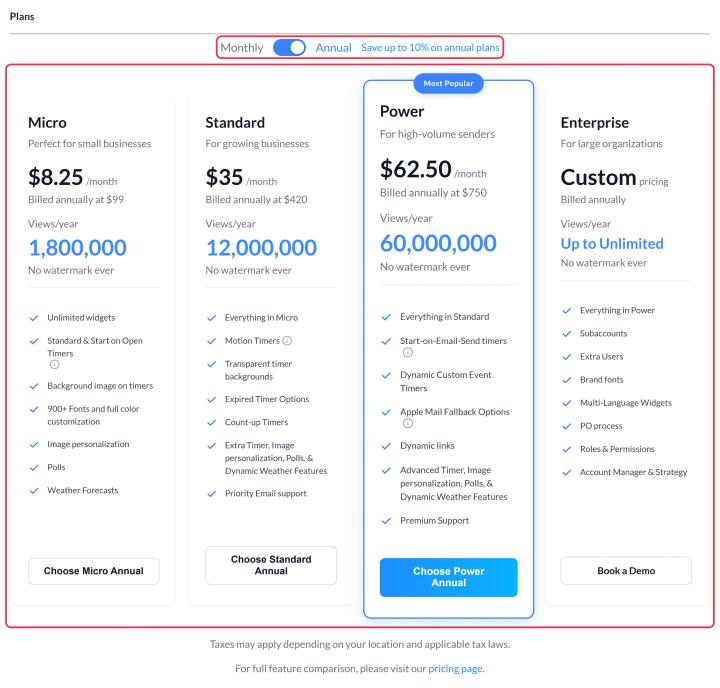
New features are available as soon as the change goes through.
Enterprise
Enterprise plans have custom pricing and add users, subaccounts, brand fonts, critical alerts, custom domains, purchase orders and an account manager. Click Book a Demo on the Enterprise card, or see how to contact us.
Moving to a smaller plan
You can choose a smaller plan the same way. Before you do, check whether your widgets use features the smaller plan doesn't include, such as Start on Email Send timers or live poll results. You won't be able to save those widgets with those features turned on afterwards.
Not sure which plan you need?
Start from your monthly views: your dashboard shows how many you've used this cycle. If you regularly go over, a bigger plan is worth it. See how are widget views counted?
Related
- What happens if I go over my paid plan views?
- What payment methods do you offer?
- How to cancel my plan or subscription
Was this article helpful?
Thanks for your feedback!