
How to set the forecast dates for a weather widget
Last updated
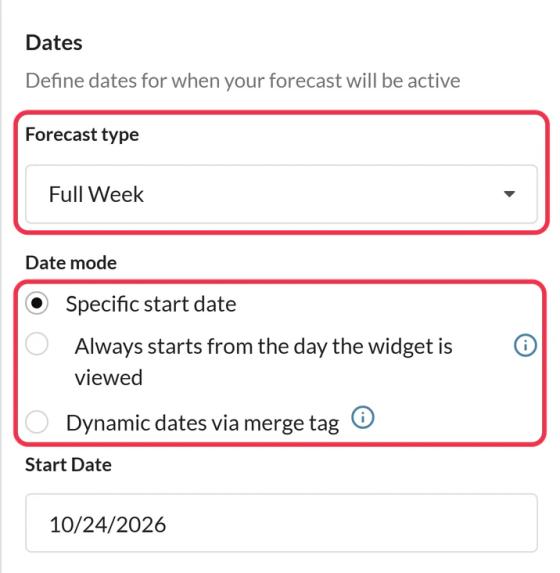
On the Settings tab of your weather widget, the Dates section controls how many days the forecast shows and which day it starts.
How many days
Forecast type: Full Week (7 days), 5 Day, 3 Day or 1 Day. The Free plan shows a full week; shorter forecasts are available on Micro and above.
When the forecast starts
| Option | Use it when | Plan |
|---|---|---|
| Specific start date | You know the date, like an event day | All plans |
| Always starts from the day the widget is viewed | The forecast should start on whatever day the email is opened, in the time zone you choose | Power and above |
| Dynamic dates via merge tag | Each subscriber has their own date, like a trip or booking | Standard and above |
For dynamic dates, the code includes date=YYYY-MM-DD. Replace YYYY-MM-DD with your platform's merge tag for that date. Klaviyo users can pick it in the Klaviyo forecast start-date merge tag field instead.
How far ahead
Forecasts are available for about the next 10 days. If you pick a start date further away, the editor warns you. Days without a forecast show a dash, and if none of the dates have a forecast, the widget shows "No data for this date range".
For dynamic dates, set up a Fallback image (or choose Hide the widget) for dates that are in the wrong format, too far ahead or already past.
To learn more about weather widgets, see our Weather Widget for Email page.
Related
Was this article helpful?
Thanks for your feedback!