
How to sign up and log in to Sendtric
Last updated
Create an account
- Go to app.sendtric.com/register.
- Enter your full name, email address and a password (at least 8 characters), and accept the Terms of Service and Privacy Policy.
- Click Start Free. Or click Continue with Google or Continue with Microsoft.
- Check your inbox for the activation email and click the link.
- Tell us a little about yourself, including the email platform you use, so we can set up its merge tags for you. Then click Continue.
The Free plan includes 10,000 views a month, and no card is needed.
Didn't get the activation email? Check your spam folder, or use Resend Verification Email on the verification screen.
Log in
Go to app.sendtric.com and sign in with your email and password, or with Continue with Google or Continue with Microsoft.
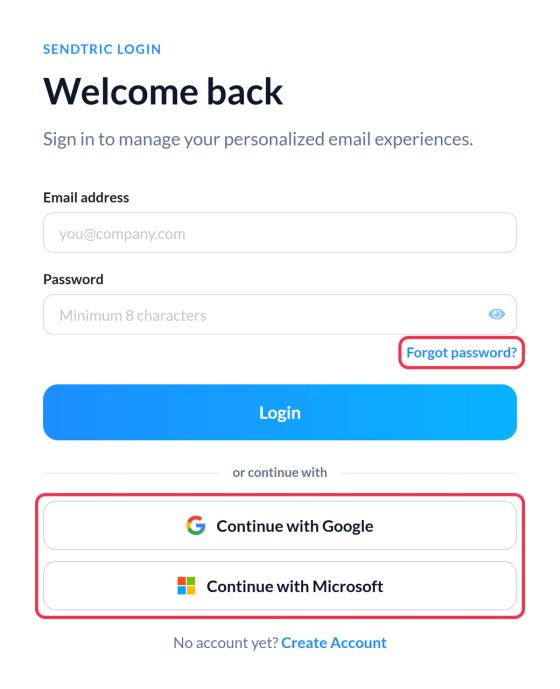
Google and Microsoft sign-in
- Your Google or Microsoft account must use the same email address as your Sendtric account to sign in to it.
- Some Microsoft work or guest accounts don't share an email address. If you see "Microsoft email not usable", sign in with your email and password instead.
- See which methods are linked in Settings > Account settings > Sign-in methods. You can unlink Google or Microsoft there, as long as you keep at least one way to sign in.
- More detail, including how accounts are created and linked: how to sign up or log in with Google or Microsoft.
Two-factor authentication
If your account has two-factor authentication on, you'll enter a 6-digit code after signing in. See how to sign in with two-factor authentication, or set it up to protect your account.
Forgot your password?
- On the login page, click Forgot password?.
- Enter your email and click Send reset link.
- Open the email and choose a new password.
If two-factor authentication is on, it stays on after a password reset: sign in with your new password, then enter your code.
If you signed up with Google or Microsoft and want a password too, go to Settings and use Set a password.
Can't get in?
If you no longer have access to your email address, email support@sendtric.com from another address with your current login email. See how to change my login email.
Related
- Getting started with Sendtric
- How to manage your account settings
- How to sign up or log in with Google or Microsoft
- How to set up two-factor authentication
Was this article helpful?
Thanks for your feedback!