
How to show each subscriber their local weather
Last updated
Turn on dynamic location and the weather widget shows each subscriber the forecast for their own city or postcode, using data from your email platform. Location by city is available on Micro and above, and by postcode on Standard and above.
The location comes from your subscriber data, not from where they open the email.
Set it up
- Open your weather widget and, on the Settings tab, turn on Set location dynamically.
- Choose a Location format:
- City, (optionally state), country code, for example
London,GBorAustin,TX,US. - ZIP/Postcode, country code, for example
90210,USorE14,GB.
- City, (optionally state), country code, for example
- Add a Fallback image (see below).
- Click Save and copy the code.
- In your email, replace
city,countryCode(orzipCode,countryCode) in the code with your platform's merge tags, for example{{ city }},{{ country }}.
Country codes must be the two-letter ISO code (GB, US, DE). Capitals don't matter.
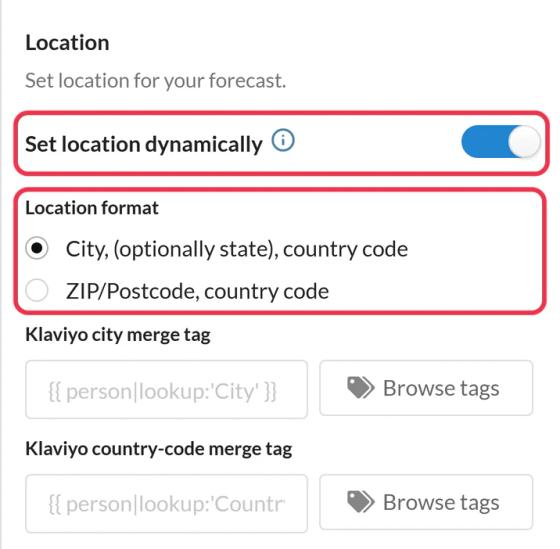
Using Klaviyo? Fill in the Klaviyo city merge tag (or ZIP) and Klaviyo country-code merge tag fields, using Browse tags to pick them. The code then includes them for you.
Not sure a city will be recognized? The Dynamic Location info window in the editor links to a list of supported cities.
Fallback for missing locations
Under Fallback image, choose Hide the widget (the default) or Upload an image (Micro and above) to show instead when:
- the subscriber has no city or postcode,
- the location can't be found,
- your platform doesn't fill in the merge tag.
Use a recommended size shown in the editor, so the fallback takes the same space as the forecast.
To learn more about weather widgets, see our Weather Widget for Email page.
Related
- How to create a weather widget
- How to set the forecast dates for a weather widget
- How to use merge tags in Sendtric widgets
Was this article helpful?
Thanks for your feedback!