
Getting started with Sendtric
Last updated
Sendtric adds live, personalized widgets to your emails: countdown timers, polls, personalized images, weather forecasts and more. Each widget is an image that's created at the moment someone opens your email, so it can show the time left right now, live poll results, today's forecast, or text made for that subscriber. It works with any email platform that lets you add HTML or an image.
How it works
- Create a widget in the Sendtric dashboard.
- Copy its code, or push it straight to Klaviyo, Mailchimp or HubSpot.
- Paste the code into your email and swap any merge-tag placeholders for your platform's own tags.
- Send. Every open loads a fresh image. If you edit the widget later, emails you've already sent show the change the next time they're opened.
How to add a widget to your email walks through steps 2 to 4 in detail.
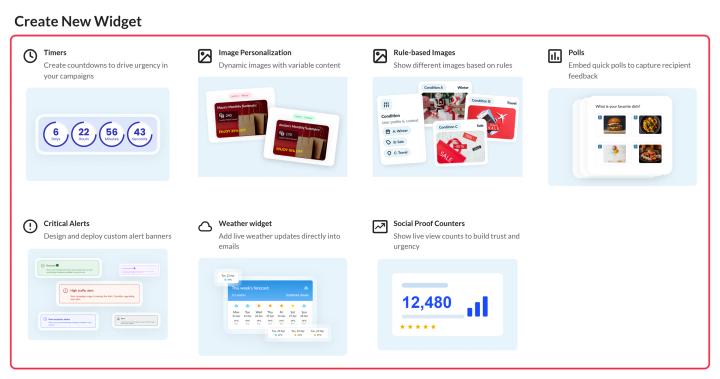
Which widget to use
- Countdown timer: counts down (or up) to a date, from when the email is opened or sent, or to a date for each subscriber.
- Polls: subscribers vote by clicking an answer in the email, and you get the results, optionally shown live.
- Image Personalization: personalize an image with personalized text, images and other widgets, including names, cities, codes or other subscriber data.
- Rule-based Images: shows a different image depending on date, time, device or subscriber data.
- Weather widget: shows a live forecast with a dynamic or fixed location and start date.
- Critical alerts: a notice or warning banner you can switch on or off after the email is sent (Enterprise).
- Social proof counters: shows a running count of views or clicks (Power and Enterprise).
Widgets can also be combined, for example a rule-based image that shows a different timer to different segments. See how to put one widget inside another.
A few things worth knowing
- Views. Your plan includes a number of views per month or year. A view is one load of a widget, usually when someone opens your email. Read how widget views are counted.
- Merge tags. Personalized widgets use your email platform's merge tags, or a data source, to show the personalized information to each subscriber. Read how to use merge tags in Sendtric widgets.
- Edit any time. Widgets keep working after you send, and you can change them later. Read how to change a widget after your email is sent.
- Plans. Some features depend on your plan, and locked options show an upgrade badge. Compare plans on our pricing page.
Need help?
Email support@sendtric.com and we'll get back to you, usually within one business day. More ways to reach us are in how to contact us.
Was this article helpful?
Thanks for your feedback!