
How to manage your account settings
Last updated
Everything about your account lives in Settings. Open it from the top menu, or click your email address at the top right and choose Settings. Each section opens when you click its heading. Which sections you see depends on your plan and role.
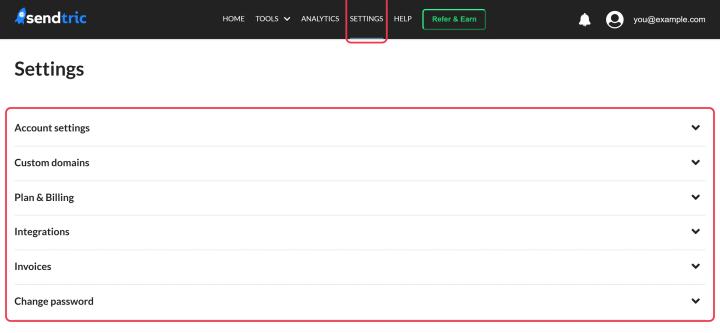
Account settings
- Change your email address. See how to change my login email.
- Sign-in methods: see whether a password and Google or Microsoft sign-in are set up, and unlink Google or Microsoft. See how to sign up or log in with Google or Microsoft.
- Two-factor authentication: ask for a code from an authenticator app or your email at every sign-in. See how to set up two-factor authentication.
- Default Email Service Provider: the platform you send with. New timers use its merge tags automatically. See how to use merge tags in Sendtric widgets.
- Analytics: turn the monthly analytics breakdown on or off. If you turn it off, analytics for that period can't be recovered later. Your total and billing-cycle views are always kept.
Change password
Set a new password, or Set a password if you signed up with Google or Microsoft and don't have one yet.
Plan & Billing
Your current plan, views used this cycle, renewal date, payment method, billing details and plan options.
- How to upgrade or change your plan
- How to update or add a new payment method
- Why was I charged VAT or sales tax?
- How to cancel my plan or subscription
Invoices
Every invoice with a Download Invoice link. See how to see and download my invoices.
Integrations
Connect Klaviyo, Mailchimp or HubSpot. See how to connect Klaviyo, Mailchimp or HubSpot.
Enterprise sections
- Brand: custom fonts and default fonts. See how to upload custom brand fonts.
- Custom domains: serve widgets from your own subdomain. See how to use your own domain for widgets.
- User Management: a link to Accounts. See how to invite users and set their roles.
- Subaccount users see Your account details with their subaccount, name, email and role instead of billing.
API plans
API plans also see API Key, with a link to the API documentation, and BeeFree plugin timer types.
Related
Was this article helpful?
Thanks for your feedback!