
How to use your own domain for widgets
Last updated
By default, widget images load from Sendtric's domain. With a custom widget domain, they load from your own subdomain, like widgets.yourbrand.com, so the images and links in your emails carry your brand. Available on Enterprise and API plans.
Before you start
- You'll need access to your domain's DNS settings, or someone who has it.
- Use a subdomain, like
widgets.yourbrand.com. A root domain likeyourbrand.comcan't be used, because DNS doesn't allow the required record there. - Enterprise owners and admins, subaccount admins and API users can set this up.
Set up your domain
- In the dashboard, open Settings and expand Custom domains.
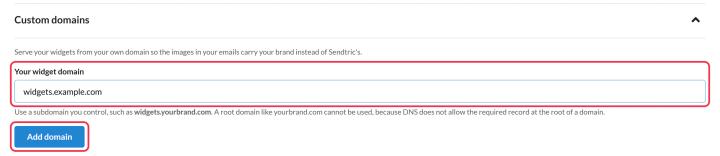
- Enter your subdomain in Your widget domain and click Add domain.
- In your DNS provider, add the record shown:
- Type: CNAME
- Name: your subdomain
- Value: the Sendtric target shown (use Copy)
- Back in Sendtric, click Check now.
- The status moves from Waiting for your DNS record to Securing your domain (usually a few minutes) to Active.
DNS changes can take a while to spread. If the record isn't found within 7 days, or the security certificate can't be issued within 24 hours, the status shows Needs attention. Check the record is still in place, then click Check now again.
What changes
Once the domain is active, Use this domain for widget and dynamic link URLs turns on, and:
- new widget code, Dynamic Link URLs and widgets you push to your email platform use your domain;
- code you copied before keeps using Sendtric's domain and keeps working, so there's no need to update sent emails.
Each subaccount can have its own domain. Subaccounts without one use the main account's domain.
Removing your domain breaks widgets in emails already sent with it. To go back to Sendtric's domain for new widgets only, switch off Use this domain for widget and dynamic link URLs instead.
Related
- How to add a widget to your email
- How to create and manage subaccounts
- How to make a timer clickable with Dynamic Links
Was this article helpful?
Thanks for your feedback!