
How to send large amounts of data to a data source
Last updated
When you send thousands of records to a data source, group them into batches and send the batches one after another. It's faster than one request per record, and it keeps every request within Sendtric's limits.
This applies to the Sendtric API and to Zapier and n8n data sources.
The limits
| Limit | Value |
|---|---|
| Records per request | 10,000 |
| Request size | 10 MB |
| Identifier value | 255 characters |
| Any single text value | 10 KB |
| Nesting depth | 20 levels |
A request over the record or size limit is rejected with status 413, and nothing in it is saved.
Good batching habits
- Send arrays, not single records. One request with 50 records does the same work as 50 requests, with far less overhead.
- Send batches one after another, not all at once in parallel.
- Pause briefly between batches when you're sending thousands of records.
- Retry on 503 and network errors. A
503response includes aRetry-Afterheader with the number of seconds to wait. Then send the same batch again. - Don't retry 400, 401, 404 or 422 without fixing the request first. Those mean something in the request needs to change.
Resending a batch is safe. A record with an identifier that already exists replaces the old one, so a retried batch never creates duplicates.
n8n: 1,000 to 5,000 records
For a few thousand records, the HTTP Request node's own batching is enough. Open the node that sends to Sendtric and set:
- On the Parameters tab, under Options, click Add option and add:
- Batching: Items per Batch
50and Batch Interval (ms)5000. - Timeout:
30000.
- Batching: Items per Batch
- On the Settings tab:
- Turn on Retry On Fail.
- Max. Tries:
3. - Wait Between Tries (ms):
3000. - On Error: Stop Workflow.
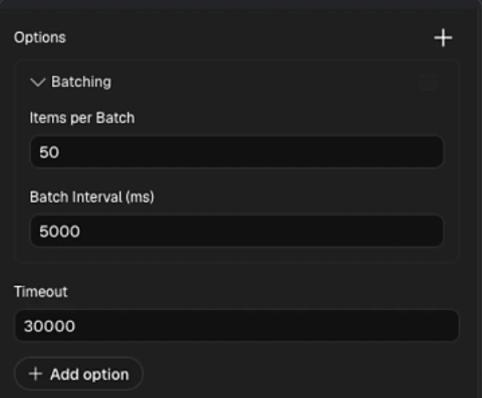
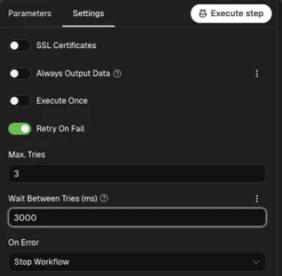
With these settings n8n still sends one request per record, 50 at a time, then waits 5 seconds before the next 50.
n8n: more than 5,000 records
For larger data sets, use our ready-made workflow. It groups every 50 records into one request and sends the groups one after another, so 10,000 records become 200 requests instead of 10,000.
The workflow has four nodes:
- Google Sheets Trigger reads your sheet. It checks for changes every minute.
- Loop Over Items splits the rows into batches of 50.
- Code in JavaScript wraps each batch into a single request body.
- HTTP Request sends the batch to Sendtric, retries if it fails, then hands back to the loop for the next batch.
Set it up
- In Sendtric, create an n8n data source and copy its webhook endpoint and API key. See how to send records from Zapier or n8n.
- Copy the workflow JSON below.
- In n8n, create a new workflow and paste the JSON onto the empty canvas (or save it as a
.jsonfile and use Import from File). - Open Google Sheets Trigger, connect your Google account, then choose your spreadsheet and sheet.
- Open HTTP Request:
- Replace the URL with your Sendtric n8n webhook endpoint.
- In the
Authorizationheader, replaceYOUR_API_KEYwith your key. Keep the wordBearerand the space before it.
- Run the workflow once to test it, check the records on the data source's Records tab in Sendtric, then activate the workflow.
Your sheet needs a column with the same name as the data source's unique identifier field, filled in on every row.
Need data from somewhere other than Google Sheets? Replace the trigger with any node that outputs your records, and connect it to Loop Over Items.
Workflow JSON
{
  "name": "Google Sheets to Sendtric data source",
  "nodes": [
    {
      "parameters": {
        "pollTimes": { "item": [{ "mode": "everyMinute" }] },
        "documentId": { "__rl": true, "value": "", "mode": "list" },
        "sheetName": { "__rl": true, "value": "", "mode": "list" },
        "options": {}
      },
      "type": "n8n-nodes-base.googleSheetsTrigger",
      "typeVersion": 1,
      "position": [0, 16],
      "id": "e8a0600f-7814-44c9-9960-22b9eb6dc708",
      "name": "Google Sheets Trigger"
    },
    {
      "parameters": {
        "batchSize": 50,
        "options": { "reset": false }
      },
      "type": "n8n-nodes-base.splitInBatches",
      "typeVersion": 3,
      "position": [240, 16],
      "id": "05d065b5-a82b-49ea-8f0b-bd5e3116c694",
      "name": "Loop Over Items"
    },
    {
      "parameters": {
        "jsCode": "// Collect every record in this batch\nconst batchItems = $input.all().map(item => item.json);\n\n// Send the batch as one request body\nreturn [{\n  json: {\n    payload: batchItems\n  }\n}];"
      },
      "type": "n8n-nodes-base.code",
      "typeVersion": 2,
      "position": [464, 16],
      "id": "1c93cf1d-6636-4d30-b732-df749cbcb9bc",
      "name": "Code in JavaScript"
    },
    {
      "parameters": {
        "method": "POST",
        "url": "PASTE_YOUR_SENDTRIC_N8N_WEBHOOK_ENDPOINT",
        "sendHeaders": true,
        "headerParameters": {
          "parameters": [{ "name": "Authorization", "value": "Bearer YOUR_API_KEY" }]
        },
        "sendBody": true,
        "specifyBody": "json",
        "jsonBody": "={{ JSON.stringify($json) }}",
        "options": {}
      },
      "type": "n8n-nodes-base.httpRequest",
      "typeVersion": 4.5,
      "position": [688, 0],
      "id": "26a6141b-faa8-457c-927f-6ab5ef94a6ec",
      "name": "HTTP Request",
      "retryOnFail": true,
      "waitBetweenTries": 5000
    }
  ],
  "connections": {
    "Google Sheets Trigger": {
      "main": [[{ "node": "Loop Over Items", "type": "main", "index": 0 }]]
    },
    "Loop Over Items": {
      "main": [[], [{ "node": "Code in JavaScript", "type": "main", "index": 0 }]]
    },
    "Code in JavaScript": {
      "main": [[{ "node": "HTTP Request", "type": "main", "index": 0 }]]
    },
    "HTTP Request": {
      "main": [[{ "node": "Loop Over Items", "type": "main", "index": 0 }]]
    }
  },
  "settings": { "executionOrder": "v1" }
}
Check the result
Records are usually available within about a minute of being accepted. Open the data source and use the Records tab to search for a few identifiers and confirm the values look right.
If a response reports skipped records, the X-Skipped-Records header says how many. They're usually rows missing the identifier field, or with a value over 10 KB.
Related
- What are data sources and how do they work?
- How to send records to a data source with the Sendtric API
- How to manage, edit and delete a data source
Was this article helpful?
Thanks for your feedback!