
How to connect a data source to your own API
Last updated
With a connected API data source, Sendtric calls your API to get a subscriber's data when their email is opened. Nothing is copied into Sendtric, so images show whatever your API returns at that moment, like a live order status or today's account balance.
If you'd rather push data to Sendtric ahead of time, see how to send records with the Sendtric API.
What your API needs
- An HTTPS URL that's reachable from the public internet.
- A way to ask for one record by its identifier, in the path or a query parameter. For example
https://api.example.com/customers/12345. - A JSON response with the record's fields, such as
{"first_name": "Sarah", "points": 1250}. - A quick reply: Sendtric waits up to 5 seconds, and the response must be under 1 MB.
Set it up
- In the left sidebar, click Data sources, then New data source.
- Under API, choose API and click Continue.
- Choose Retrieve data from an API and click Continue.
- Fill in Data source name, Unique identifier field (for example
customer_id) and, if you like, Description. - Choose the Method: GET or POST.
- Enter your API URL and put
{{uid}}where the identifier goes, for examplehttps://api.example.com/customers/{{uid}}. Sendtric replaces{{uid}}with each subscriber's identifier. - Add any Headers your API needs, like
Authorizationwith your API token. Click + Add for each one. - Add any Query parameters. If your API takes the identifier as a parameter, put
{{uid}}in its value instead of the URL, for exampleid={{uid}}. - Enter a real identifier in Test unique identifier value and click Test API.
- Check the response, then click Save data source.
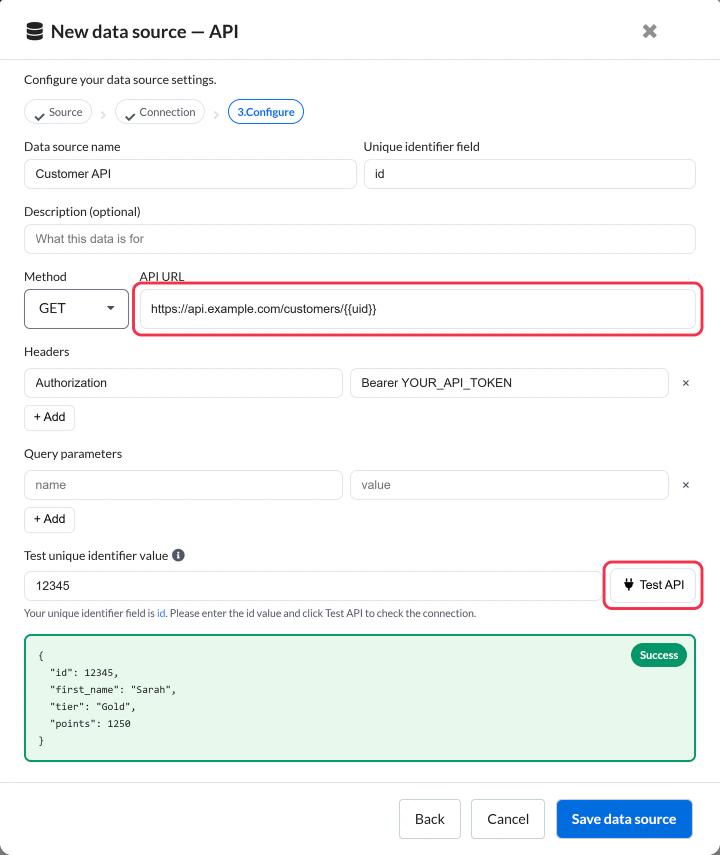
Save data source stays disabled until the test succeeds and the response contains at least one field. If you change the URL, method, headers or parameters, test again.
Use a test endpoint or a dedicated, read-only API token. Sendtric keeps header values secret after saving, so you'll need to re-enter one to change it.
How lookups work
- Each lookup sends one request to your API for one subscriber.
- Identifiers are sent exactly as the merge tag fills them in, so upper and lower case matter if your API cares about them.
- Sendtric keeps a generated image for the Cache time you set in the image editor (2 to 60 minutes), so repeated opens don't call your API every time.
- If your API is slow, returns an error or has no record for the identifier, the value is treated as empty. In a personalized image, that layer is hidden, so design the image to still look right without it.
Change the connection
In Data sources, click the data source to open its settings. You can change the URL, method, headers and parameters, then run Test API again before saving.
Next step
- How to use a data source in a personalized image
- How to use a data source in a rule-based image
- What are data sources and how do they work?
Was this article helpful?
Thanks for your feedback!