
Advanced Motion timers vs Standard Timer Styles
Last updated
Standard timer styles show a new frame once a second, so the numbers simply change. Advanced Motion styles render 20 frames per second, so each number flips, slides or grows into place. The result looks like a live clock and is much harder to scroll past.
Standard vs Advanced Motion
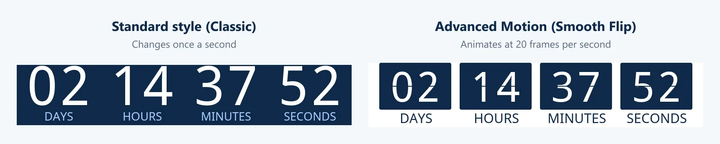
Both timers count down to the same deadline. The standard style jumps from one second to the next, and the motion style animates the change.
Why motion gets more attention
Movement catches the eye
People notice motion before anything else on a screen, so an animated timer draws readers to your deadline as they scroll.
It feels live
A smooth, ticking countdown looks like it's happening right now, which adds a real sense of urgency.
It looks premium
Polished animation makes your email feel designed with care, which suits launches and high-value offers.
It stands out in the inbox
Most of an email is still. A moving timer gives readers one clear thing to look at, right next to your call to action.
More attention on the timer means more attention on your offer, which is what turns a countdown into clicks.
The Advanced Motion styles
All four are available on the Standard plan and above. Like every Sendtric style, you can change their colors, fonts, labels and size.
Smooth Flip
The classic flip clock. The top half of each card folds down to reveal the next number.
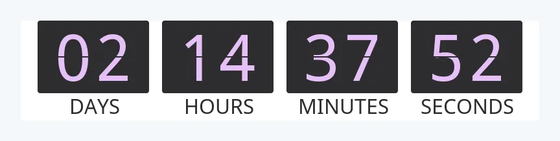
Smooth Flip Rounded
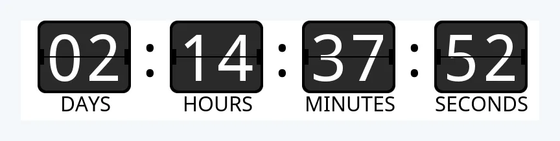
The same flip animation with rounded cards and colons between the units, for a softer look.
Stacked Digits
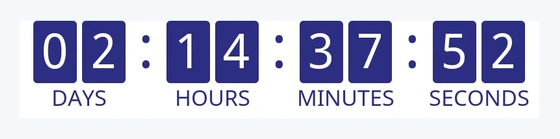
Every digit sits on its own tile, and the new digit drops in from the top.
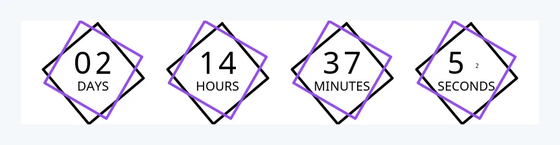
Diamond Frame
Each unit sits inside two overlapping diamond outlines, and the new number grows into place.
When to use each
Advanced Motion works well for:
- Product launches and big sale events
- Black Friday, holiday and other seasonal campaigns
- Premium brands and high-value offers
- Hero sections, where the timer is the main focus of the email
A standard style is a good fit for:
- Frequent sends, where the same animation every day can lose its impact
- Service and reminder emails, where the timer is a small detail
- Emails with lots of other images, where you want to keep the email light
- Designs that need a transparent or full-size background (see below)
How to choose a motion style
- Open your timer and go to Visual Design.
- Click the current style to open Select a New Timer Style.
- Under Standard+, choose Smooth Flip, Smooth Flip Rounded, Stacked Digits or Diamond Frame.
- Turn on Use Currently Selected Colors if you want to keep your colors, then save your timer.
Your existing timer code keeps working. Emails you have already sent show the new style the next time they're opened.
Good to know
| Standard styles | Advanced Motion styles | |
|---|---|---|
| Frames per second | 1 | 20 |
| Animation | Numbers change once a second | Numbers flip, slide or grow into place |
| Styles | Classic, Clean, Blocks, Arcs, Pill Bar, Ticks, Ring Progress and more | Smooth Flip, Smooth Flip Rounded, Stacked Digits, Diamond Frame |
| Plan | Free (Classic), Micro and above (10 more), Standard and above (all) | Standard and above |
| Typical file size (Medium) | About 40 to 50 KB | About 50 to 145 KB |
| Transparent background | Yes | Not on Smooth Flip styles |
| Full-size background image | Yes | No |
- File size. Motion styles hold more frames, so their GIFs are larger. Even the largest stays small enough to load quickly in an email.
- The 60-second loop works the same way for every style. See why does my countdown timer repeat after 60 seconds?
Related
- Countdown timer customization options
- How to use your own background image on a timer
- Why is my transparent background countdown timer blurry?
- How to create a countdown timer
Was this article helpful?
Thanks for your feedback!