Personalize Loyalty Program Emails: Tier Rewards, Points Cards & Expiry Countdowns
Show every member the reward for their tier, their own points balance and a countdown to the day their points expire, all from one email design.
Loyalty Emails Work When They Are About the Member
A loyalty email that shows every member the same offer wastes the data your program already holds. Members want three things answered at a glance: what their tier gets them, how many points they have, and when those points run out.
Sendtric answers each one with a different widget. Use them on their own or together in the same email:
- Rule-based images show each tier its own reward.
- A personalized loyalty card shows the member's name and points balance.
- A dynamic countdown timer counts down to each member's own expiry date.
More than 200,000 companies trust Sendtric




















Loyalty Email Personalization: What Works
- Lead with the member's status, not your offer. Put the tier reward or points balance at the top of the email, where it is seen without scrolling. That is the part each member reads as theirs.
- Show progress to the next tier. A status label tells members where they are. A message like "150 points to Gold" tells them what to do next. Rule-based images can combine conditions, such as Silver tier and a balance above 450, to show that message only to members who are close.
- Use live data when balances change often. Merge tag values are fixed when the email is sent. If members earn or spend points between send and open, connect a data source so balances and rules are read when the email is opened.
- Count down to a real date. Use each member's actual expiry date from your loyalty data, not a generic campaign end date. A countdown to a deadline that doesn't exist costs you trust.
- Plan for missing data. New members, imported contacts and empty fields are normal. Set a fallback image for members who match no rule, and fallback text for blank names or balances, so nobody sees an empty card.
- Test with real member records. Before you schedule, send tests to a member in each tier, one with zero points and one with no expiry date.
Show Each Tier Its Own Reward with Rule-Based Images
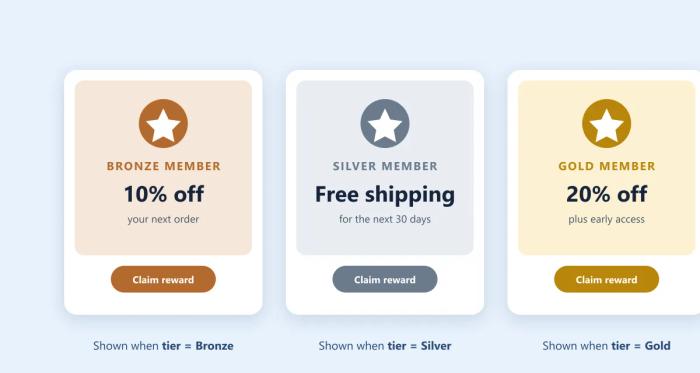
A Gold member who sees a Bronze offer feels overlooked, and a separate campaign for every tier quickly gets out of hand. With rule-based images, one image in one email changes for each member. When the email is opened, Sendtric checks your rules from top to bottom and shows the first image that matches.
- Bronze members see 10% off their next order.
- Silver members see free shipping for 30 days.
- Gold members see 20% off plus early access to the next sale.
- Everyone else sees your fallback image, such as an invitation to join.
Set it up: create a rule-based image, add a rule and an image for each tier, put the rules in order and add a fallback. See how to create a rule-based image and how to set display conditions.
Show Every Member Their Own Loyalty Card and Points Balance
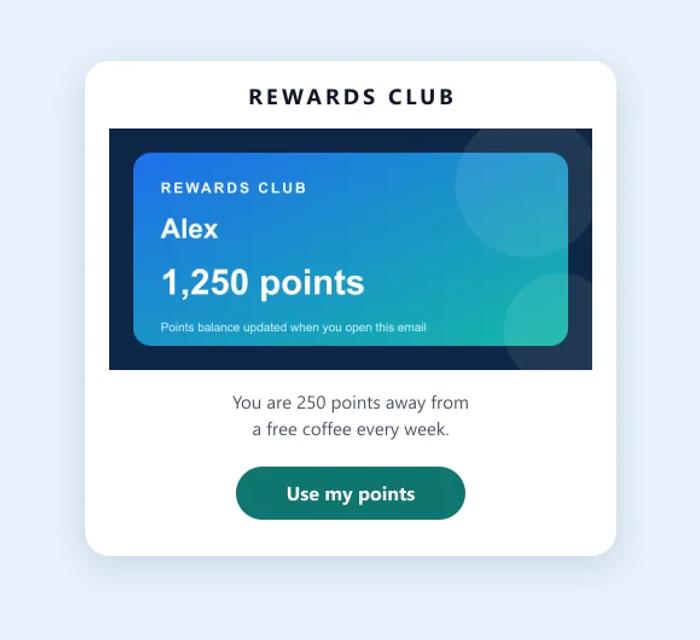
A points balance buried in a line of text is easy to skim past. A membership card with the member's name and balance makes the program feel real, and reminds them what they have to spend. With image personalization, the name and balance are dynamic text on your own card design.
- Your design: the card uses your brand fonts and colors.
- Current balances: a connected data source reads the balance when the email is opened, even days after sending.
- One card per tier: use the card as a rule's image in a rule-based image to change the design by tier.
Set it up: create a personalized image with your card as the background, then add Dynamic Text layers for the name and balance, each with fallback text. See how to create a personalized image.
Count Down to Each Member's Points Expiry with Dynamic Timers
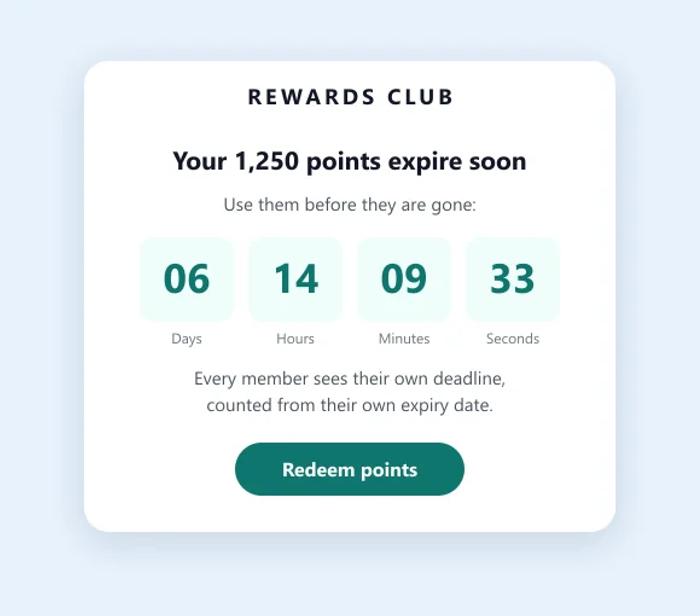
"Your points expire soon" is easy to ignore. A countdown to the exact moment they expire is not. A Dynamic Timer from Sendtric's email countdown timers reads each member's own date from your email platform, so one email shows every member their own deadline.
- Each member's own date, taken from a merge tag as a Unix timestamp or ISO 8601 date.
- One email for every date, so it can run as an automated flow.
- The same setup works for membership renewals and reward vouchers that expire.
Set it up: create a timer with the Dynamic Timer type, copy the code from the Dynamic Code tab and replace the value after ?to= with your expiry date merge tag. Dynamic timers are available on the Power plan and above. See how to set up a Dynamic or Start on Email Send timer.
Put All Three in One Loyalty Email
The three widgets work together in a monthly statement email:
- The tier reward at the top, from a rule-based image.
- The member's card and balance below it.
- The expiry countdown next to the call to action.
Only want the countdown for members whose points expire this month? Put the timer inside a rule-based image with a date condition, and leave the fallback empty so everyone else sees nothing. See how to put one widget inside another.
More Loyalty and Retention Ideas
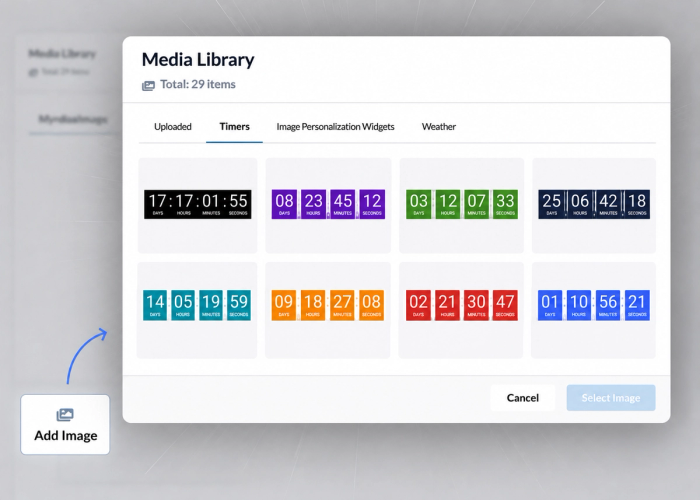
See every condition and data source on the Rule-Based Images page, card ideas on Personalized Images for Email and every timer type on Email Countdown Timers.
For the bigger picture, read the top industries achieving results with personalized images and how to use countdown timers with email automation. Celebrating a membership anniversary? See personalized birthday and anniversary emails.
Browse All Use CasesWhy clients LOVE Sendtric...
“We couldn't be happier with Sendtric. It allows us to add value to our customers and see the NPS go up. The countdown feature has been an invaluable tool to drive revenue for our customers. It adds a touch of personalized dynamism and urgency to our users' campaigns, effectively motivating their customers to act promptly.”
Founder of WoowUp
“At Splio, we are thrilled to share how Sendtric has transformed customer engagement through its exceptional countdown feature. This powerful tool allows us to personalize our customers' campaigns and instill a sense of excitement and urgency, driving the end-customers to take immediate action. With Sendtric, we have elevated our customer satisfaction. It's very quick & simple to install together with Beefree, allowing us to generate instant value.”
VP of Product at Splio