Personalized Birthday & Anniversary Emails with Image Personalization
Put every customer's name on the celebration, not just in the subject line. One image, personalized for everyone.
Celebrations Should Feel Personal
Birthday and anniversary emails are some of the most opened messages a brand sends. A name in the subject line is expected. A name in the hero image feels like it was made for them.
With Sendtric's image personalization, you design one banner and add dynamic text for the subscriber's name, so every customer sees their own.
More than 200,000 companies trust Sendtric


















Example: A Birthday Treat
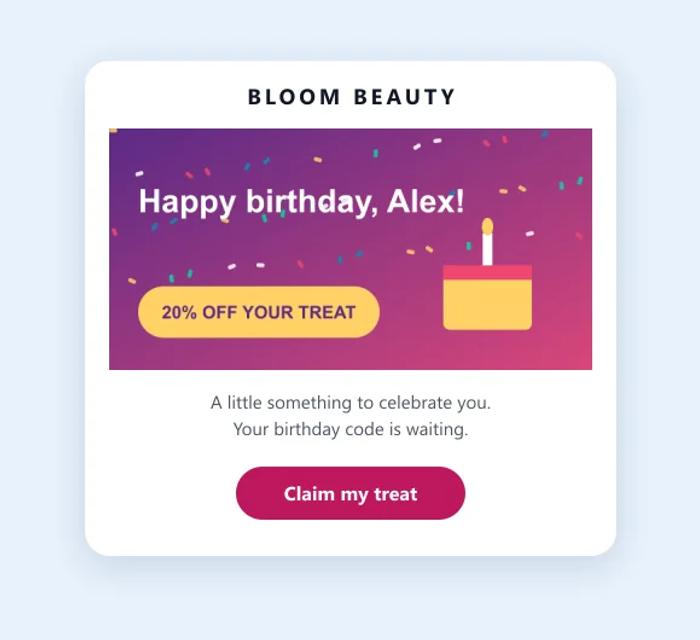
Here is how a beauty brand could personalize its birthday email:
- The banner reads "Happy birthday, Alex!", using each subscriber's first name.
- The offer sits on the same image, so the whole banner works as one design.
- Fallback text reads "Happy birthday, friend!" for anyone without a name on file.
The same setup works for membership anniversaries ("3 years with us, Alex") and first-order milestones.
Birthday and Anniversary Emails: What Works
- Collect the date before you need it. Ask for a birthday at sign-up or in your preference center, and say what members get for sharing it. You only need the day and month.
- Give the offer time. Send on or just before the day, and keep the offer valid for a week or more so customers can use it when it suits them.
- Put the name where it is seen first. A name in the subject line is expected. A name on the hero image is the first thing the reader sees, and it looks made for them.
- Clean your name data. Names in capitals, nicknames or test values look worse on a banner than in a line of text. Tidy the field, and set a warm fallback like "friend" for blanks.
- Leave room for long names. Test the banner with the longest first names in your list, and design the space around the name to fit them.
- Celebrate more than birthdays. Membership and first-order anniversaries work the same way, with the number of years as dynamic text.
How to Create a Personalized Birthday Banner
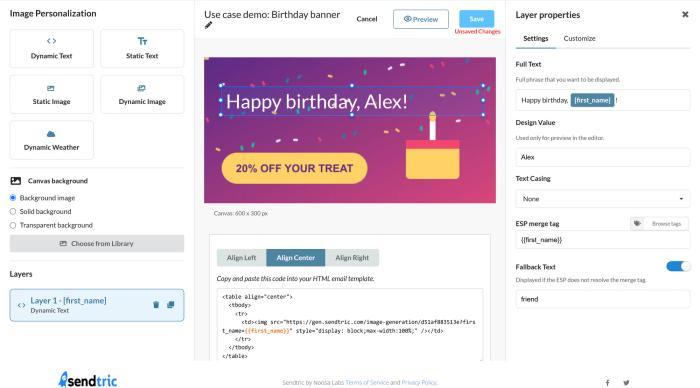
- Create a personalized image with your birthday banner as the background.
- Add a Dynamic Text layer for the first name, with fallback text.
- Copy the code into your birthday email.
For step-by-step instructions, see how to create a personalized image and how to use merge tags and fallback text.
More Ways to Use Image Personalization
Personalized images also work for year in review emails and loyalty program emails. For the bigger picture, read how image personalization in email increases conversions.
Explore Image PersonalizationWhy clients LOVE Sendtric...
“We couldn't be happier with Sendtric. It allows us to add value to our customers and see the NPS go up. The countdown feature has been an invaluable tool to drive revenue for our customers. It adds a touch of personalized dynamism and urgency to our users' campaigns, effectively motivating their customers to act promptly.”
Founder of WoowUp
“At Splio, we are thrilled to share how Sendtric has transformed customer engagement through its exceptional countdown feature. This powerful tool allows us to personalize our customers' campaigns and instill a sense of excitement and urgency, driving the end-customers to take immediate action. With Sendtric, we have elevated our customer satisfaction. It's very quick & simple to install together with Beefree, allowing us to generate instant value.”
VP of Product at Splio