Travel & Hospitality: How to Use Dynamic Weather Widgets in Email Marketing
Travel and hospitality are often at the mercy of the weather. With dynamic weather widgets in your emails, you can control the narrative.
 First Publish Date:
The travel and hospitality sectors are often at the mercy of the weather. But while the wind and rain might be out of your control, you can still get a say in how it all plays out – with dynamic weather widgets in your emails.
Dynamic weather widgets update your email content to give real-time weather updates for any location you choose – your resort, an event venue, or the city saved in each subscriber's profile. And soon, you'll be able to change your messaging, imagery, and more based on weather-specific rules. This can be massively valuable for events, travel, and hospitality businesses, giving them a jump on weather changes before they happen – and giving customers better experiences.
Key Takeaways
- An estimated $13.5 billion of US sales are impacted annually by the weather.
- Relevance beats discounts. Experiments with weather-based promotions outperformed Black Friday deals by 2x for a major international company.
- Travelers can shorten their stays if the weather doesn't match expectations. Weather widgets can help them pack and prepare better.
- Weather data can boost engagement, increase attendance, and elevate ancillary sales.
- With weather-based automation rules, a single email can serve each individual recipient with personalized content – drastically reducing the burden on marketing teams.

What Are Dynamic Weather Widgets in Email?
A dynamic weather widget is an embeddable element that displays a live, location-specific weather forecast directly inside an email [1]. Unlike static images that are fixed at send time, weather widgets render at the moment of opening, pulling the latest forecast data for anywhere you specify. That could be your hotel, the venue of an event, or the city saved in each subscriber's profile.
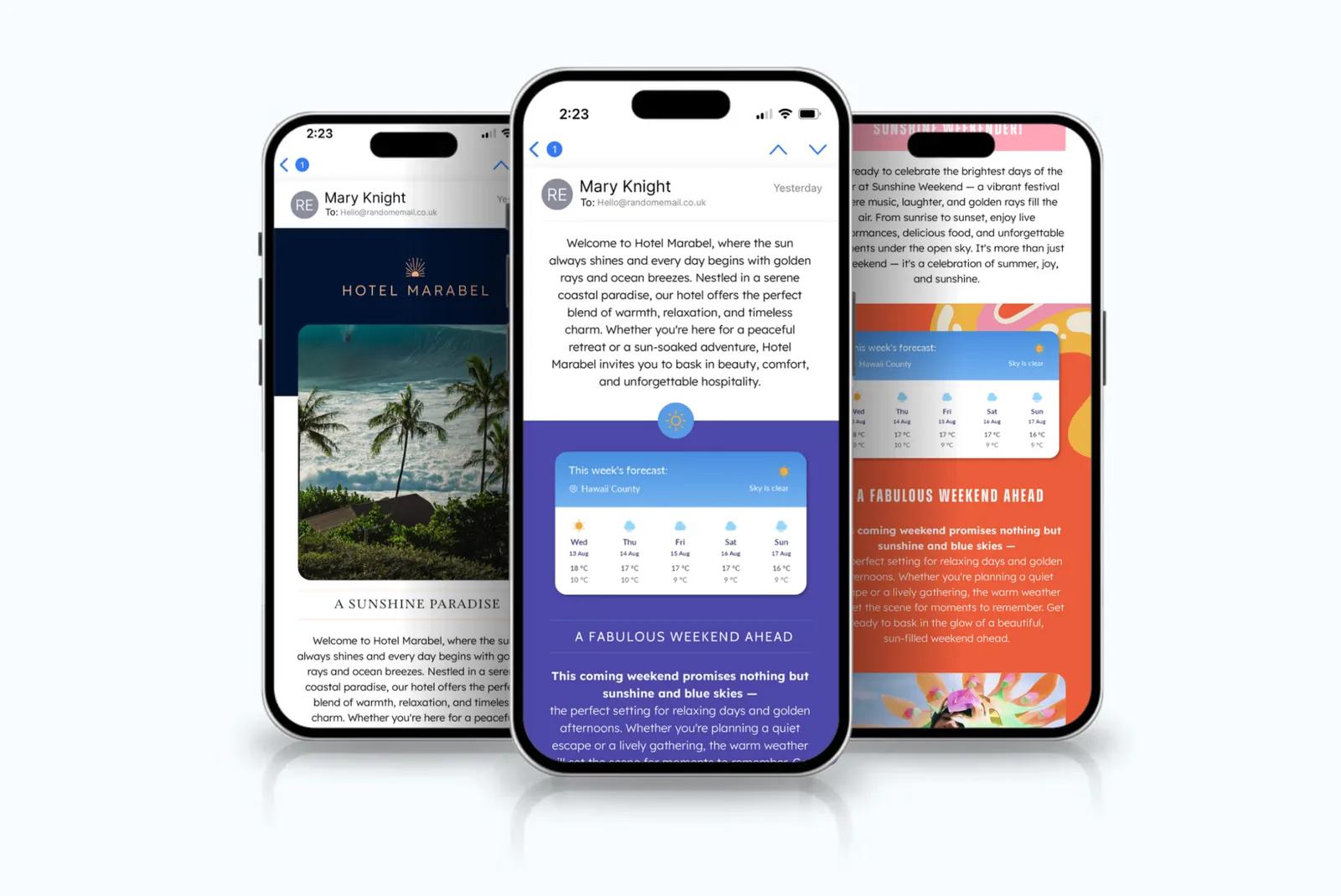
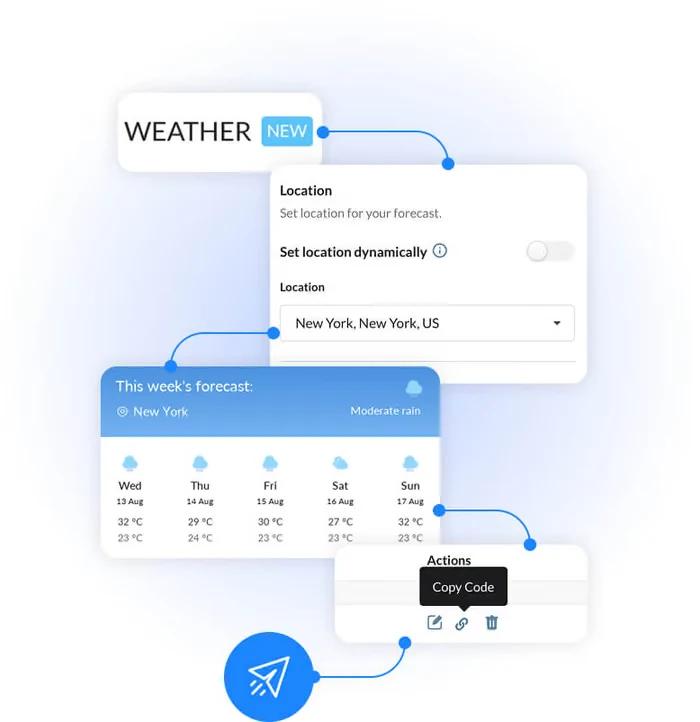
The technology works similarly to other dynamic email personalization tools. You create the widget in a platform, configure the location parameters, and paste the generated embed code into your email template. When a subscriber opens the email, the widget requests the current weather data – and displays it instantly.
Weather widgets are excellent for a ton of use cases – but they're especially useful for travel and hospitality. We'll get into why that is next.
Why Weather Matters More in Travel and Hospitality
An estimated $13.5 billion of US sales are impacted annually by the weather [2] – and travel, hospitality, and events decisions are highly weather-sensitive.
When the weather at a destination doesn't match travelers' expectations, it can create disappointment. Travelers will even shorten their stay when the weather doesn't meet their expectations [3].
A restaurant with outdoor seating, a ski resort, a beachside hotel, a walking tour company, an outdoor venue – all of these businesses see demand and customer experience shift dramatically based on the weather.

Traditional email marketing treats weather as a static variable – if it even considers it at all. Dynamic weather widgets allow marketing emails to become as changeable as the weather, adapting at the moment the email is opened, showing the recipient content that matches (and deals with) reality.
Weather can really make or break a lot of travel and hospitality businesses [3]. While you can't change it or stop it from happening at your venue or event, you can give customers a heads up – allowing them to prepare for what's coming. It can also be used to amp up excitement, like forecasting fresh powder at a ski resort, or great weather for eating outdoors at your restaurant, or favorable conditions for surfing… The applications for weather-sensitive businesses are incredibly compelling.
It gives you a unique chance to tailor your products or offers suited to the forecast, and advise customers on how to get the best out of their experience.
How to Use Weather Widgets in Travel and Hospitality Emails
Outdoor activities and events are at the mercy of the weather, and last-minute cancellations can ruin an event. But your audience will genuinely appreciate timely weather information that they can use to prepare.
By helping guests plan, you can reduce the number of dropouts and keep the good vibes flowing – or just enhance engagement and excitement around the event. Data-driven widgets help you stand out from the crowd, and make your emails more clickable and memorable.
Let's look at a few ways to use dynamic weather tools in your emails, beyond just basic forecasting.
Resort and Destination Marketing
Ski resorts, beach hotels, and outdoor adventure companies live and die by weather conditions.
Winter sports destinations should use weather widgets in their emails to send automated snow reporting emails, using dynamic weather data. By connecting real-time weather feeds to an automated email personalization platform, you can tailor what content goes out based on the forecast, and give guests (and potential last-minute customers) a reason to get out on the slopes.
For destinations with variable conditions, a weather widget in a pre-arrival email can set expectations and help guests pack appropriately. A beach resort showing clear skies reinforces the value of the booking, but even rain can highlight your indoor amenities or nearby attractions.
The point is, you don't just let the weather happen – you tailor the experience around it.
Event Promotion and Attendance
For outdoor events, weather is the single biggest variable affecting attendance. A rainy forecast can deter even the most diehard ticket holders from showing up, while a sunny one can boost sales and walk-ins. Weather widgets embedded in event reminder emails give attendees the information they need to plan; what to wear, whether to bring an umbrella, whether the event is still worth the trip [1].
Sendtric's weather widget displays a live forecast for any event location, helping guests prepare and reducing last-minute dropouts. For event organizers, the widget adds practical value to every reminder email, making the communication something the recipient actually wants to open.
Retail and Gear Promotion
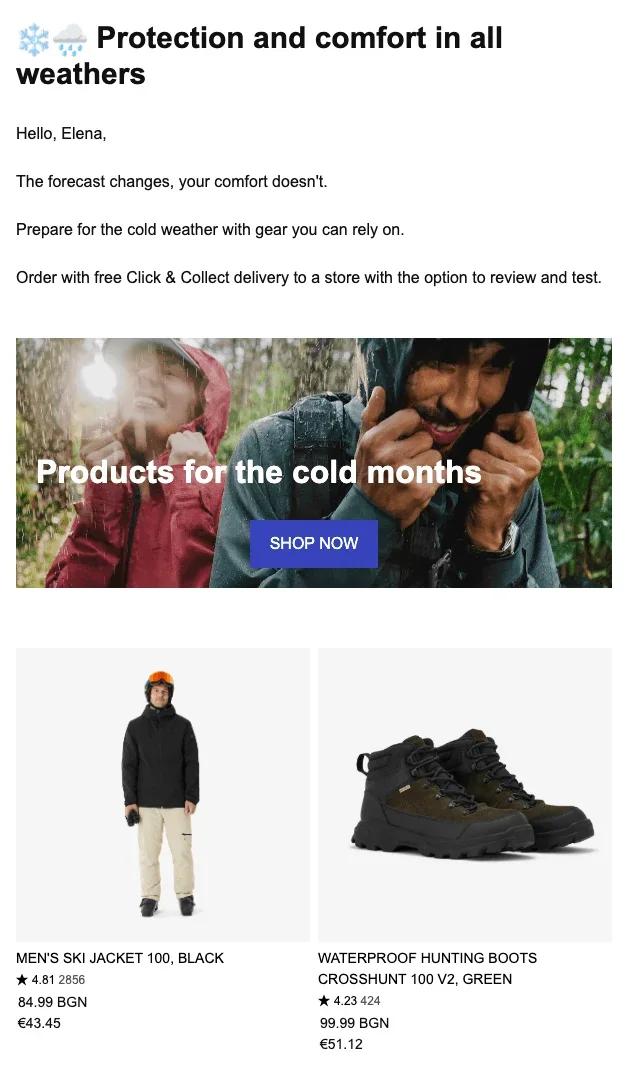
Let's quickly take a look at how retail can benefit – because there are definitely lessons to learn for travel and hospitality here.
Multinational sports retailer, Decathlon, ran a weather-triggered campaign to upend the Black Friday discount frenzy. Instead of competing on price during the most promotion-heavy period of the year, the CRM team prepared a campaign featuring full-price winter essentials – and waited for the first snowfall. The moment it started snowing, the email went out [4].
The result? Relevance beat discounting, delivering more than 2x the revenue of the company's Black Friday campaign [4]. Customers didn't need money off to buy winter gear when they could see snow falling out the window. The timing and usefulness of the message did all the work.
Image: stripo.email
This approach is directly transferable to travel and hospitality brands. When the weather changes, highlight activities and partners that make sense for the conditions – and keep your customers delighted.
Dynamic Imagery Based on Weather
Weather data doesn't have to be displayed as a forecast widget. It can drive any content that a subscriber sees.
For example, online fashion brand PrettyLittleThing used weather-specific content in their emails, changing the hero image based on temperature. The result was a 68% uplift in total clicks [5].
For travel and hospitality, this technique can be adapted easily. Winter chill coming in? Your hotel marketing emails can show sunny pool and beach imagery to recipients, inviting them to warm up at your resort. Or if you run a safari, whale watching, or sightseeing tour, send a snapshot of visibility and viewing conditions for the client's upcoming adventure.
If the weather is unexpected, send an image of recommended items to pack: raincoats and gloves – or water and sunscreen. Give yourself every chance of success, regardless of the weather.
Weather-based conditions are coming to Sendtric in Q1 2027, so you'll be able to swap images like these automatically with rule-based images.
Operational Efficiency and Automation
One of the most underrated benefits of weather widgets is operational. Manually updating emails with current and forecasted conditions is pretty much a full-time job – but using automation and emails triggered by weather data will free up your marketing team to focus on more important things.
That's exactly what Alterra Mountain Company achieved.
All of their resorts send daily Snow Report emails, to encourage guests to hit the slopes. These are highly engaging, and increase ancillary spending on the mountains. But these reports were almost entirely manual – until they started using weather-based automation.
The result? The company claimed back 180 hours of their team's schedule per week [6], simply by automating their snow updates.
For hospitality brands with multiple properties in different climates, automated weather personalization gives every guest relevant content, without the marketing team having to build separate campaigns for each location. One email can do it all. The dynamic weather widget pulls the right data, for the right recipient, at the right time – with no manual intervention.
Getting Started with Weather Widgets
1. Identify Your Use Case
Not every weather widget needs to show a forecast – so first, decide what you want the widget to accomplish. Do you want to:
- Show guests the forecast for their upcoming stay or event?
- Change an offer or product recommendation based on conditions? (Weather-based conditions are coming to Sendtric in Q1 2027.)
- Swap hero images based on temperature or weather condition? (Also coming in Q1 2027.)
- Automate daily reports (like snow or surf conditions) that your audience expects?
Once you know what you want to achieve, the next step is to figure out what data you'll need to pull it off.
2. Choose Your Location Logic
Weather widgets can use different location sources. You can use your event's location, any one of your resort locations – or anywhere else you can think of!
Set a fixed location for destination-specific campaigns, or pull a location field from your CRM (like the resort the guest is visiting, for example) for booking confirmation emails.
Now it's time to put it all together…
3. Build and Embed the Widget
Using a platform like Sendtric, create an email weather widget by selecting the location logic and customizing the display to match your brand. The platform generates an embed code that you paste into your email template just like an image. No coding or development resources are required, and the widget works with any ESP.
4. Test and Refine
Weather widgets are inherently variable, which makes testing more complex than static campaigns. Start with a single use case – an event reminder, a pre-arrival email, or a daily conditions report – and measure engagement against your baseline. Once you see the lift, expand to other campaigns and refine your rules based on what resonates with your audience.
Try it now – create a dynamic email weather widget
Dynamic Weather Widgets for Email – FAQs
What is a dynamic weather widget in email marketing?
A dynamic weather widget is an embeddable element that displays a live, location-specific weather forecast directly inside an email. Weather-based conditions, for showing dynamic content based on weather-triggered rules, are coming to Sendtric in Q1 2027.
How do weather widgets work technically?
A weather widget is created on a platform like Sendtric. You state the location parameters, and what to display – then paste the generated embed code into your email template. When the recipient opens the email, the widget requests current weather data and renders the forecast instantly.
Can weather widgets show the forecast for a destination?
Yes. You can configure the widget to use a fixed location (like your resort or event venue) or pull a location from your CRM data (like the destination of an upcoming booking). This is ideal for pre-arrival and booking confirmation emails.
What results have travel brands seen with weather personalization?
Alterra Mountain Company saved approximately 180 staff hours per week by automating snow report emails with weather data. Experiments with weather-based promotions outperformed Black Friday revenue by 2x for a major international company.
Can weather widgets help reduce event no-shows?
Yes – by giving attendees a clear forecast for the event location in reminder emails, you help them prepare appropriately and make an informed decision about attending. This reduces last-minute dropouts.
Does weather personalization work outside of promotions?
Yes. Weather-triggered campaigns can be purely informational (daily snow or surf reports), operational (automated condition updates), or visual (changing imagery based on temperature). The common thread is that relevance beats selling.
How does weather personalization compare to discount-driven campaigns?
Weather-triggered relevance can outperform discounts, especially during promotion-heavy periods. Decathlon used weather triggers to send winter gear promotions during the first snowfall, instead of competing on Black Friday discounts. The timing and usefulness of the message drove results without eating into their profit margin.
Do weather widgets work with my existing ESP?
Yes – weather widgets from platforms like Sendtric are ESP-agnostic. You simply paste the embed code into your template, just like any other add-on.
Can I combine weather widgets with other personalization?
Yes, to great effect. Weather data is just one layer in a broader personalization strategy. Once weather-based conditions arrive in Sendtric in Q1 2027, you can combine them with purchase history, browsing behavior, or loyalty status to create highly specific experiences. For example, showing a rain jacket to a customer in a rainy location who has previously browsed outerwear could land the sale.
Sources
[1] https://www.sendtric.com/weather-widget-for-email-campaigns/
[3] https://insights.ehl.edu/hospitality-trends-weather-effects-on-tourism
[5] https://www.litmus.com/customers/pretty-little-thing-5
[6] https://www.litmus.com/customers/alterra-mountain-company