Keep Event Attendees Informed After You Hit Send with Critical Alerts
Venue changes, weather warnings and new start times don't wait for your next send. Show the update inside the emails your attendees already have.
Event Plans Change. Your Emails Can Too.
Event emails get opened again and again: when tickets arrive, the week before, and on the way to the venue. If something changes after they're sent, a new email has to compete with everything else in the inbox, and the original still shows the old details.
Sendtric's critical alerts let you switch on a message inside emails you've already sent, so anyone who opens them sees the update.
More than 200,000 companies trust Sendtric




















Example: A Festival Weather Update
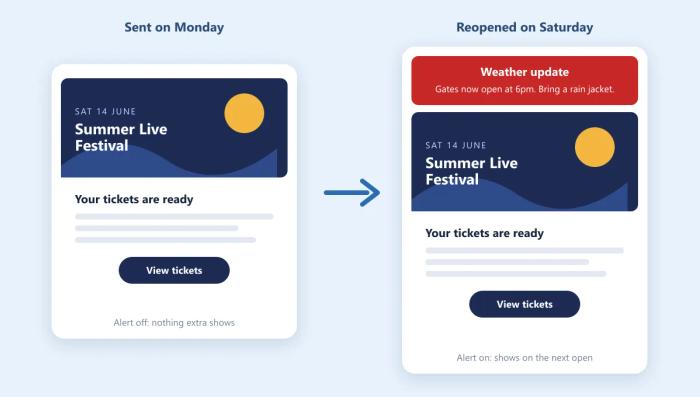
A festival sends its ticket emails on Monday with a critical alert embedded. While the alert is off, it's an invisible 1x1 pixel that doesn't use any views.
On Friday the forecast turns, so the organizer switches on a weather alert: "Gates now open at 6pm. Bring a rain jacket." Anyone who reopens their ticket email from then on sees the alert at the top.
When the update no longer applies, the alert is switched off, or turns itself off at the end of its scheduled window.
Critical Alerts in Event Emails: What Works
- Embed it in every event email before sending. Tickets, confirmations and reminders all get reopened, and an alert can only appear in emails that already contain its code.
- Lead with the change and the action. "Gates now open at 6pm. Bring a rain jacket." tells attendees what changed and what to do in one line.
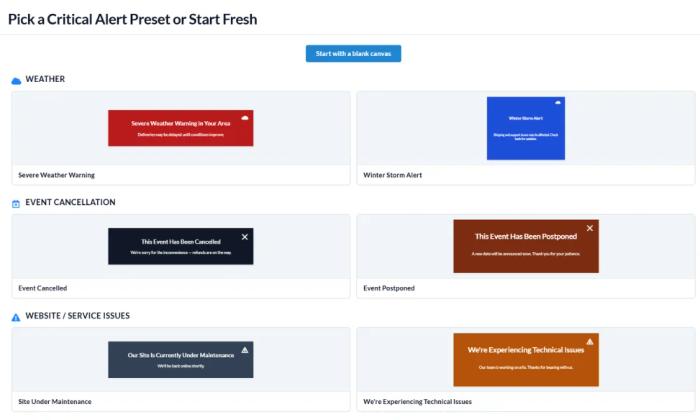
- Start from a preset. Severe Weather Warning, Event Cancelled and Event Postponed presets give you a clear, tested layout in seconds.
- Schedule day-of updates in the event's time zone. Show an entrance change only on event day, and let it switch off once the doors close.
- Still email everyone about big changes. A cancellation or new date also deserves its own email. The alert makes sure anyone who reopens an old ticket email sees it too.
How to Add a Critical Alert to Your Event Emails
- Create a critical alert from a preset such as Severe Weather Warning or Event Postponed.
- Paste the code at the top of your ticket and reminder emails before you send them.
- When plans change, edit the message and switch it on, or schedule it.
For step-by-step help, see how to create a critical alert and how to turn a critical alert on or off.
Schedule Alerts Around Your Event
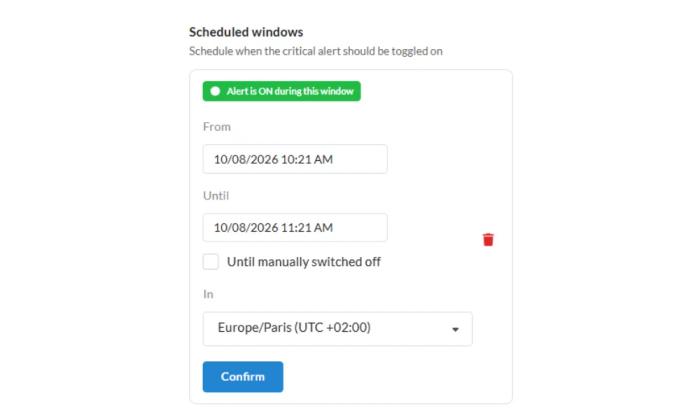
Already know when an update matters? Schedule the alert to switch on and off by itself, in the time zone of your event.
For example, show a note about a changed entrance only on event day, then let it switch off once the doors close.
Explore Critical Alerts
Critical alerts are available on Enterprise plans. See every setting, preset and scheduling option on the Critical Alerts page, or browse more use cases.
Running a software product? See maintenance and outage notices with critical alerts.
Explore Critical AlertsWhy clients LOVE Sendtric...
“We couldn't be happier with Sendtric. It allows us to add value to our customers and see the NPS go up. The countdown feature has been an invaluable tool to drive revenue for our customers. It adds a touch of personalized dynamism and urgency to our users' campaigns, effectively motivating their customers to act promptly.”
Founder of WoowUp
“At Splio, we are thrilled to share how Sendtric has transformed customer engagement through its exceptional countdown feature. This powerful tool allows us to personalize our customers' campaigns and instill a sense of excitement and urgency, driving the end-customers to take immediate action. With Sendtric, we have elevated our customer satisfaction. It's very quick & simple to install together with Beefree, allowing us to generate instant value.”
VP of Product at Splio