How to Add Social Proof Counters to GetResponse
Put a running total of views or clicks into a GetResponse message, with a starting number and a minimum so the counter only shows once it's worth showing.
 First Publish Date:
Show GetResponse readers how many others have already looked or clicked.
A Sendtric social proof counter is an image with a live total in it, refreshed on every open. It can count views of the image or clicks on a special link, and you write the text around the number. You'll need a Sendtric Power or Enterprise plan.
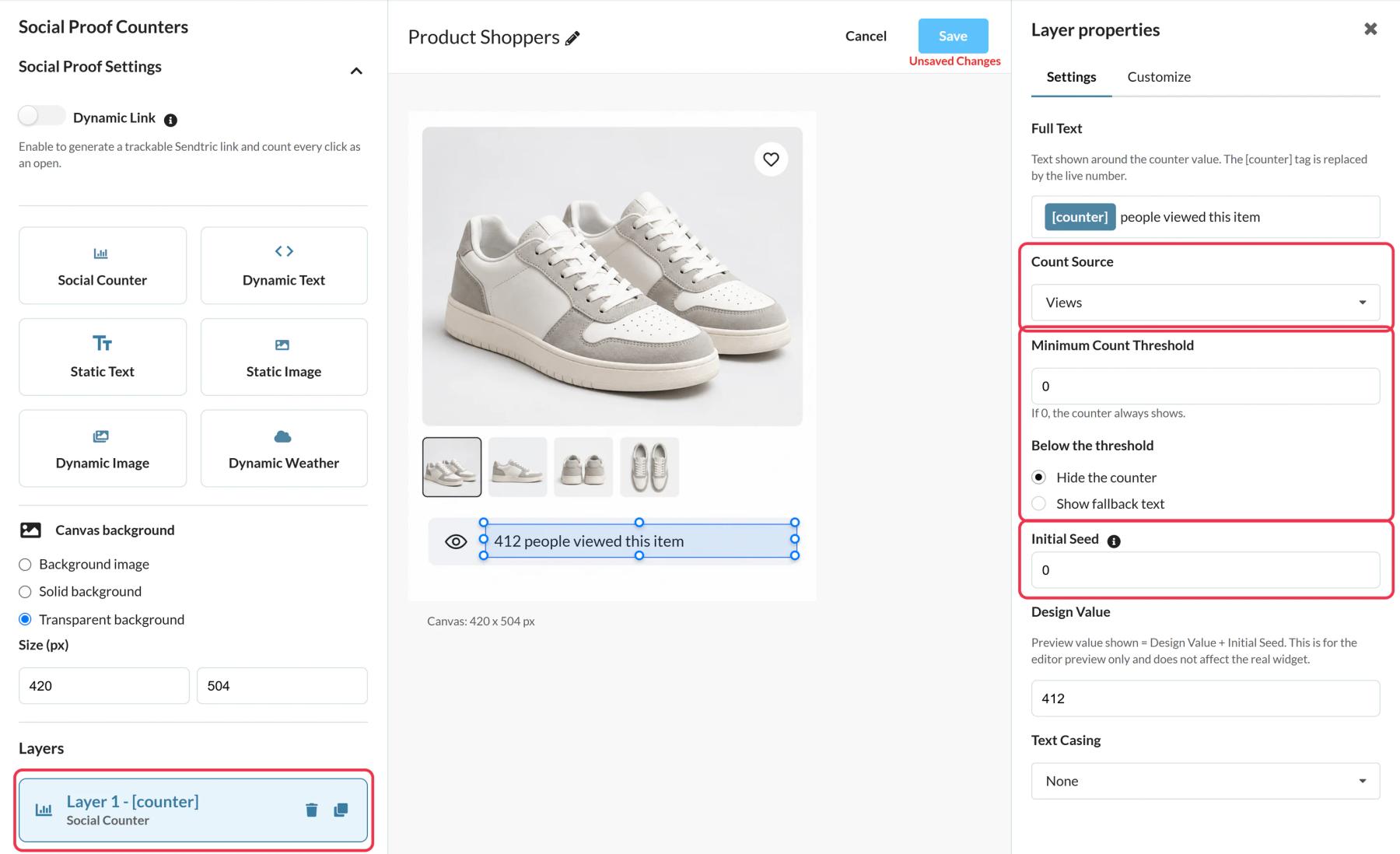
Be clear about what the number means: it's a running total since you created the counter, plus an optional starting number. Views include repeat opens by the same person, so write "times viewed" rather than "people" if precision matters to you.
What you can do with social proof counters in GetResponse
- Webinar invitations: "1,150 clicks to register so far", with Opens counting clicks on your register button.
- Course launches: a views counter under the course image in your launch sequence.
- Popular products: "3,200 views" on the product you feature in a newsletter.
- Free downloads: count clicks on the download button of a lead magnet message.
How to add a social proof counter to GetResponse
Step 1: Pick a preset or start blank
In Sendtric, go to Social proof counters and click Create New. Presets such as Fan Favorite or Trending Destination give you a ready layout; the live number sits in the Social Counter layer.
Step 2: Set what is counted
Under Count Source, choose Views to count image loads, or Opens to count clicks. Opens needs a Dynamic Link in Social Proof Settings: enter the page people should land on, starting with https://.
Step 3: Add a seed and a threshold
Initial Seed adds a starting number to the real count, for example the registrations you already had before the email. Minimum Count Threshold hides the counter, or shows a short fallback text, until the total reaches that number.
Step 4: Copy the code and the link
Save, click Copy Code for the image, and if you count clicks, copy the address from Your Dynamic Link URL.
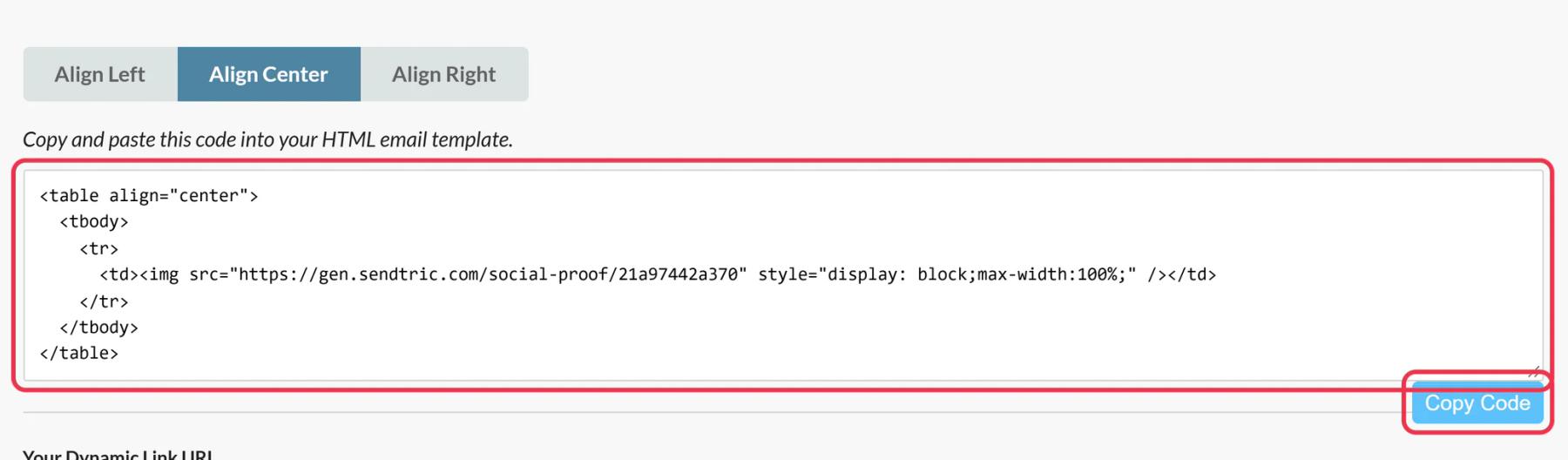
Step 5: Add both to your GetResponse message
Drag Custom HTML from Layout > Basic blocks into the message and paste the counter code into the right-hand panel. For Opens, select your Button block and paste the Dynamic Link as its link.
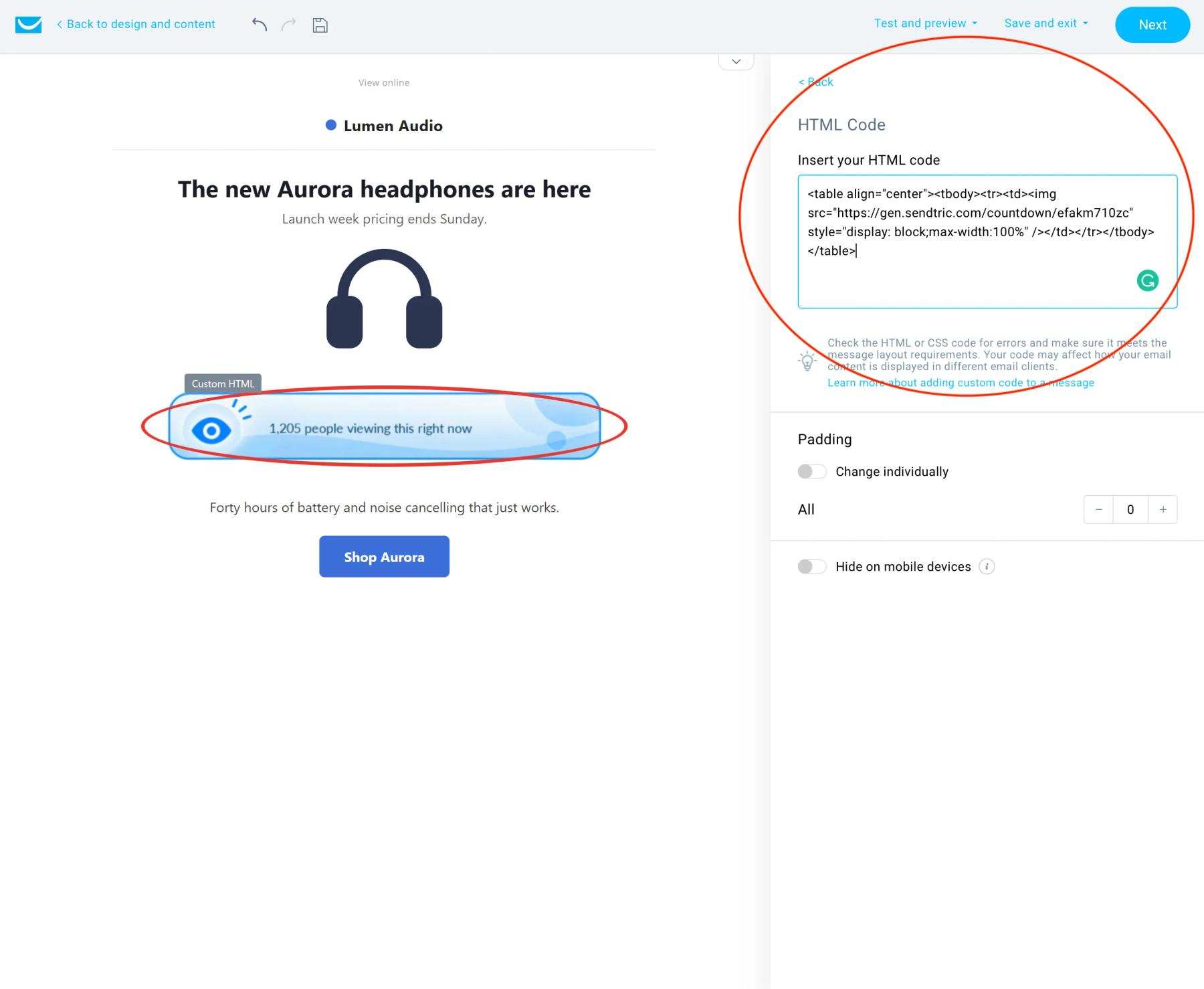
Put the counter right next to the button
The counter image itself isn't clickable. Place it directly above or below the button that carries the Dynamic Link, so the number and the action read as one.
Your own previews count
Every time the image loads, including in GetResponse previews and your test messages, the views total goes up. Expect a few extra views from setup, or create a fresh counter once you're done testing.
GetResponse Social Proof Counter FAQ
Is it counting unique people?
No. Views count every load of the image, including repeat opens, and Opens count every click on the Dynamic Link. It's a running total.
Does the number keep rising while someone reads the message?
No. It's set when the message is opened. New activity shows up on later opens, usually within a minute or two.
Which plan do I need?
Power or Enterprise. See the pricing page.
Can I send people to a different page after the message is out?
Yes. Change the Dynamic Link's destination in Sendtric and clicks from sent messages go to the new page.
Can the counter be hidden while the number is small?
Yes. Set a Minimum Count Threshold and choose to hide the counter or show a short fallback text until the total reaches it.
Ready for more? The social proof counters overview covers every setting, and the email personalization page shows how to combine it with other Sendtric widgets.
More GetResponse guides
- Countdown Timers - How to Add Countdown Timers to GetResponse
- Live Polls - How to Add Live Polls to GetResponse
- Personalized Images - How to Add Personalized Images to GetResponse
- Rule-Based Images - How to Add Rule-Based Images to GetResponse
- Dynamic Weather - How to Add Dynamic Weather to GetResponse
- Critical Alerts - How to Add Critical Alerts to GetResponse
Using a different platform? See all Sendtric integrations.