How to Add Dynamic Weather to Klaviyo
Add a live forecast to Klaviyo emails, set the location from each profile's city or zip code, and choose what shows when a location can't be found.
 First Publish Date:
Give every Klaviyo profile the forecast for where they live.
The Sendtric weather widget is a forecast image that is fetched when the email is opened. Point it at a fixed place, or let Klaviyo fill in each profile's city or zip code so everyone sees their own local weather.
What you can do with dynamic weather in Klaviyo
- Weather-led product picks: pair a local forecast with rain jackets or sunscreen in an outdoor or apparel campaign. More ideas in local weather forecasts for outdoor retail and fitness emails.
- Trip reminders: in a booking flow, show the forecast for the destination starting from the travel date.
- Event day emails: a fixed-location forecast for your venue in the week before the event.
- Store pickup nudges: a sunny weekend forecast next to a click-and-collect offer.
| Weather option | Plan |
|---|---|
| Fixed location, full week forecast | Free |
| Location from a city property, 1, 3 or 5 day forecasts | Micro and above |
| Location from a zip or postcode, forecast dates from a property | Standard and above |
| Forecast that always starts on the day of opening | Power and above |
How to add dynamic weather to Klaviyo
Step 1: Create the widget
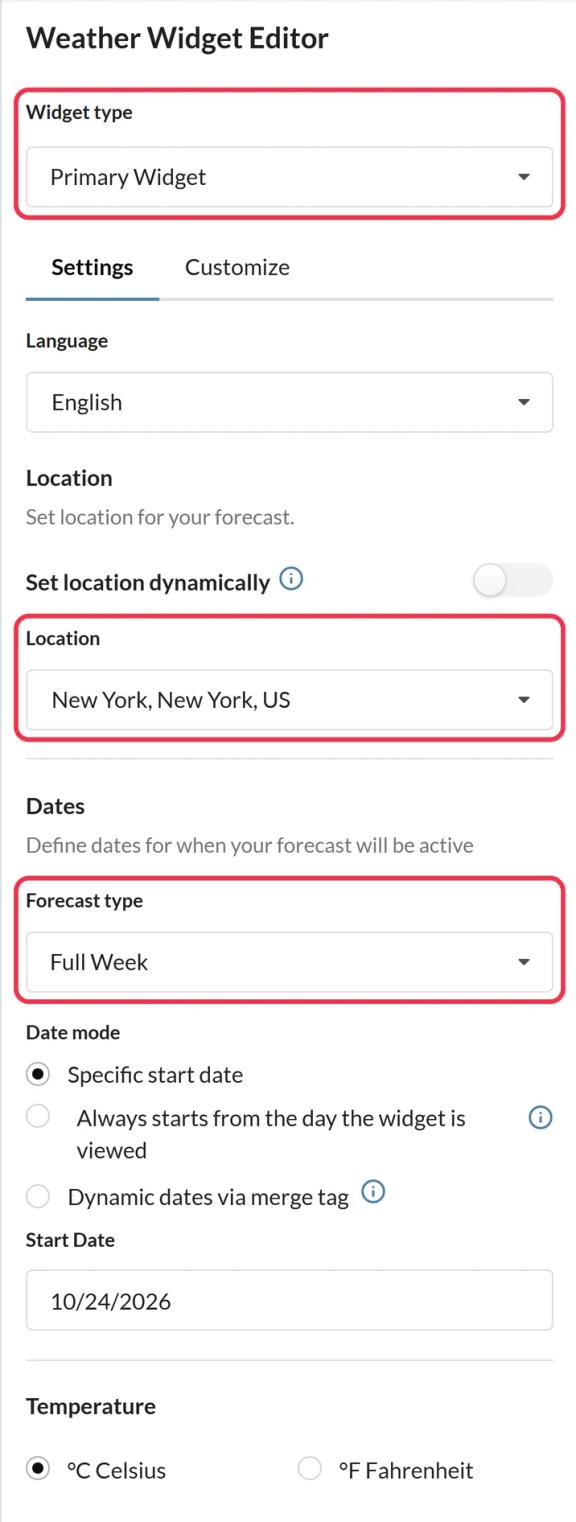
In Sendtric, open Weather widget and click Create New. Choose Primary Widget for a card or Inline Widget for a slim strip, then pick the language, forecast length and Celsius or Fahrenheit.
Step 2: Fill the location from Klaviyo
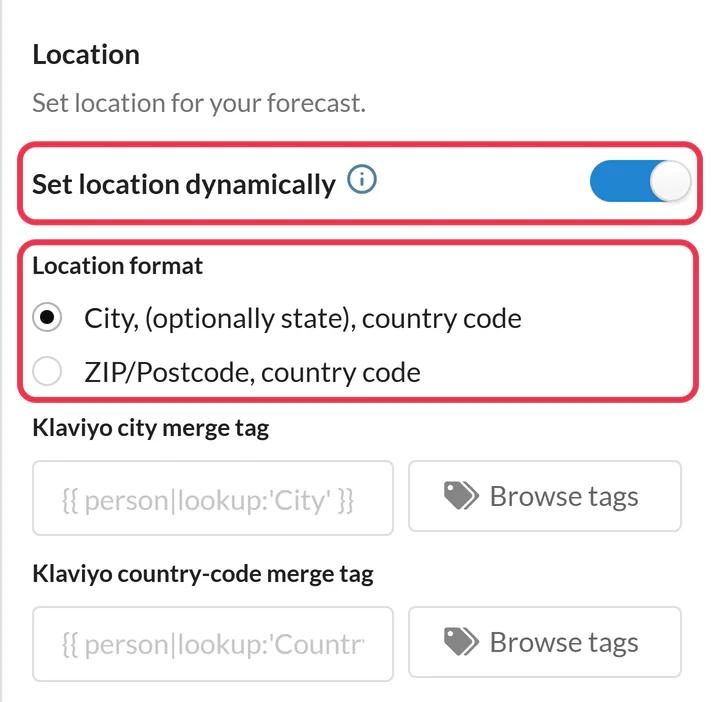
Turn on Set location dynamically and choose a Location format: city with a country code, or zip/postcode with a country code. The editor has Klaviyo fields for the city, zip and country code. Pick the properties with Browse tags, for example {{ person.City }} and {{ person.Zipcode }}, and Sendtric writes them into the code for you.
Step 3: Choose a fallback
Under Fallback image, keep Hide the widget or upload an image (Micro and above). It shows when a profile has no location, the location isn't recognized, or the dates are outside the forecast range.
Step 4: Save, then push or copy
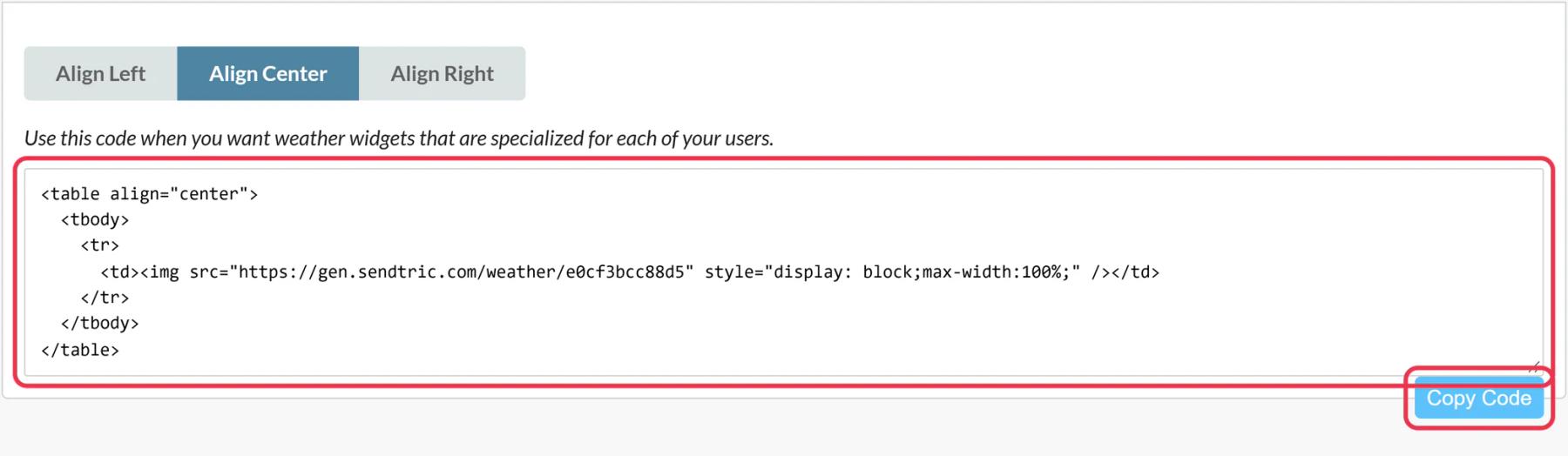
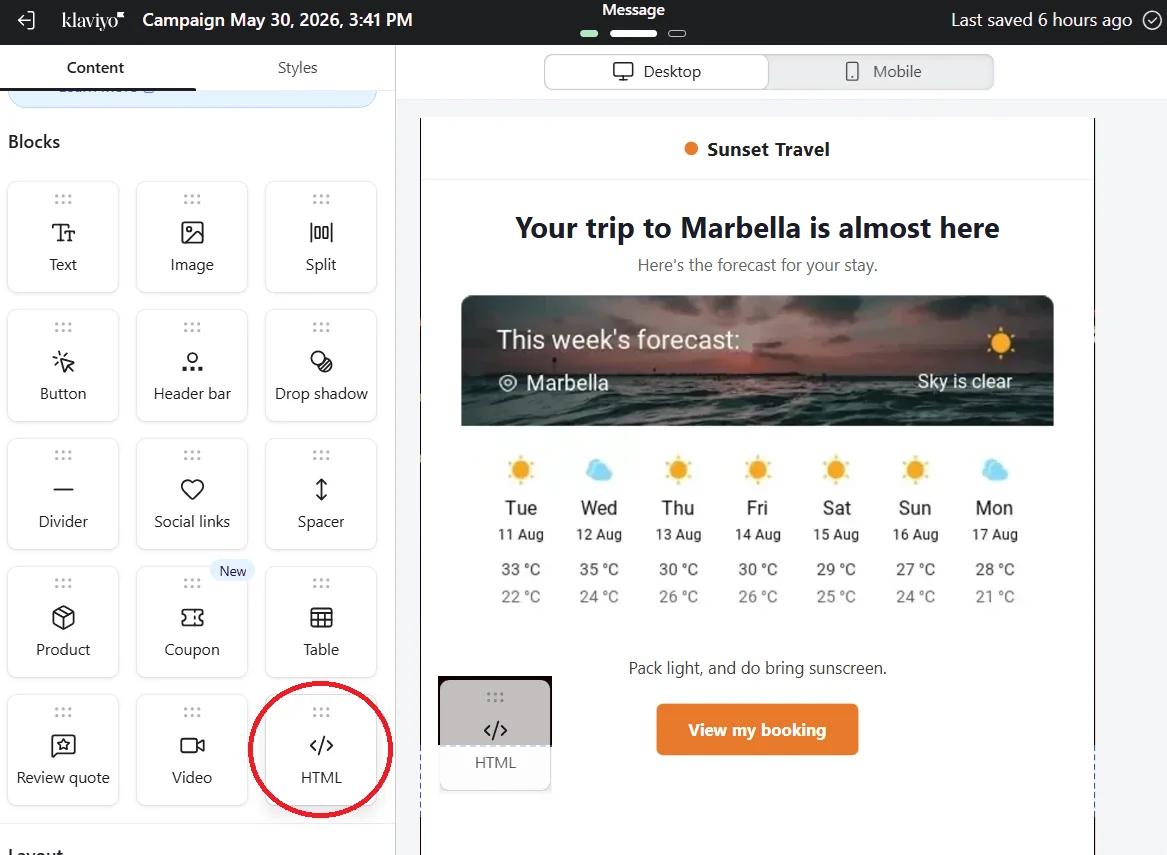
Click Save. Then click Push to Klaviyo, or use Copy Code and paste the code into an HTML block in Klaviyo's editor.
Step 5: Test with two locations
Preview the email as a profile with a city and one without, then use Send test. You should see a local forecast for the first and your fallback for the second.
Check what your Country property holds
Sendtric needs a two-letter country code, like US or GB. If {{ person.Country }} holds full country names in your account, store the two-letter code in a custom property and use that tag in the country code field instead.
Location comes from the profile, not the inbox
The widget never guesses a location from where someone opens the email. A profile with no city or zip code gets the fallback, so it's worth adding a show/hide rule in Klaviyo if you'd rather leave those profiles out of the weather section entirely.
Full setup notes: how to show each subscriber their local weather.
Klaviyo Weather Widget FAQ
Where does Klaviyo's city come from?
From the profile's City property, the one {{ person.City }} reads. Open a few profiles in Klaviyo to see how well it's filled in your account. Profiles with no city get your fallback.
Can I use a trip date from my booking flow?
Yes, on Standard and above. Turn on dynamic dates and pass the start date from a profile or event property that already holds it as YYYY-MM-DD. Forecasts reach about 10 days ahead, so time the flow email close to the trip.
How fresh is the forecast?
It is fetched on open and kept for up to an hour, so a reopen later in the week shows a newer forecast.
Do I need to replace anything in the code?
Not if you filled the Klaviyo fields in the editor or pushed the widget. If you skipped them, replace city,countryCode or zipCode,countryCode in the code with your Klaviyo tags.
Is the weather text translated?
Day names and the header follow the widget's language setting, with 47 languages to pick from. You can make one widget per language and show the right one with Klaviyo's show/hide logic.
Ready for more? The dynamic weather overview covers every setting, and the email personalization page shows how to combine it with other Sendtric widgets.
More Klaviyo guides
- Countdown Timers - Add Countdown Timers in Klaviyo
- Countdown Timers - How to Add Dynamic Timers in Klaviyo
- Live Polls - How to Add Live Polls to Klaviyo
- Personalized Images - How to Add Personalized Images to Klaviyo
- Rule-Based Images - How to Add Rule-Based Images to Klaviyo
- Critical Alerts - How to Add Critical Alerts to Klaviyo
- Social Proof Counters - How to Add Social Proof Counters to Klaviyo
Using a different platform? See all Sendtric integrations.