How to Add Dynamic Weather to Braze
Add a forecast to Braze emails that is fetched when the email opens, for a fixed venue or for each user's city from their Braze profile.
 First Publish Date:
Bring a live, local forecast into your Braze emails.
The Sendtric weather widget is a forecast image generated when the email is opened. Show one place to everyone, like a festival site, or pass each user's city from Braze so every forecast is local.
What you can do with dynamic weather in Braze
- Delivery and food apps: a rainy-evening forecast next to a "stay in tonight" offer.
- Travel bookings: the forecast for the destination and dates from a booking event, a few days before the trip.
- Outdoor events: the event-day forecast in a Canvas reminder.
- Retail: local weather next to the products that suit it.
| Weather option | Sendtric plan |
|---|---|
| Fixed location, full-week forecast | All plans |
| City from a Braze attribute, 1, 3 or 5 day forecasts | Micro and above |
| Postcode location, dates from Liquid | Standard and above |
| Forecast starting from the day of opening | Power and above |
How to add a weather forecast to Braze
Step 1: Create the widget
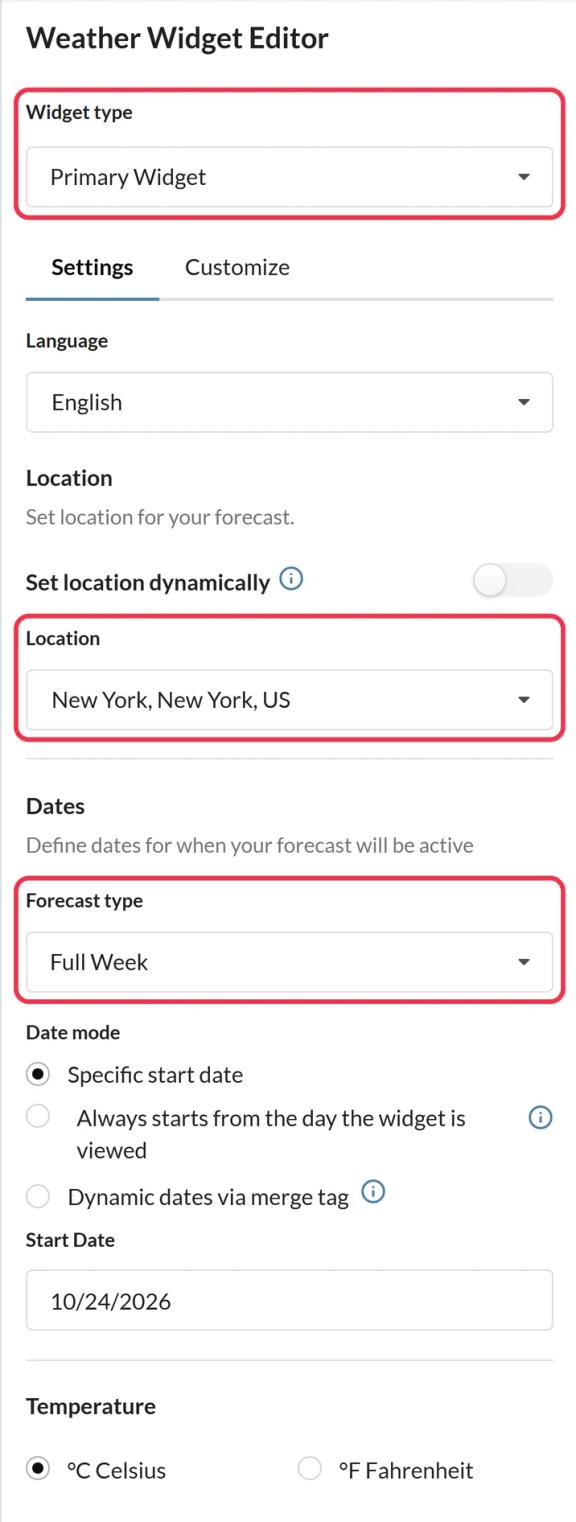
In Sendtric, go to Weather widget and click Create New. Choose Primary Widget or Inline Widget, the number of days and Celsius or Fahrenheit.
Step 2: Turn on dynamic location
Turn on Set location dynamically and choose city with country code, or postcode with country code. Decide what happens when a location can't be found: hide the widget, or upload a fallback image.
Step 3: Copy the code and add Braze tags
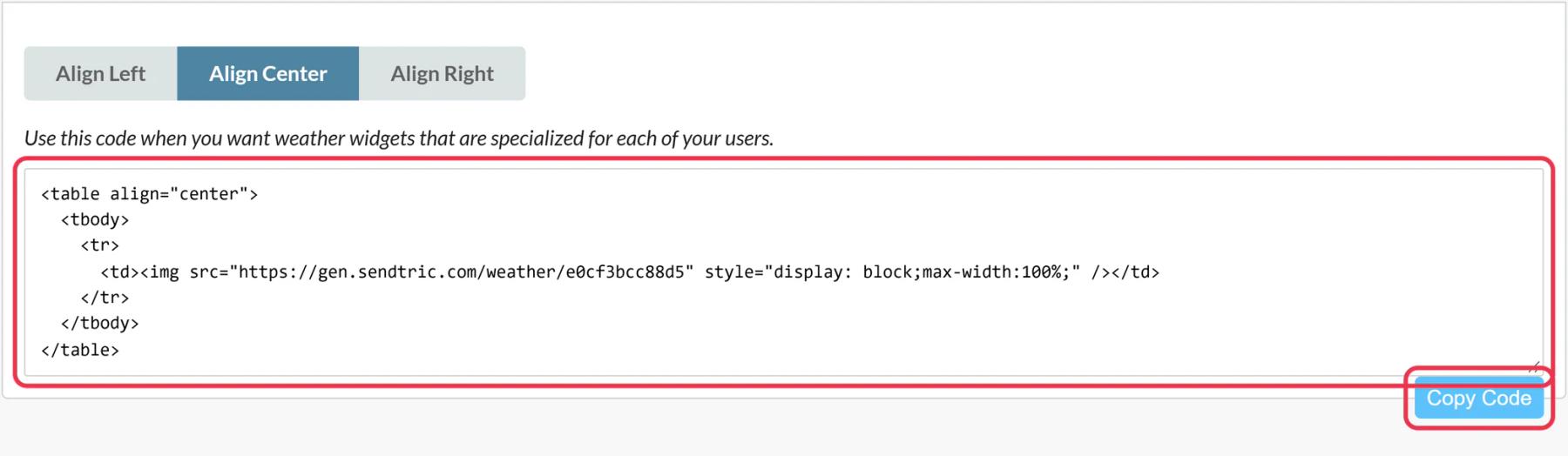
Save and copy the code. In the URL, replace city with {{${city}}} and countryCode with a two-letter country code. Use a fixed code like GB if your audience is in one country, or Braze's {{${country}}} if it holds two-letter codes for your users.
Step 4: Paste it into an HTML block
In Braze, select Edit Email Body, drag an HTML block from the Content panel into the email and paste the code. The HTML block is where Braze expects Liquid.
Step 5: Preview as users in different cities
In Preview & Test, preview as a few users from different places and check the forecast header shows each city. Then send a test.
Passing a trip or event date
Dynamic dates must be YYYY-MM-DD. Liquid's date filter can format a Braze date, for example {{custom_attribute.${trip_date} | date: '%Y-%m-%d'}}. Keep single quotes inside the code so the image's src attribute isn't broken.
Forecast range
Forecasts cover up to 10 days ahead. Dates further out show your fallback, so time the Canvas step accordingly.
Braze Weather Widget FAQ
Does Sendtric use the user's location from their device?
No. Sendtric never uses the recipient's IP address. The location is the one you set, or the city you pass from Braze in the code.
How fresh is the forecast?
It is fetched when the email opens and cached for up to an hour, so a late open still shows a current forecast.
What if a user's city is empty?
The widget falls back: it is hidden, or shows your fallback image if you uploaded one.
Can I show the forecast in another language?
Yes. Pick one of 47 languages in the widget settings.
Can the forecast sit inside my own design?
Yes. Add the weather widget as a layer in a personalized image to place it on your own background.
Want to see what else you can do? Explore Sendtric's dynamic weather in more detail, or browse the full email personalization toolkit.
More Braze guides
- Countdown Timers - How to Add Countdown Timers to Braze
- Live Polls - How to Add Live Polls to Braze
- Personalized Images - How to Add Personalized Images to Braze
- Rule-Based Images - How to Add Rule-Based Images to Braze
- Critical Alerts - How to Add Critical Alerts to Braze
- Social Proof Counters - How to Add Social Proof Counters to Braze
Using a different platform? See all Sendtric integrations.