How to Add Rule-Based Images to Braze
Swap images per Braze user by custom attribute, day or time of opening, without writing Liquid conditionals into every template.
 First Publish Date:
Pick the right image for each Braze user when they open, not when you hit send.
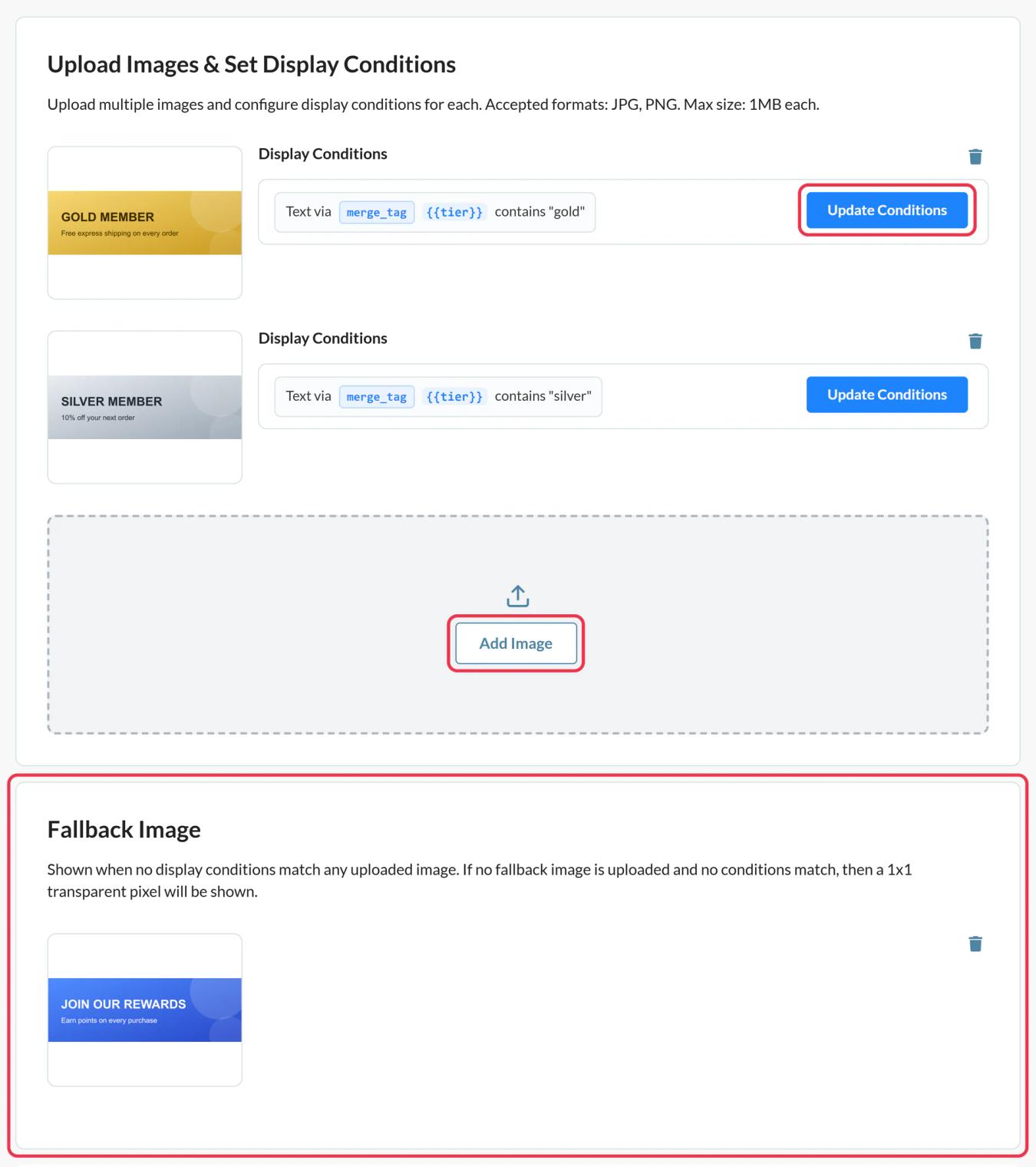
Sendtric rule-based images hold several versions of one image, each with conditions. On every open, Sendtric checks them from the top and shows the first one that matches, or your fallback image.
Liquid if blocks in Braze are evaluated when the message is sent. Sendtric's date, day and time rules are evaluated at open, which helps when a Canvas message sits in an inbox for days.
What you can do with rule-based images in Braze
- Plan or tier visuals: a different upgrade banner for free, trial and paid users from a custom attribute.
- Language or market creative: match
{{${language}}}or{{${country}}}and show the right campaign art. - Weekday and weekend offers: switch creative by the day the email is opened.
- Expiring deals: show the offer image until a date, then a "next time" image after it.
| Rule or option | Sendtric plan |
|---|---|
| Up to 2 images, text match on an attribute | Free |
| Up to 4 images, fallback image | Micro |
| Up to 10 images, date, day and time rules | Standard |
| Unlimited images, number and device rules | Power and Enterprise |
How to add a rule-based image to Braze
Step 1: Add your images in priority order
In Sendtric, go to Rule-based Images and click Create New. Add each version with Add Image. There's no reordering, so add the most specific ones first.
Step 2: Set conditions for each image
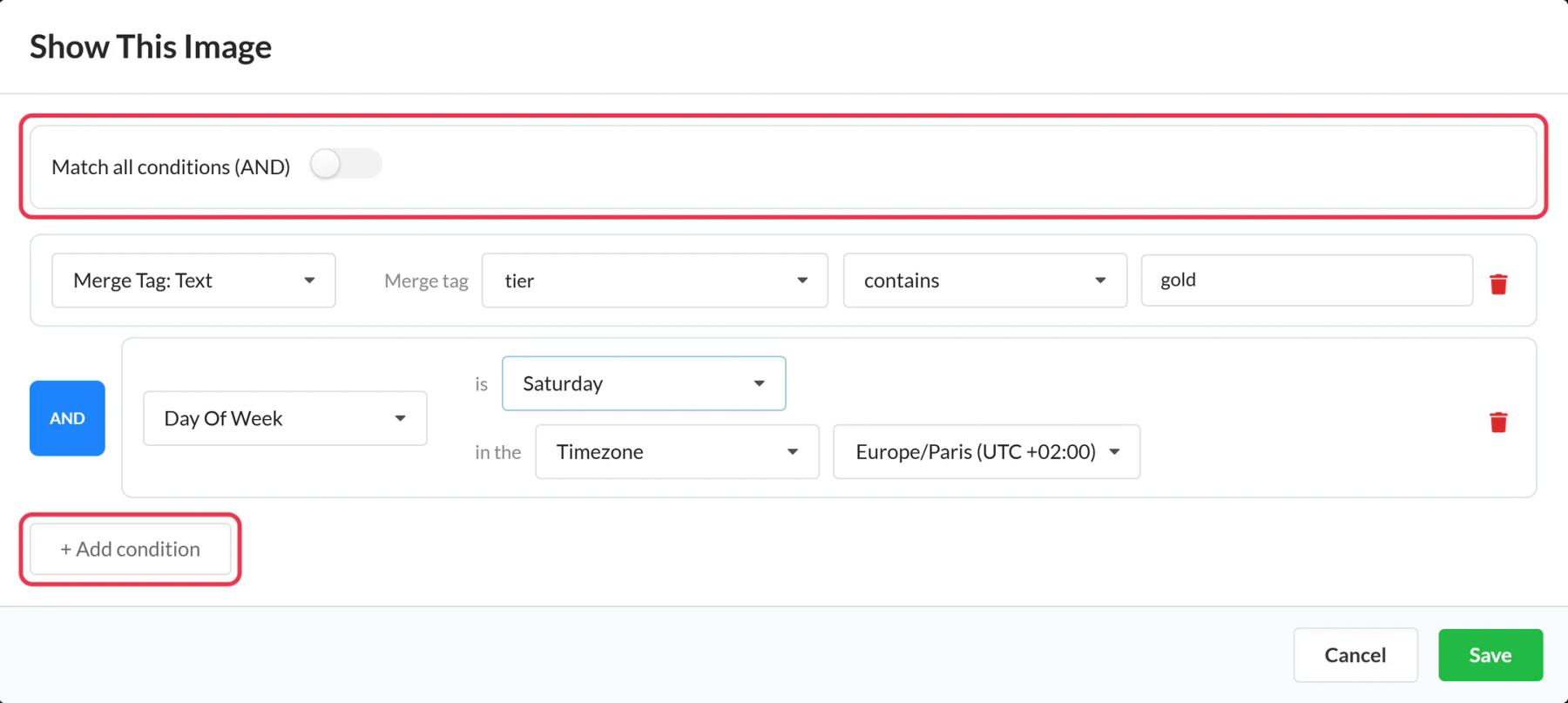
Click Update Conditions, choose AND or OR, and add rules. For a Braze attribute rule, name the merge tag (for example plan) and set the value to match. Add a fallback image.
Step 3: Copy the code and add Liquid
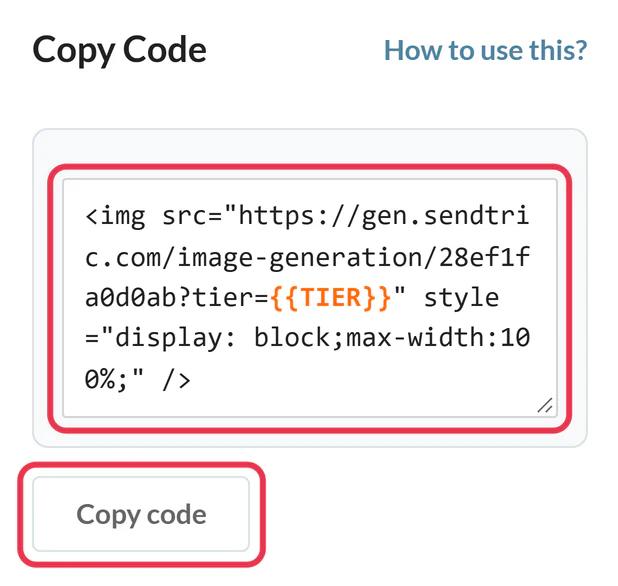
Save and copy the code. Replace each {{NAME}} placeholder with the Braze tag, for example plan={{custom_attribute.${plan}}}.
Step 4: Paste it into an HTML block
In the Braze drag-and-drop editor, drag an HTML block from the Content panel into the email and paste the code.
Step 5: Check every branch
Use Sendtric's Preview to simulate dates, devices and attribute values. Then use Braze's Preview & Test with users who fall into different rules.
Time zones from Braze
Date and time rules can use a fixed time zone or a Dynamic Timezone from a merge tag. Braze's {{${time_zone}}} can fill it, as long as the value is a zone name like America/New_York. Blank or invalid values fall back to UTC.
Device rules and Gmail
Gmail loads images through its own servers, so device rules may treat those opens as desktop. Use attribute rules for anything that must be exact.
Braze Rule-Based Images FAQ
Why not just use Liquid conditionals?
You can for send-time decisions. Rule-based images add open-time rules (date, day, time, device) and keep the image logic in one place you can change after sending.
What if nothing matches?
The fallback image shows. Without one, the slot is an invisible 1 by 1 pixel image.
Are text matches case sensitive?
No, but the spelling must match the attribute value stored in Braze.
Can an option be a timer or a weather widget?
Yes. The image library has tabs for your timers, personalized images and weather widgets.
Why is one of my images never chosen?
Images without any conditions are skipped, and an earlier match always wins. Check both.
This guide covers one piece of Sendtric's email personalization platform. For every rule-based images option and example, see the main page.
More Braze guides
- Countdown Timers - How to Add Countdown Timers to Braze
- Live Polls - How to Add Live Polls to Braze
- Personalized Images - How to Add Personalized Images to Braze
- Dynamic Weather - How to Add Dynamic Weather to Braze
- Critical Alerts - How to Add Critical Alerts to Braze
- Social Proof Counters - How to Add Social Proof Counters to Braze
Using a different platform? See all Sendtric integrations.