How to Add Social Proof Counters to Braze
A running count of views or clicks, drawn fresh on each open, that you add to Braze emails with an HTML block.
 First Publish Date:
Show Braze users how many others have already taken a look.
A Sendtric social proof counter is an image with a live total in it, like "3,100 people opened this offer". It counts loads of the image (views) or clicks on its tracked link (opens), and it is redrawn on each open. You need a Sendtric Power or Enterprise plan.
The number is the all-time total for that counter, not people active right now. Copy like "have viewed" keeps it accurate.
What you can do with social proof counters in Braze
- Feature launches: "2,000 people opened the new feature tour" in a launch campaign, counted from clicks on the tour link.
- Popular listings: a views count on a product, course or property.
- Event sign-ups: a click count on the register button to show interest is building.
- Start from a sensible number: an Initial Seed so a brand-new counter doesn't read zero.
How to add a social proof counter to Braze
Step 1: Create the counter
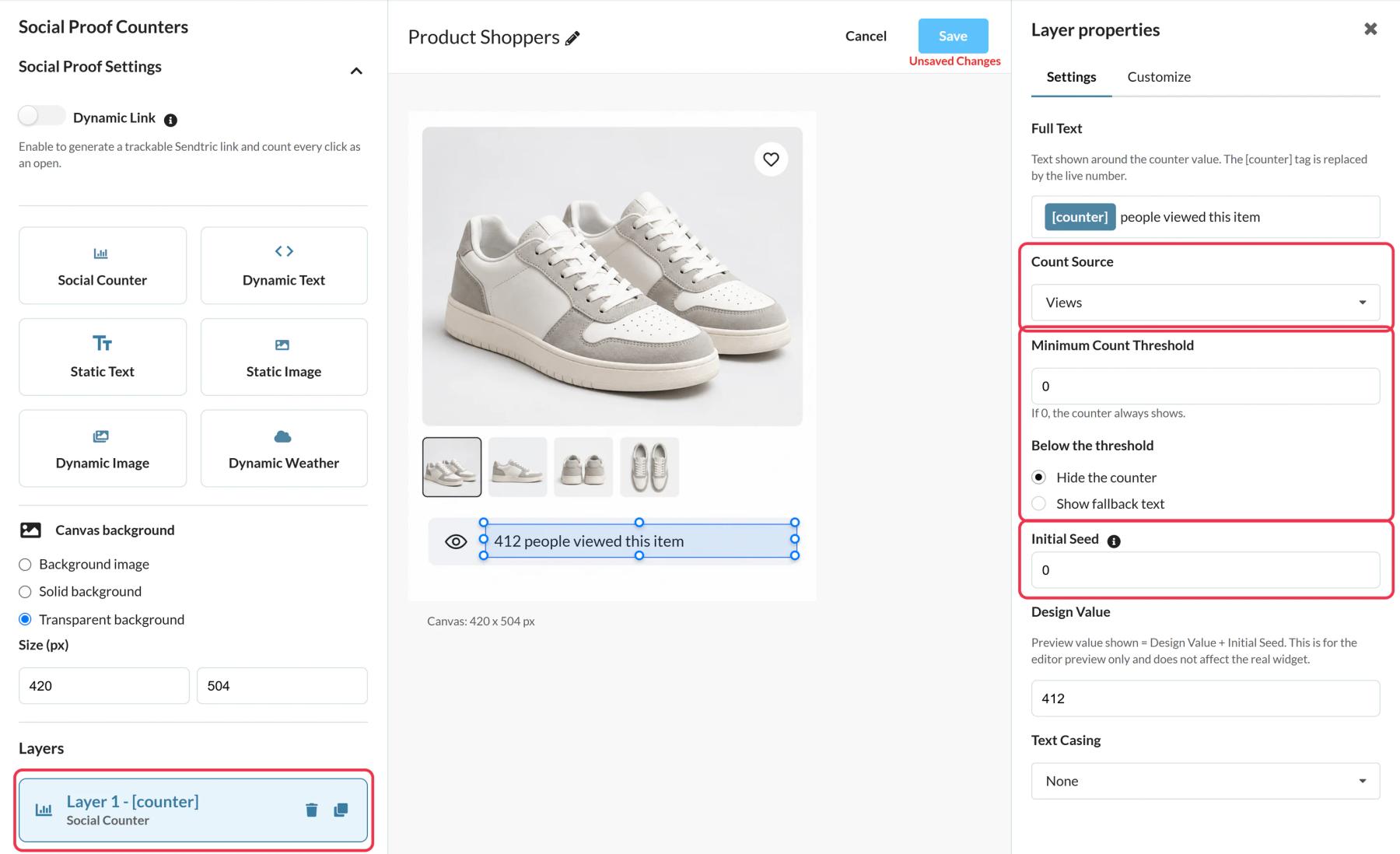
In Sendtric, go to Social proof counters and click Create New. Use a preset or a blank canvas, add a Social Counter layer and write the text around [counter].
Step 2: Pick views or opens
Set Count Source to Views or Opens. Opens counts clicks on a Dynamic Link, so set one up in Social Proof Settings with a destination URL starting with https://. Add a Minimum Count Threshold if you'd rather hide small numbers.
Step 3: Copy the code and Dynamic Link
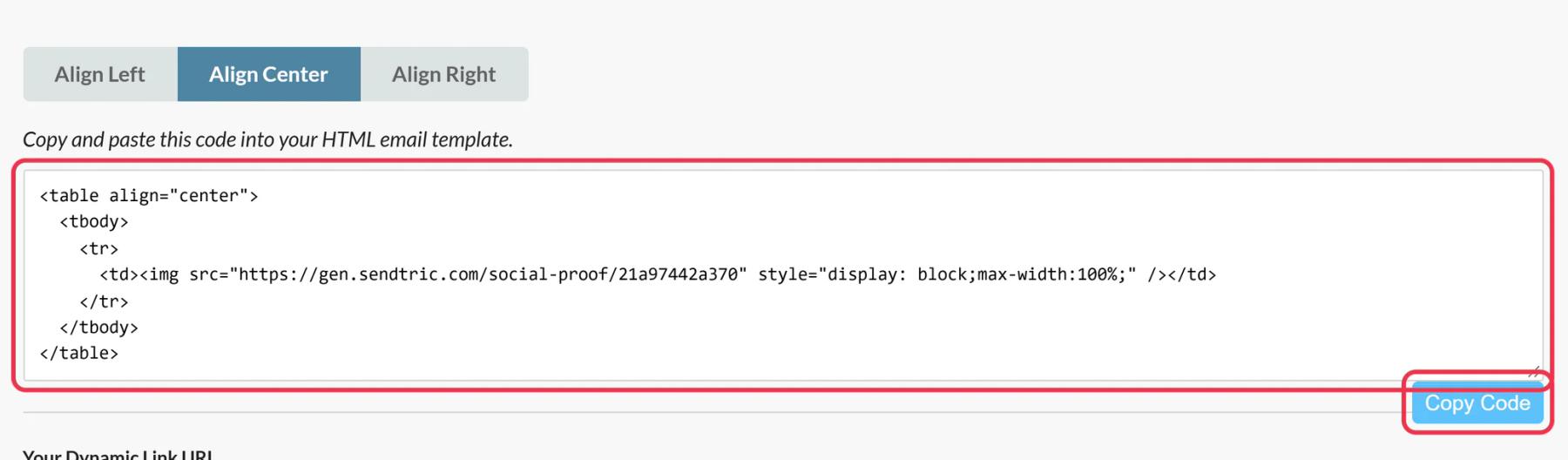
Save, then copy the image code and, if you use one, the URL from Your Dynamic Link URL.
Step 4: Add them in Braze
Drag an HTML block from the Content panel into your email and paste the image code. Put the Dynamic Link on the button users should click, so those clicks are counted.
Step 5: Test
Send a test from Preview & Test, open it and click the button. The count picks up new views and clicks within a minute or two.
The counter image isn't clickable on its own
Only clicks on the Dynamic Link are counted as opens. Put the link on a Button block's URL next to the counter; it contains no Liquid, so the button field accepts it as it is.
Updating the destination
You can change the Dynamic Link's destination in Sendtric after sending, so emails in a long-running Canvas can point to a new page without editing the step.
Braze Social Proof Counter FAQ
Is it a count of unique users?
No. It counts every image load or every click, including repeats from the same user.
Does the number update while someone is reading?
No. It is set when the email opens and refreshes on the next open.
Why use Opens instead of Views?
Views count every load of the image. Opens count clicks on the Dynamic Link, which shows how many people actually acted on the email.
Which plan do I need?
Power or Enterprise. See pricing.
Want to see what else you can do? Explore Sendtric's social proof counters in more detail, or browse the full email personalization toolkit.
More Braze guides
- Countdown Timers - How to Add Countdown Timers to Braze
- Live Polls - How to Add Live Polls to Braze
- Personalized Images - How to Add Personalized Images to Braze
- Rule-Based Images - How to Add Rule-Based Images to Braze
- Dynamic Weather - How to Add Dynamic Weather to Braze
- Critical Alerts - How to Add Critical Alerts to Braze
Using a different platform? See all Sendtric integrations.