How to Add Dynamic Weather to Bloomreach
Show a live forecast in Bloomreach emails for an event, a destination or each customer's own city, refreshed when the email is opened.
 First Publish Date:
Show Bloomreach customers the forecast for the place that matters to them.
The Sendtric weather widget is a forecast image that is generated when the email is opened, not when it is sent. Set one location for everyone, such as an event venue, or pass each customer's city from Bloomreach so the forecast is local to them.
What you can do with dynamic weather in Bloomreach
- Pre-trip emails: the destination forecast a few days before departure, using the destination and travel date stored in Bloomreach.
- Seasonal retail: a local forecast next to rain gear or sunscreen picks.
- Events and venues: the forecast for the day of an outdoor event in the reminder email.
- Restaurants and hospitality: a patio or terrace message next to the local forecast.
A fixed location and a full-week forecast work on every plan. Pulling the city from Bloomreach needs Micro or higher, postcodes and dates from Jinja need Standard, and starting the forecast from the day of opening needs Power. Check pricing for the rest.
How to add a weather forecast to Bloomreach
Step 1: Create the weather widget
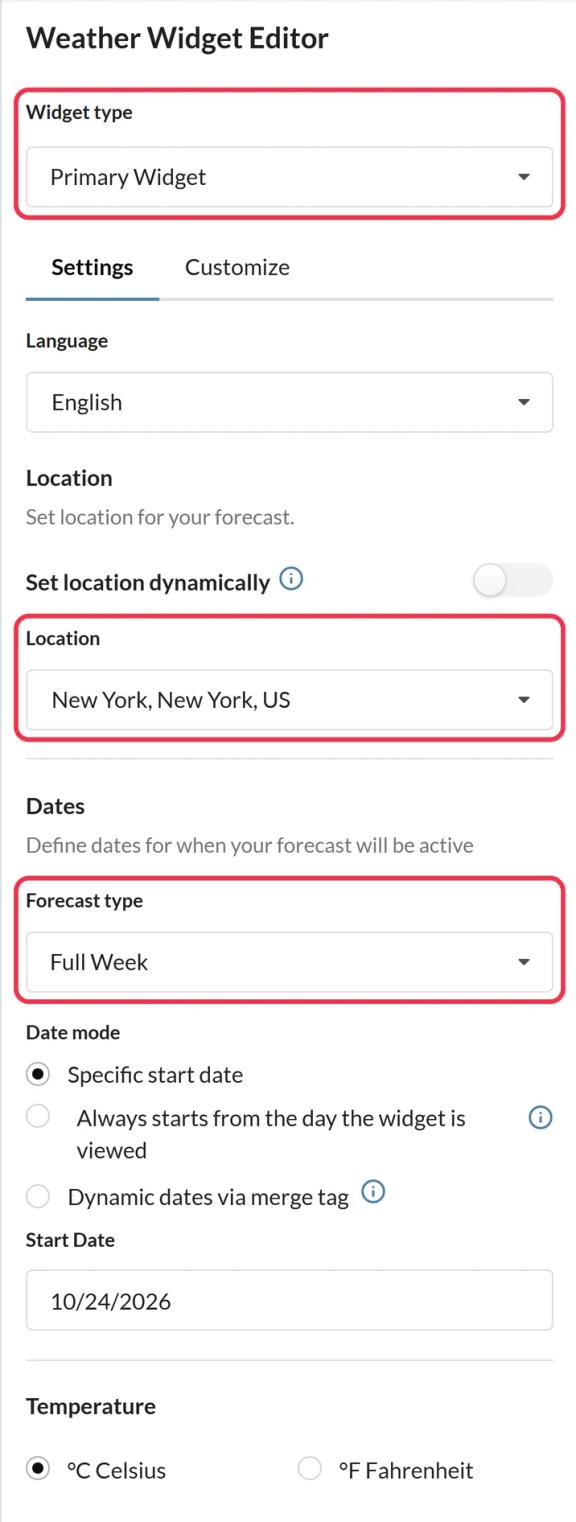
In Sendtric, go to Weather widget and click Create New. Pick Primary Widget for a card or Inline Widget for a compact strip, then choose the forecast length, temperature unit and colors.
Step 2: Set the location
For one place, search for it in Location. For a per-customer forecast, turn on Set location dynamically and pick the format: city with a two-letter country code, or postcode with a country code. Add a fallback image, or leave it hidden, for customers whose location can't be found.
Step 3: Copy the code and add the Jinja
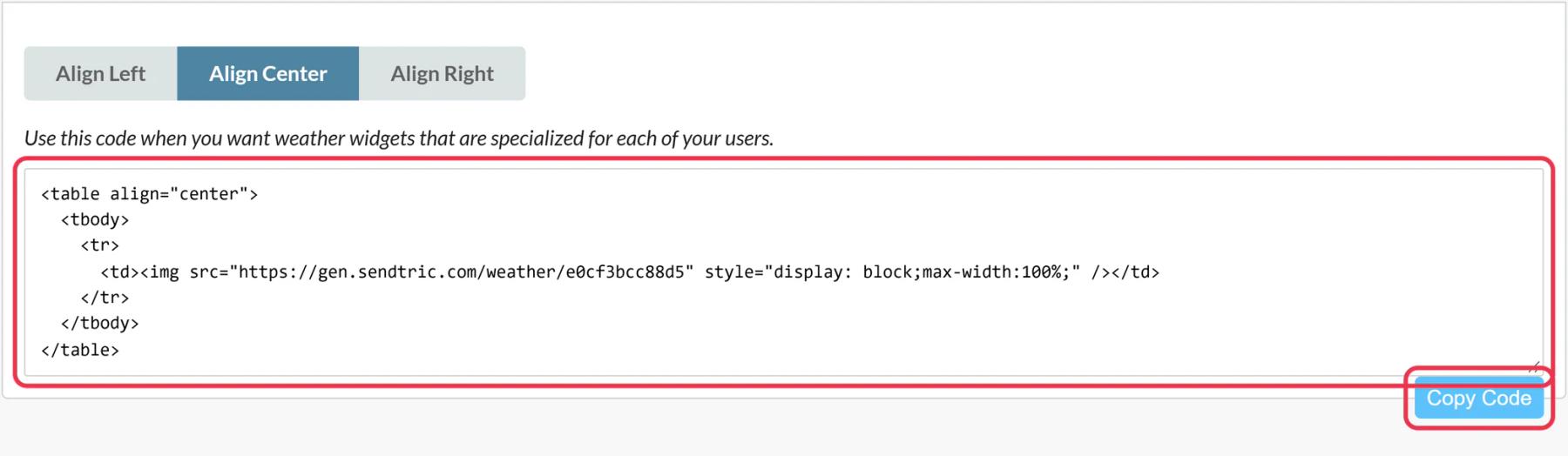
Save and copy the code. With a dynamic location, the URL contains location=city,countryCode. Replace city with your Bloomreach attribute, such as {{ customer.city }}, and countryCode with a two-letter code, either typed in (like US) or from an attribute that stores the code. A dynamic date works the same way with a date in YYYY-MM-DD format.
Step 4: Paste it into the HTML element
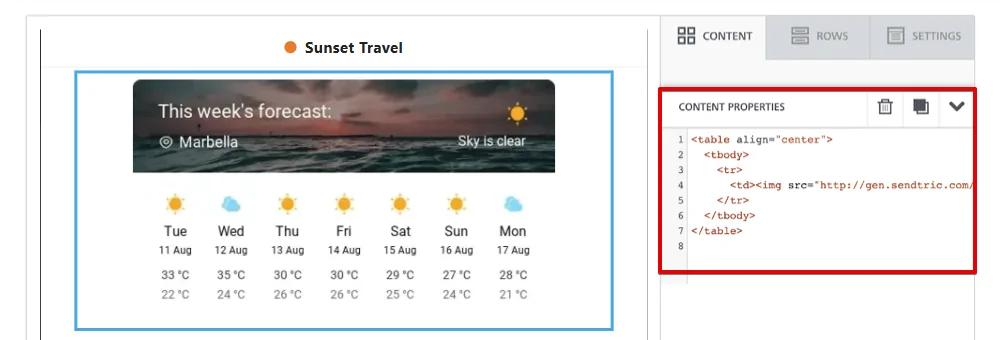
In the Bloomreach visual builder, drag an HTML element from the Content tab into the email and paste the code under Content Properties.
Step 5: Test with a customer who has a city
Send a test to a preview customer whose profile has a city. The forecast header should show that place. A customer without one should see your fallback, or nothing if you chose to hide the widget.
Format dates for the forecast
If you pass a travel or event date, it has to arrive as YYYY-MM-DD. Bloomreach's from_timestamp filter can format a timestamp attribute, for example {{ customer.trip_start | from_timestamp('%Y-%m-%d') }}.
Forecasts look up to 10 days ahead
Plan sends so the date you pass is within the next 10 days. Dates further out trigger the fallback.
Bloomreach Weather Widget FAQ
Does Sendtric detect the customer's location?
No. The location is never taken from the recipient's IP address. It comes from the fixed place you set or the Bloomreach attribute you pass in the code.
When is the forecast fetched?
When the email is opened. Each forecast is cached for up to an hour, so a customer who opens the email two days after you sent it still sees a current forecast.
What if a customer's city is misspelled?
If the location can't be resolved, the widget shows your fallback image or is hidden. The forecast header shows the weather provider's name for the place it found, so a quick test with a few real profiles will catch messy city data.
Can I translate the forecast?
Yes. Choose from 47 languages in the widget settings; day names and the header are translated.
Can I combine weather with other widgets?
Yes. A weather widget can be a layer inside a personalized image or a critical alert, so you can place it inside your own design.
Want to see what else you can do? Explore Sendtric's dynamic weather in more detail, or browse the full email personalization toolkit.
More Bloomreach guides
- Countdown Timers - How to Add Countdown Timers to Bloomreach
- Live Polls - How to Add Live Polls to Bloomreach
- Personalized Images - How to Add Personalized Images to Bloomreach
- Rule-Based Images - How to Add Rule-Based Images to Bloomreach
- Critical Alerts - How to Add Critical Alerts to Bloomreach
- Social Proof Counters - How to Add Social Proof Counters to Bloomreach
Using a different platform? See all Sendtric integrations.