Add Each Subscriber's Local Forecast to Outdoor Retail & Fitness Emails
Show every subscriber this week's forecast for their own city, right next to the gear, classes or plans that fit it.
Make Every Newsletter Feel Local
For outdoor retailers, running clubs, gyms and garden brands, the weather decides what people do this week. A forecast for the subscriber's own city makes your newsletter instantly relevant, and gives your product picks context.
Sendtric's weather widget uses each subscriber's city or postcode from your email platform, and can always start from the day the email is opened.
More than 200,000 companies trust Sendtric




















Example: A Weekly Running Newsletter
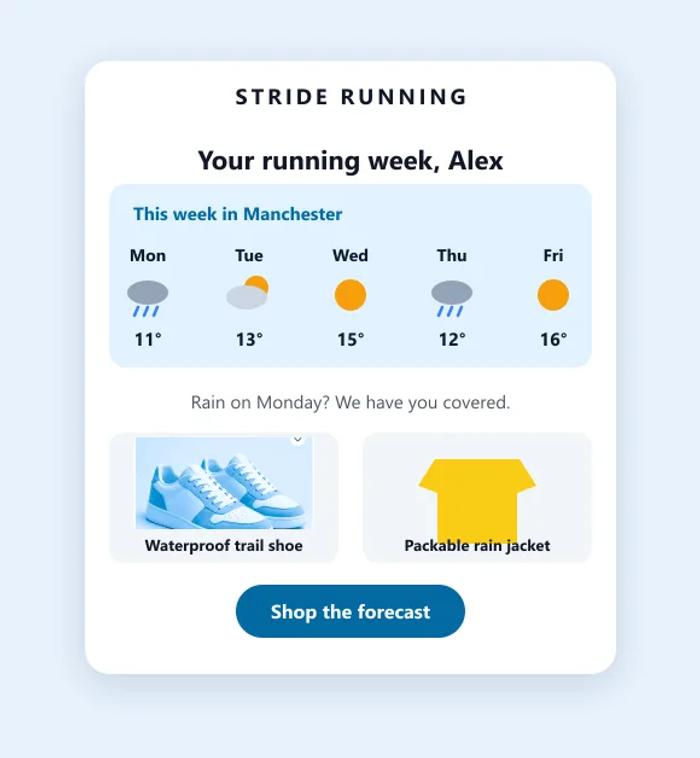
Here is how a running brand could use local forecasts:
- The forecast shows the week ahead for the subscriber's city, starting from the day they open the email.
- The products below it cover the likely conditions, like waterproof shoes and a packable jacket.
- Subscribers without a city see a fallback image instead of an empty space.
Local Forecasts in Newsletters: What Works
- Start from the day the email is opened. Weekly newsletters are opened over several days. Choose Always starts from the day the widget is viewed, so a reader on Thursday doesn't see Monday's weather.
- Use the most precise location you have. A postcode gives a more local forecast than a city. Location by city is available on the Micro plan and above, and by postcode on Standard and above.
- Pick products for a range of conditions. The forecast changes for each subscriber but your product picks don't, so choose items that cover what most of your audience is likely to see this week.
- Keep it in the same place every week. A forecast in the same spot becomes a regular, useful feature rather than a one-off.
- Ask for the location you are missing. Show subscribers without a city a fallback image, and invite them to add their location in your preference center.
How to Show Each Subscriber's Local Forecast
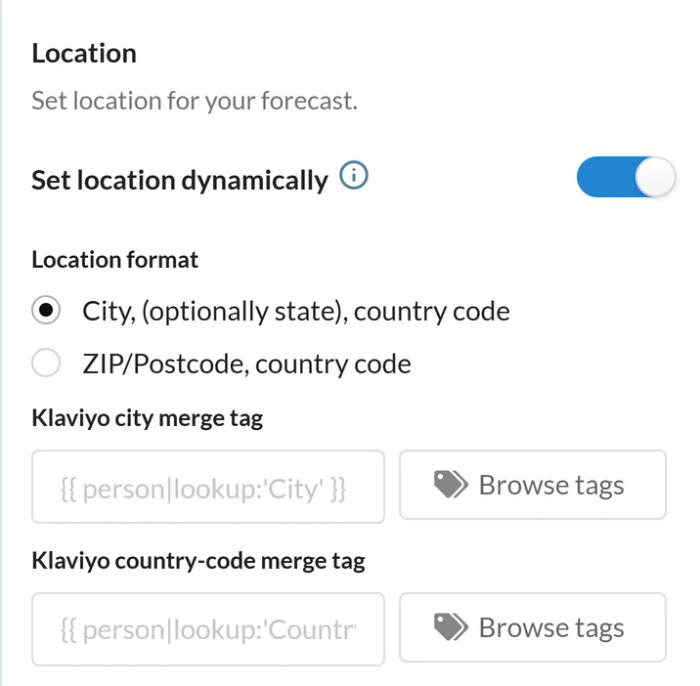
- Create a weather widget and turn on Set location dynamically.
- Under Dates, choose Always starts from the day the widget is viewed, and add a fallback image.
- Copy the code and swap the location placeholder for your merge tag.
Location by city is available on the Micro plan and above, and by postcode on Standard and above. For step-by-step instructions, see how to show each subscriber their local weather.
More Ways to Use Weather in Email
Travel and event brands use the same widget for forecasts in booking emails. For more on making emails relevant, read what is email personalization, with real examples.
Explore the Weather WidgetWhy clients LOVE Sendtric...
“We couldn't be happier with Sendtric. It allows us to add value to our customers and see the NPS go up. The countdown feature has been an invaluable tool to drive revenue for our customers. It adds a touch of personalized dynamism and urgency to our users' campaigns, effectively motivating their customers to act promptly.”
Founder of WoowUp
“At Splio, we are thrilled to share how Sendtric has transformed customer engagement through its exceptional countdown feature. This powerful tool allows us to personalize our customers' campaigns and instill a sense of excitement and urgency, driving the end-customers to take immediate action. With Sendtric, we have elevated our customer satisfaction. It's very quick & simple to install together with Beefree, allowing us to generate instant value.”
VP of Product at Splio