Add Live Weather Forecasts to Travel & Event Booking Emails
Show every guest the forecast for their own destination and dates, so they arrive ready for whatever the weather does.
Helpful Emails Get Opened
Pre-arrival and event reminder emails are already anticipated. Adding the forecast makes them genuinely useful: guests know what to pack, and attendees know whether to bring a coat.
Sendtric's weather widget reads the location and start date from your booking data, so every guest sees the forecast for their own trip.
More than 200,000 companies trust Sendtric




















Example: A Pre-Arrival Email for a City Break
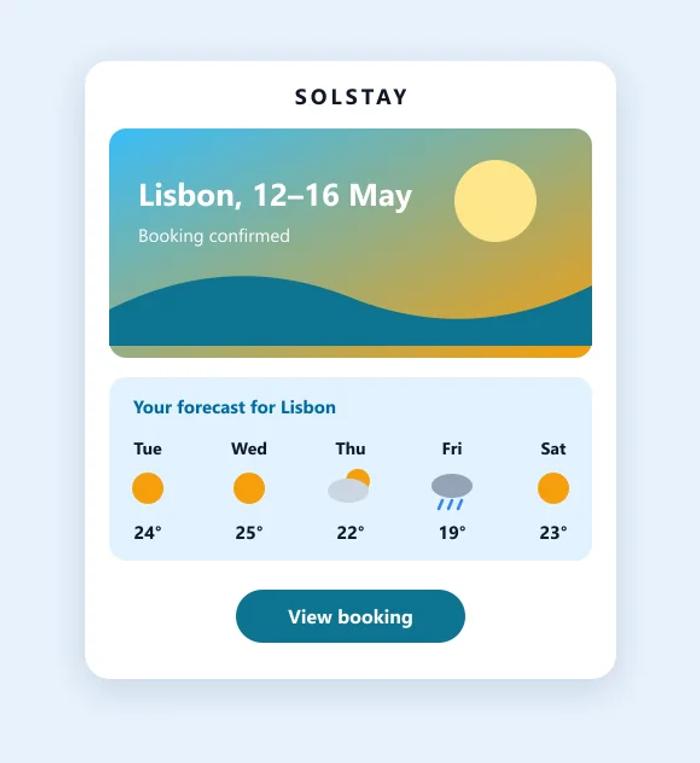
Here is how a hotel or travel brand could add the forecast to its pre-arrival email:
- The location comes from the booking's destination city, through a merge tag.
- The start date comes from the booking's arrival date, so the forecast covers the trip.
- A fallback image shows for bookings too far ahead for a forecast, or without a location.
Forecasts in Booking Emails: What Works
- Send it inside the forecast window. Forecasts reach about 10 days ahead, so the widget belongs in pre-arrival and reminder emails sent in the week before the trip. A confirmation sent months ahead will show the fallback.
- Use the booking, not the subscriber's address. Map the location merge tag to the destination city and the date merge tag to the arrival date, so guests see the weather where they're going.
- Turn the forecast into advice. Pair it with what to pack, indoor options for rainy days or extras like airport transfers. The forecast gives the rest of the email a reason to exist.
- Always set a fallback. Bookings without a location, or too far ahead for a forecast, should see a fallback image, such as a photo of the destination, or no widget at all.
- Use the units your guests expect. Show Celsius or Fahrenheit based on the market you're sending to.
How to Show Each Guest Their Trip Forecast
- Create a weather widget and turn on Set location dynamically.
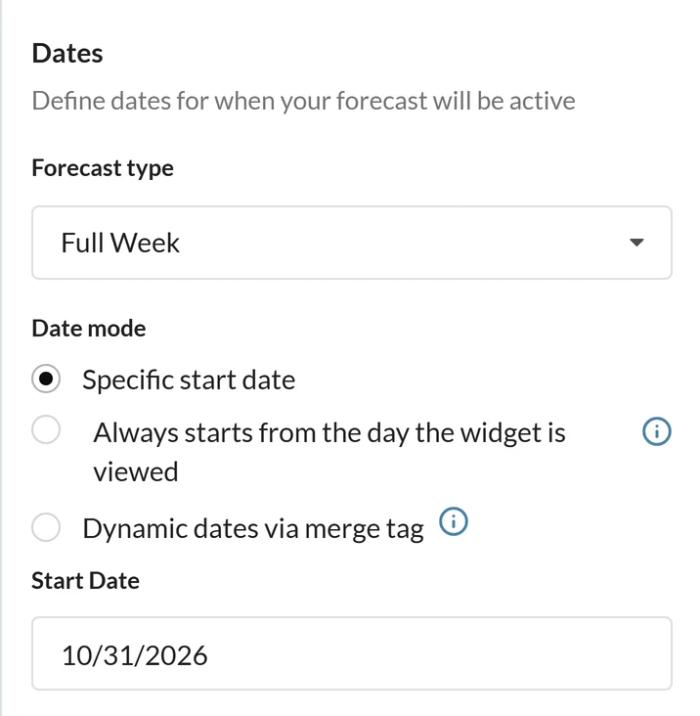
- Under Dates, choose Dynamic dates via merge tag, and add a fallback image.
- Copy the code and swap the placeholders for your booking platform's merge tags.
Forecasts are available for about the next 10 days, so use the widget in emails sent shortly before arrival. For step-by-step instructions, see how to show each subscriber their local weather and how to set the forecast dates.
More Ways to Use Weather in Email
Weather also helps retailers and fitness brands with local forecasts in weekly emails. For event emails, see our tips to promote your event, and pair the forecast with a countdown to your launch or event.
Explore the Weather WidgetWhy clients LOVE Sendtric...
“We couldn't be happier with Sendtric. It allows us to add value to our customers and see the NPS go up. The countdown feature has been an invaluable tool to drive revenue for our customers. It adds a touch of personalized dynamism and urgency to our users' campaigns, effectively motivating their customers to act promptly.”
Founder of WoowUp
“At Splio, we are thrilled to share how Sendtric has transformed customer engagement through its exceptional countdown feature. This powerful tool allows us to personalize our customers' campaigns and instill a sense of excitement and urgency, driving the end-customers to take immediate action. With Sendtric, we have elevated our customer satisfaction. It's very quick & simple to install together with Beefree, allowing us to generate instant value.”
VP of Product at Splio