
What is Email Personalization? (With Real Examples)
Email personalization is a marketing strategy that uses subscriber data to deliver tailored, relevant email content to individual recipients. A personalized campaign sends different content to different people, based on what the sender knows about them. And it’s a hugely effective way to drive engagement and conversions.
 First Publish Date: .Last Updated:
 In a previous post, Best Email Personalization Tools (2026), we explored the platforms making email personalization possible. But before you can choose the right tool, you need to understand what email personalization actually is – and what it looks like when done right. Let’s explore the fundamentals of email personalization, with real-world examples, and give you practical tactics to move beyond the basics.
Key Takeaways
- Email personalization is a marketing strategy that uses subscriber data to deliver tailored, relevant content to individual recipients
- Using recipient names in subject lines is the most basic form of this, but consumers increasingly recognize this as automated
- Demand for email personalization has exploded. 74% of consumers expect brands to provide personalized experiences. Google Trends identifies it as a breakout trend
- Personalized emails generate 82% higher open rates than generic messages, with 332% higher click rates and an extraordinary 2,361% increase in conversions
- Personalization works best when based on recent, high-intent signals: abandoned carts, product views from the last 48 hours, and stated preferences
- The most effective campaigns combine multiple personalization tactics: location, behavior, and dynamic images, all working together
What is Email Personalization? The Fundamentals
Email personalization is a marketing strategy that uses subscriber data to deliver tailored, relevant email content to individual recipients. A personalized campaign sends different content to different people, based on what the sender knows about them.
Here’s the headline stuff you should pay attention to: email personalization delivers substantial, measurable benefits across engagement, revenue, and customer loyalty.
Personalized emails generate 82% higher open rates than generic messages [12]. Conversion improvements are even more striking: personalized automated campaigns deliver 332% higher click rates and an extraordinary 2,361% increase in conversions [13].
| Email Performance After Personalization | Increase |
|---|---|
| Open Rate | +82% |
| Click Rate | +332% |
| Conversions | +2,361% |
And the most powerful place to get the data to power this is your own audience.
That’s because, despite everyone falling into groups, categories, subcultures and cliques – we’re all unique. And while you might find that several users like the exact same things on paper, behavior data will always tell you otherwise.
Your audience is not the same as the next brand’s, so while you can benchmark and set goals to match a competitor, you’ll never be able to gain them by the same means. Don’t worry – this is a good thing! It means that you have the answers already: you just need to extract the data.
Types of First-party Data for Email Personalization
Before you can personalize anything, you need data. First-party data (information your customers voluntarily provide or that you observe through their interactions with your brand) is the backbone of effective email personalization.
The best email personalization strategies combine three types of first-party information: Demographic and profile data, behavioral data, and stated preferences (sometimes called zero-party data).
Each type tells you something different about your customer, and together they create a complete picture that powers individually-relevant campaigns. Let’s learn more about these types of data, and how to get them.
Basic Demographic and Profile Data
This is the foundational layer of customer information. It answers the question "who is this person?" – but in broad strokes that help group customers more effectively.
Name
While the marketing industry is moving away from {First Name} as the centrepiece of email personalization [1], names still have a role to play. Use them in the body copy of welcome emails, in personalized image overlays, and in post-purchase follow-ups.
The key is natural, contextual placement. Shoehorning names into every paragraph feels forced – and just wouldn’t happen in real life.
Location and City
Location data unlocks some of the most powerful and practical personalization tactics available. When you know where a subscriber lives, you can tailor content based on geography, local events, weather, and cultural references.
At its simplest, location data lets you optimize email send times, and most ESPs offer send-time optimization based on recipient time zone. This should be the standard for any serious email marketer.
At a more advanced level, location data enables weather-triggered campaigns, where an email dynamically changes based on the subscriber's location and real-time weather data. It can also be triggered by local events or stock levels at their nearest store.
Date of Birth
Birthday campaigns are a classic personalization tactic for good reason – they work! Birthday emails have a 481% higher transaction rate than promotional emails, and generate 342% higher revenue per email [2].
Beyond the obvious birthday discount offers, date of birth data helps you determine age-appropriate offers and content. A skincare brand, for example, might promote anti-aging products to subscribers over 40 and acne solutions to those under 25 – not as a hard rule, but as a starting point for relevance.
Company Name and Job Title
For B2B marketers, company name and job title are essential personalization fields – not for including in email copy, but for tailoring content by industry, company size, and decision-making authority.
Each level of seniority has different priorities. A C-suite executive needs high-level strategic content; a practitioner needs tactical how-to guides. Job title tells you which content to serve each user. Even in B2C contexts, job titles can be useful for understanding your audience, their likely schedules, their attention, and their interests.
Behavioral Data
Demographic data tells you who your customer is. Behavioral data tells you what they do – and what they do is often more predictive of future actions than what they say.
Purchase History
Purchase history is arguably the most valuable data point for ecommerce personalization. It reveals what a customer actually buys (not just what they say they're interested in), how much they spend, how often they buy, and what categories they prefer.
You can use purchase history to send personalized recommendations based on past purchases. More advanced use cases include replenishment reminders for consumable products (coffee, pet food, dietary supplements) and loyalty rewards that acknowledge a customer's total spend.
Website Behavior
Website behavior data (pages viewed, products clicked, time spent on site, search terms used) gives you insight into a customer's current interests and intent.
This data powers some of the most effective triggered email campaigns, like abandoned cart reminders, and price drop alerts for viewed products. A customer who spends ten minutes looking at running shoes but doesn't buy is signalling strong intent – that's a prime opportunity for a personalized follow-up email.
Email Engagement
Email engagement data (which messages a subscriber opens, which links they click, which campaigns they ignore) tells you what content resonates with each individual.
Use this data to group subscribers by their demonstrated preferences. Someone who always clicks your "new arrivals" emails but never opens "sale" emails is telling you what they value. Someone who clicks every "how to" guide but ignores product announcements is telling you they want education, not promotion.
This data can also inform frequency optimization. Subscribers who open every email might welcome a higher cadence. Those who open once a month might need a less frequent schedule or higher value content to stay engaged.
App and Website Engagement
Beyond what customers do on your website, how often they log in and which features they use provides valuable personalization signals. A frequent login suggests a highly engaged user who may be receptive to loyalty offers or upsells. An infrequent login might indicate a churn risk who needs an engagement campaign. Feature use tells you which product areas matter most to each customer.
Stated Preferences (Zero-Party Data)
Stated preferences – sometimes called zero-party data – is information customers intentionally and proactively share with you. Unlike behavioral data (which you observe) or demographic data (which you infer or collect passively), zero-party data is given explicitly.
This is the most trustworthy and accurate data you can collect because the customer provides it directly.
Content Preferences
Content preferences tell you what topics, product categories, or types of information a customer wants to receive. A fashion retailer might use polling to ask which styles interest their customers, and a B2B software company might ask which topics are most relevant to their recipients’ roles (product updates, industry trends, case studies, technical documentation, etc.).
Once collected, these preferences can be used to dynamically select which content blocks, images, or offers appear in each customer's email.
Frequency and Channel Preferences
Not every customer wants to hear from you at the same frequency or through the same channels. Giving subscribers control over how often they receive emails and which types of messages they receive reduces unsubscribes and improves long-term engagement [3].
Ask subscribers how often they want to hear from you (weekly, monthly, only major updates), and which channels work best for them (email, SMS, app push notifications).
How to Collect This Data
You can't just hope customers will tell you what you need to know – you have to ask, and you have to make asking worth their while. You don’t even need to offer anything or give anything away, you just have to promise a better experience.
Collecting first-party data requires intentional design and tools – starting with the stuff you can directly control.
Sign-up Forms and Preference Centers
Your email sign-up form is the first opportunity to collect data. Keep it simple at the point of subscription (email address is the only absolute requirement), and use progressive profiling to collect additional data over time.
A preference center (a page where subscribers can update their settings at any time) is essential for ongoing data collection. Include options for content preferences, frequency, and channels. Link to your preference center in every email footer, to keep users onboard.
Website and App Tracking
With proper consent and privacy compliance (GDPR, CCPA, etc.), you can track customer behavior across your website and app using tracking pixels, cookies, and analytics platforms.
This data is automatically collected – the customer doesn't have to do anything except use your website. The key is connecting this anonymous behavior data to known email addresses. Most ESPs offer tracking scripts placed on your website that can achieve this.
Be transparent about what you're tracking and why. A clear, simple privacy notice builds trust, especially if users are given an opt-out.
Purchase Data
Your ecommerce platform or CRM is a goldmine of first-party data. Every transaction tells you what a customer bought, when they bought it, how much they spent, and (often) what they used to pay.
Extract and analyze this data regularly. Look for patterns: which products are often bought together? Which customers buy on a predictable schedule? Which products have high repeat purchase rates?
These patterns become personalization rules. Use them to power replenishment campaigns, for businesses like coffee roasters, products like deodorant or makeup, and for other consumables.
Surveys and Polls
Sometimes, the best way to get data is to ask directly.
Email is an excellent channel for simple, effective polls. Sendtric's poll widget lets you add yes/no questions, 1 to 5 ratings, and unlimited multiple-choice questions directly into emails [4]. Responses are collected automatically, and can be fed back into your segmentation.
Keep your polls extremely short: one question, three to five answer options, and a clear call-to-action. A two-minute survey belongs on a landing page, not in an email. If you have more to ask, include a link to a deeper survey.
Feeding Data Into Your Email Tools
Collecting data is only half the battle. The other half is getting that data into your email personalization tools. Your ESP or enterprise marketing platform should be the central repository for customer data [5]. Use integrations or APIs to connect your ecommerce platform, CRM, analytics tools, and preference center to your email system.
With Sendtric, you can pull data from your ESP or directly from your ecommerce platform to power personalized images, weather widgets, and countdown timers. A customer's name, location, purchase history, and even live inventory levels can determine which image they see when they open your email.
To explore the specific tools that turn this data into personalized email experiences at scale, read our post on the best email personalization tools.
Real-world Examples of Email Personalization in Action
The best email personalization uses multiple tactics, drawing on location data, behavior, and user preferences, all working together. Here are some of the best
Spotify's Wrapped Campaign
Spotify Wrapped uses personalization really effectively, in a campaign that spans app notifications and email, to create an annual viral sensation. Each user gets a personalized email, with a teaser of their listening stats (behavioral data), their ranking in their region (location), and even things like how their app settings affect the listening experience (preferences). This data is pooled together and used to generate GIFs and images dynamically, to insert into each user’s unique Wrapped email.
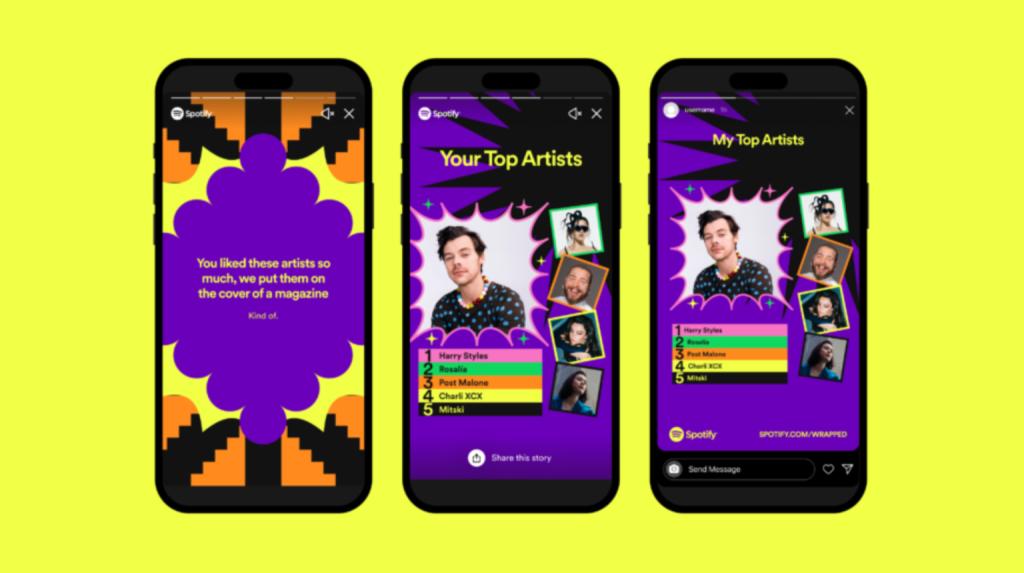
Wrapped is huge, and gets hundreds of millions of social shares with each event [6]. It’s inspired a whole new genre of marketing emails, based on user data and user generated content.
Sendtric can help email marketers create their own Wrapped-style content, too – and we'll demonstrate this in an upcoming post. Stay tuned!
Sephora's Beauty Insider Program
Launched in February 2007, the Sephora Beauty Insider program has evolved into one of North America’s most successful loyalty initiatives, now serving more than 45 million members across the United States and Canada [8]. Many marketers consider it the gold standard [7], with a robust data-driven model that gives customers genuine incentives.
One of the biggest perks are its birthday emails, featuring a free gift personalized to the customer's beauty profile. The email arrives close to the customer's actual birthday – not weeks before or after. This combination of timing and relevance drives loyalty, in-store and online.
The offer changes based on location, and whether the customer typically buys skincare, makeup, or fragrance. The data that powers the program is captured slowly – through an initial profile setup with basic information, followed by gradual behavioral data. It’s a highly effective, all-encompassing marketing effort, with personalized email at the heart.
Canva Tracks Feature Usage to Send Personalized Tutorial Emails
During onboarding, Canva takes a bunch of information, and has a comprehensive preferences center to manage what users receive. One of the coolest features is how they use behavioral data to manage onboarding better – and it’s right there, in the preference center.
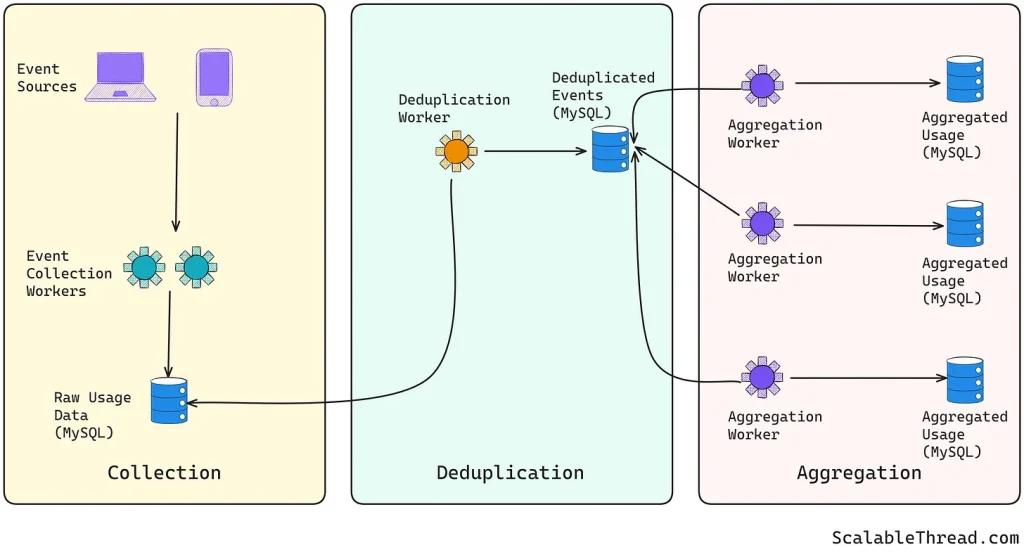
Users can get tips and templates for their top use cases [9], webinar and tutorial invites – all based on their use. This is a really cool way to boost their engagement and upsell customers who need more features or pro templates.
Canva is a mass-scale data harvester. The app and website tracks billions of events [10] to trigger all kinds of actions – including sending personalized content to customers and free tier subscribers.
Create Personalized Emails Easily, with Sendtric
Sendtric gives you the power to supercharge your email marketing. You get a suite of tools to deploy email personalization tactics, without complex coding or development resources.
With Sendtric, you can easily integrate personalized images that dynamically change based on subscriber data – or countdown timers that display the exact remaining time for a personalized offer. You can generate interactive polls, and weather widgets that pull real-time conditions for localized campaigns.
These widgets are designed to work seamlessly across all major email clients, across desktop, mobile, or tablet, integrating effortlessly with your email campaign platform. Best of all? They’re all included in every pricing tier – even our free plan!

Create your free email countdown timer
- Fill out the form with your desired countdown options
- Click Generate
- Confirm your email address
- Copy and paste the provided HTML code into your email template
- Enjoy your free email countdown timer from Sendtric with 10,000 free monthly views.*
No watermark – Up to 10,000 monthly views* on our FREE Plan
*If you exceed 10,000 free views in a month, a watermark will appear until the limit resets. Upgrade to remove it at any time. Paid plans never show a watermark, even if the limit is exceeded.
Frequently Asked Questions
What is email personalization in simple terms?
Email personalization is a marketing strategy that uses subscriber data (like name, location, purchase history, or browsing behavior) to deliver tailored, relevant content to individual recipients. Instead of sending the same email to everyone, you send different content to different people based on what you know about them.
What are examples of email personalization?
Behavioral personalization includes abandoned cart emails showing exact products left behind, replenishment reminders based on purchase cycles, and recommendations driven by browsing history. Predictive personalization uses AI to anticipate needs, and pre-emptively send emails at the right moment [11].
Does email personalization really work?
Yes – but specificity matters. Personalize based on recent, high-intent signals: abandoned carts, product views from the last 48 hours, and stated preferences. Generic personalization (like {First Name} in subject lines) can actually harm performance.
What are the benefits of email personalization?
Email personalization delivers substantial, measurable benefits across engagement, revenue, and customer loyalty. Personalized emails generate 82% higher open rates than generic messages [12]. Conversion improvements are even more striking: personalized automated campaigns deliver 332% higher click rates and an extraordinary 2,361% increase in conversions [13].
What's the difference between dynamic images and static images with merge tags?
Static images with merge tags insert text into an image's alt attribute or overlay text using your ESP's content builder. The image file itself does not change. Dynamic images – the approach used by Sendtric – generate a unique image file for each recipient. The image can change entirely based on any data point you provide.
Is using a recipient's name in a cold email a good idea?
Yes – but placement, tone, and context matter. Using the recipient's name in the body copy or preheader text remains effective, provided it feels natural and not forced.
How do I know which image to show to which customer?
The answer depends on the data you have available. Start with location, purchase history, recently viewed products, abandoned carts, customer lifecycle stage, and stated user preferences. You can even gather preference data through an email poll widget to maximize relevance.
Will personalized images work in all email clients?
Most modern email clients (including Gmail, Outlook, Apple Mail, Yahoo Mail) support dynamic personalized images. We recommend testing your emails across multiple email clients before sending to your full list.
Sources
[1] https://www.sendtric.com/best-email-personalization-tools/
[2] https://www.elixirrdigital.com/2020/01/02/email-marketing-why-you-should-embrace-birthday-emails/
[4] https://www.sendtric.com/email-poll-widget/
[5] https://www.sendtric.com/best-email-personalization-tools/
[6] https://girlsinmarketing.com/blog/spotify-wrapped-the-power-of-personalisation-in-marketing/
[7] https://www.openloyalty.io/insider/sephora-beauty-insider
[8] https://loyaltyrewardco.com/master-guide-sephora-beauty-insider-explained/
[9] https://www.canva.com/help/email-subscriptions-mobile-notifications/
[10] https://newsletter.scalablethread.com/p/how-canva-handles-billions-of-events
[11] https://www.sendtric.com/how-to-use-ai-email-marketing/