
Best Email Personalization Tools (2026)
Email has come a long way since the days of “You’ve Got Mail”, and it’s not done evolving yet. In email marketing, personalization used to just mean adding the recipient’s name into the subject and body text – but in 2026, the best email personalization tools aren’t even doing that anymore. Instead, they’re going deeper into the wants and needs of their recipients than ever before.
 First Publish Date: .Last Updated:
 In an earlier blog post, Average Email Open Rates By Industry in 2026, we discovered that the tactic of using company and recipient names in subject lines could actually be resulting in fewer opens. So where does that leave us with email personalization in 2026? Let’s explore the best email personalization tools, tactics, and how best to deploy them.
Key Takeaways
- Demand for email personalization has exploded in 2026
- Personalization is changing. Recipient names in subject lines can lower open rates
- 74% of consumers expect more brands to provide personalized experiences
- The AI boom is making more users aware of lazy personalization
- User behavior data should be driving email personalization:Purchase and browsing history, abandoned carts and wishlists, location
- The user’s wants and needs can be determined, and individualized offers created
- Deep personalization and urgency can be used together for highly effective campaigns
The Shift Away from {First Name}

How many times have you got the old “Hi, [First Name]!” treatment in an automated email? It’s way too common, even today. But even including names correctly in emails and calling it “personalization” is definitely dying out.
It used to be recommended to use the recipient’s name through the whole email – from subject to sign-off. But the latest data seems to go against this. According to benchmarking by GetResponse, recipient names in the subject actually opened at lower rates than those without [1].
Consumers are onto us. And they have been for a while. Inserting names is a tactic that recipients immediately recognize as automated [2], and it’s become much more noticeable since the AI boom took over…
But adding names isn’t really personalization – you can talk to a friend for hours without naming each other once. Personalization is much deeper than that, and if you want to be serving your recipients properly, you need to join the shift away from relying on the {First Name} merge tag.
And it’s important to get into it now. Demand for email personalization has exploded in 2026 [10], with Google Trends identifying it as a breakout trend. Thankfully, there’s a universe of possibility in email personalization beyond inserting names.
What is Email Personalization?
Now we know what it’s not, let’s explore what email personalization is. Email personalization is a marketing strategy that uses subscriber data to deliver tailored, relevant email content to individual recipients.
User behavior, location, or purchase history can all be used to build a profile for users, which can be served with highly relevant deals and offers.
This is way more useful than generic mass messaging, and gives you increased engagement. Done right, personalized emails achieve higher click-through rates [3], by making communications feel curated and personal, not automated. 74% of consumers expect more brands to provide personalized experiences [4], so skipping this in your campaigns isn’t an option.
But in 2026, there are so many ways beyond using names to achieve personalization in marketing emails, and we’ll cover them fully in an upcoming post – but to give you the basics, we’ve listed out the main ways below.
Types of Email Personalization (Beyond Adding Names)
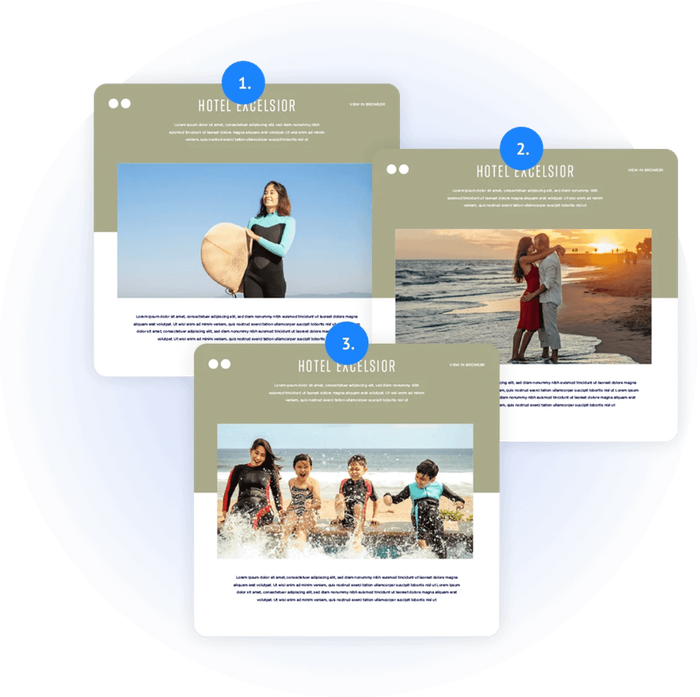
With tools like Sendtric, you can dynamically insert custom, personalized images into your emails. These images can contain products, offers, custom designs, marketing messages, and be tailored to groups and subgroups – even individuals – all in the same campaign [5].
By using name overlays on images in Sendtric, you can create user-specific end-of-year “wrapped”-style content – like Spotify’s annual Wrapped campaign [11]. We’ll be covering how to create this kind of content with our tools on the blog soon.
Behavioral Personalization
Send deals and discounts based on specific subscriber behavior. If your ecommerce platform and CRM collect browsing history, shopping cart data, wishlist data, and so on, you can deliver highly specific offers on the items people really want.
To spice things up even more and drive urgency in emails, add a countdown timer to your offers. Paired with abandoned cart info, a highly targeted discount with a time limit could push that sale far more effectively than a simple reminder!
Also, if a user makes regular purchases of the same or similar items, you can preemptively offer them a deal before their next expected purchase. Predictive personalization is one of the areas best served by AI, and we covered this in a separate post: Read more – How to Use AI to Maximize Email Marketing Results in 2026
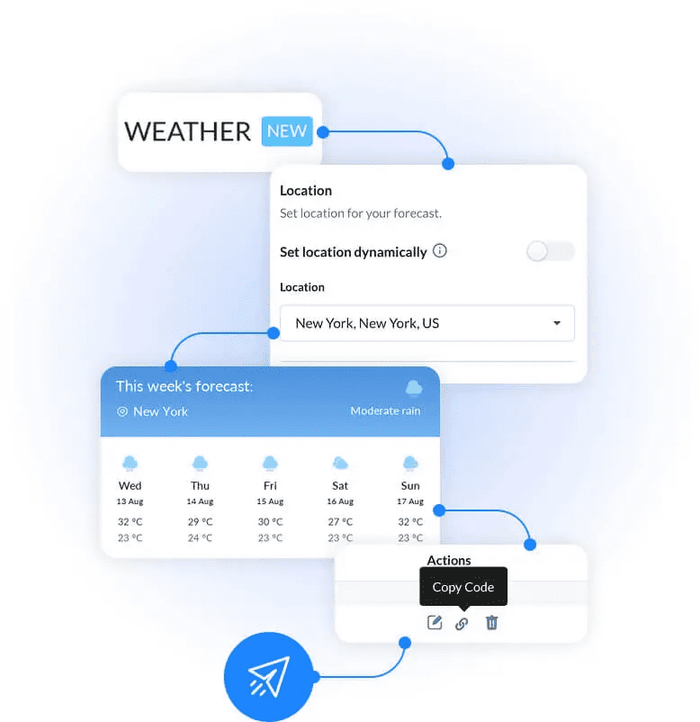
Location
When you know a user’s location, you can optimize your email delivery time. This often gets overlooked, but if you’re on the East Coast, sending emails first thing in the morning isn’t going to be well received in California.
Location data also lets you adjust campaigns for weather and local events. Sendtric’s weather widget gives realtime local weather updates [7], directly in your emails – tailored to each recipient’s location.
User Polls
Interactive polls in emails are an excellent way to retain engagement and collect valuable insights – without users having to leave for another platform. Perfect for quick customer feedback, or refining your users’ preferences even further, so you can deliver fine-tuned content to them. Sendtric’s polling feature is extremely simple, but extremely powerful. Add yes/no questions, 1–5 ratings, and unlimited multiple choice questions [6].
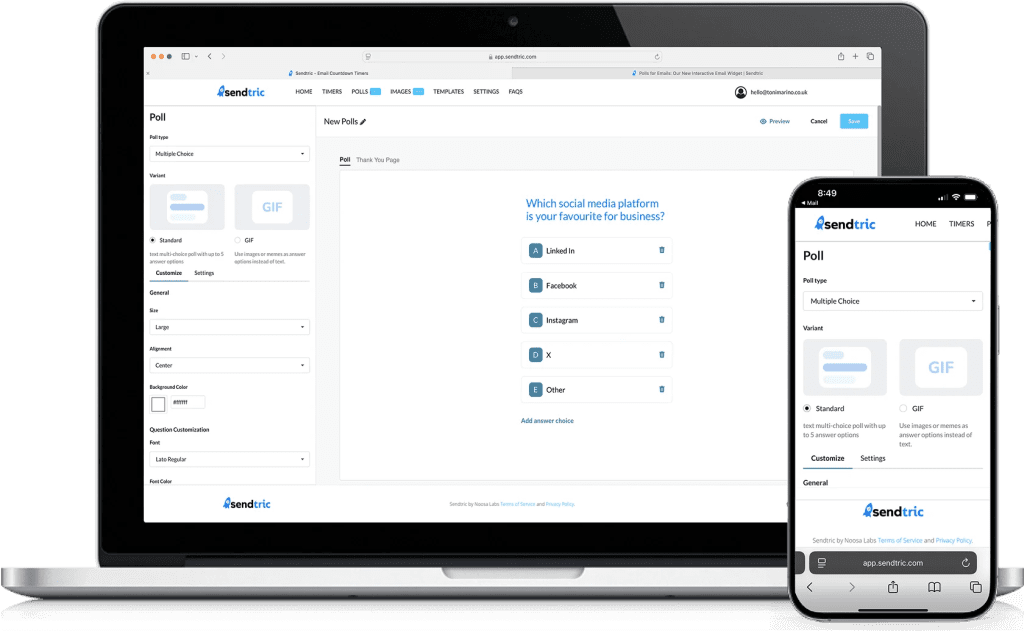
All of these can be used in combination. For instance, you can use location data to personalize the images in an email to the user’s local area. Just be mindful not to clutter up your message by making things too complicated.
Top Industries Using Personalization in Emails
- Ecommerce
- Real Estate
- Education
- Fitness
- Travel & Tourism
In a previous post, we looked at the top industries using personalization in marketing emails, and discovered that industries with broadly diverse customer bases benefit the most [8]. While the industries listed above are among the top use cases, we believe that a truly great email marketing campaign should use this level of personalization as the standard, for user retention and engagement.
Key Factors for Getting Email Personalization Right
Without data, none of this works.
One of the main factors for success in email personalization is collecting as much relevant first party data about your users as possible. Without data, you can’t personalize their emails in meaningful or creative ways. There are lots of tools out there to help you get this data. From entrepreneur to enterprise, the best email personalization tools are data-driven.
You can’t take our word (or anyone’s for that matter) on what data matters to your brand. That’s for you to discover – but here’s a list of where to start looking.
Product groups they are interested in, previous purchases, number of points, health goals…
Essential First-party Data
Basic Demographic and Profile Data
Name: While it’s all about moving on from {First Name} as your go-to email personalization tactic, you’ll still need names for overlays, offers, and body text personalization.
Location/City: You’ll need this to tailor content based on geography, like local events and weather widgets.
Date of Birth: Great for birthday campaigns and increased loyalty, as well as knowing age-appropriate offers and content.
Company Name/Job Title: Essential for B2B targeting – but can also be useful for prosumer product targeting.
Behavioral Data
Purchase History: This is a big one. Use purchase history data to send personalized recommendations, replenishable items, or loyalty rewards.
Website Behavior: Track users’ page views and product browsing, for behavioral triggers like abandoned cart or browse abandonment emails.
Email Engagement: Monitor which content, subject lines, and topics a user opens and clicks. Group users by their email likes and dislikes.
App/Website Engagement: Check their frequency of logins, or use of specific features.
Stated Preferences (Zero-party Data):
Content Preferences: What topics or types of products are they interested in?
Frequency/Channel Preferences: How often do they want to hear from you, and on which channels (email/SMS)?
How to Collect This Data (First-party Methods)
Sign-up Forms/Preferences: Use preferences to allow users to specify interests.
Website/App Tracking: Add tracking pixels and analytics (with consent).
Purchase Info: Extract and analyze information from your own ecommerce system or CRM.
Surveys and Polls: Ask customers directly about their preferences and needs – you can do this with Sendtric’s poll widget [6].
This data can be fed into your ESP or enterprise marketing platform. We’ll cover these in the next section.
The Best Email Personalization Tools in 2026
The table below compares every major email personalization tool available in 2026, with a focus on ease of use and best-fit use cases.
| Tool | Best For | Segmentation | Pricing |
|---|---|---|---|
| Sendtric | Best email personalization platform in 2026 for enterprises and small businesses and for creating dynamic, personalized images, countdown timers, polls, weather widgets. | Use your ESP's segmentation and integrate seamlessly | Generous free plan, affordable subscription tiers, and super competitive enterprise plans |
| Klaviyo | Ecommerce automation (Shopify, BigCommerce, Magento) | Predictive analytics, browser/device tracking | Usage-based (email sends) |
| Omnisend | Ecommerce automation with built-in SMS | Behavior-based, pre-built automation workflows | Usage-based (contacts) |
| ActiveCampaign | CRM, email automation for B2B and B2C | Deep conditional content, site tracking, event tracking | Tiered (contacts) |
| Mailchimp | Small business and beginner marketers | Basic segmentation, pre-built audiences | Freemium (free plan up to 500 contacts) |
| Bloomreach | Enterprise ecommerce personalization (product discovery, email) | Powered by customer data platform with real-time behavioral tracking | Enterprise (custom quote) |
| Manago AI | Mid-market and enterprise B2C (retail, ecommerce, travel) | Customer data platform with 360° customer view, real-time behavioral scoring | Enterprise (custom quote, typically volume-based) |
| Splio | Mid-market and enterprise (retail, hospitality, nonprofit) | Gamification, loyalty data, transaction history, real-time event triggers | Enterprise (custom quote) |
| Brevo (formerly Sendinblue) | Transactional and SMTP-focused marketing | Workflow builder, basic scoring | Volume-based (email sends) |
| ConvertKit | Creators, bloggers, and course sellers | Tag-based, visual automations | Tiered subscription |
| HubSpot | Full-stack marketing and sales teams | CRM integration, predictive lead scoring | Tiered (contacts, premium features) |
| Salesforce | Enterprise-level multi-channel orchestration | Data-driven, real-time segmentation | Enterprise (custom quote) |
| Adobe Campaign | Large enterprise, cross-channel campaigns | Enterprise-grade CDP integration | Enterprise (custom quote) |
| Zapier | Connecting hundreds of apps without developers | Basic – exists only as triggers and actions | Usage-based (tasks/operations) |
1. Sendtric (best for specialized image and countdown personalization)
Sendtric is a purpose-built dynamic email widget platform, created by two PHD students. Sendtric allows marketers to create images that change based on any recipient data – location, name, past purchase behavior, browsing history, or even live inventory levels. It’s especially good at personalized images and email countdown timers, with one of the most generous free tiers in the email marketing industry.
Sendtric’s email personalization tools are perfect for marketers who want powerful, specific personalization without switching their primary ESP. Excellent for ecommerce (abandoned cart recovery, product recommendations), travel (destination-specific imagery based on browsing history), and events (personalized schedules or session reminders).
Sendtric focuses on widgets; it is not (yet) a full ESP, so you will still need a separate platform to manage lists, automation, and delivery. However, it integrates seamlessly with all major ESPs, and gives users the flexibility to add powerful tools to any platform.
2. All-in-one ESPs (best for segmentation and automation workflows)
All-in-one ESPs (like Klaviyo, Omnisend, ActiveCampaign, Mailchimp, Brevo, ConvertKit, HubSpot) excel at native segmentation and automation workflows – and if you’re an email marketer, it’s overwhelmingly likely that you're on one of these platforms.
Some (like Klaviyo and HubSpot) offer "dynamic content blocks", where you can show different text or product recommendations based on segments, but deeper control over personalization is not generally available without custom development or third-party widgets.
However, Klaviyo's predictive analytics, Omnisend's pre-built ecommerce workflows, ActiveCampaign's deep CRM integration, and HubSpot's full-stack marketing capabilities are all world-class. With Sendtric plugged in, email personalization can be massively boosted on any of these platforms – with quick, easy integration.
3. Enterprise Marketing (best for cross-channel, international marketing)
Salesforce Marketing Cloud, Bloomreach, Adobe Campaign, SALESmanago, Splio – these platforms are designed for massive scale, cross-channel orchestration (email, SMS, push, web, direct mail), and international regulatory compliance (GDPR, CCPA, HIPAA).
And they're extremely powerful. These enterprise-grade platforms offer true dynamic content (including image swapping) via scripting languages (Salesforce's AMPScript, Adobe's scripting engine). These features require significant technical expertise to implement and maintain, so a typical "personalized image" campaign might require a developer to write custom logic, set up data extensions, and test across multiple email clients.
That’s no issue for a large enterprise with a dedicated marketing technology team – so if you need complex, multi-brand, multi-region marketing tools, platforms like Bloomreach, SALESmanago and Splio are the way to go.
4. Zapier and No-code Automation Platforms
Platforms like Zapier and Make are like magic – they connect hundreds of apps, without users having to write any code themselves. They can trigger email sends based on actions in other tools (like, "when a new row is added to Google Sheets, send an email via Gmail").
It’s powerful stuff, and they can be used to create automation workflows that feed data into another tool – like Sendtric. For example, a Zap could monitor your ecommerce platform for abandoned carts, then send the product ID and customer name to Sendtric – which then generates a personalized abandoned cart image.
Zapier is amazing for marketing teams who need to connect their email personalization stack to other business tools (CRMs, forms, payment processors) without developer involvement, but it's not a direct solution for personalization. It can’t create any content itself, just trigger actions between tools and platforms.
Which Email Personalization Tool is Right for You?
There is no single "best" tool – only the best fit for your specific needs, budget, and technical resources.
If you are a small business or solo marketer: Start with your ESP's native personalization (merge tags, basic segmentation). Add Sendtric's free countdown timer and personalized images when you need more power.
If you are an ecommerce brand: Klaviyo or Omnisend for automation, plus Sendtric for dynamic images and timers.
If you are a B2B company: ActiveCampaign or HubSpot for CRM integration, plus Sendtric for personalized visuals in nurture sequences.
If you are an enterprise brand: Use Bloomreach, SALESmanago, Splio for scale and compliance, and consider Sendtric as a lightweight addition for campaigns that do not require the full weight of your marketing cloud.
Create High Performing Email Widgets Easily, with Sendtric
Sendtric gives you the power to supercharge your email marketing. You get a suite of tools to deploy these tactics, without complex coding or development resources.
With Sendtric, you can easily integrate personalized images that dynamically change based on subscriber data – or countdown timers that display the exact remaining time for a personalized offer. You can generate interactive polls, and weather widgets that pull real-time conditions for localized campaigns.
These widgets are designed to work seamlessly across all major email clients, across desktop, mobile, or tablet, integrating effortlessly with your email campaign platform. Best of all? They’re all included in every pricing tier – even our free plan!
Frequently Asked Questions
What is the best email personalization tool for small businesses?
Your ESP (HubSpot, Klaviyo, MailChimp etc.) will have basic personalization tools, like name merge tags, built-in. For advanced personalization, Sendtric lets you personalize images and add countdown timers without any coding,with up to 10,000 monthly views with no watermark on the free plan.
Does personalization really work?
Yes – but specificity is important. Personalize based on recent, high-intent signals – abandoned carts, product views from the last 48 hours, stated preferences – not old or inferred data [9].
Is image personalization expensive?
It doesn’t have to be – Sendtric offers a free plan that includes personalized images and countdown timers for up to 10,000 monthly views. Paid plans start at modest monthly rates, making image personalization accessible to businesses of almost any size.
Can I personalize images in real-time based on live inventory?
Yes. Sendtric can integrate with your ecommerce platform to pull live inventory data and display it directly within email images. Connect your ecommerce platform (Shopify, WooCommerce, Magento, etc.) to Sendtric via API or a pre-built integration. For most users, this is a one-time setup that your development team or a Sendtric support specialist can help with.
Is using a recipient's name in an email ever a good idea?
Yes, of course – but the placement, tone, and context matters. Using the recipient's name in the body copy or preheader text remains effective [1], provided it feels natural and not forced.
How do I know which image to show to which customer?
The answer depends on the data you have available. Use location, purchase history, recently viewed products, abandoned carts, customer lifecycle, and user preferences. You can even gather data through an email poll widget, for maximum relevance.
Will personalized images work on all email clients?
Most modern email clients (Gmail, Outlook.com, Apple Mail, Yahoo Mail) support dynamic personalized images. We recommend testing your personalized email across multiple email clients before sending it to your full list, and Sendtric's dashboard includes testing tools to preview how your images will render.
What is the difference between dynamic images and static images with merge tags?
Static images with merge tags insert text into an image's alt attribute, or overlay text on an image using your ESP's content builder. The image file does not change. If you want to show a different image to different recipients, you must create multiple versions of the email or use complex conditional logic. Dynamic images – the approach used by Sendtric – generate a unique image file for each recipient. The image can change based on any data point you provide.
Can I use Sendtric with my existing ESP?
Yes. Sendtric is designed to work alongside any ESP. The integration is simple: you create your personalized image or countdown timer in Sendtric, copy the generated HTML code, and paste it into your email template within your ESP. Sendtric handles the image generation and delivery; your ESP handles list management, automation, and analytics. For advanced use cases, you can connect Sendtric to your ecommerce platform or CRM via API. Sendtric provides documentation and support for these integrations.
How many personalized widgets can I create on Sendtric’s free plan?
Sendtric's free plan includes up to 10,000 monthly views across all your widgets (countdown timers, personalized images, polls, and weather). There is no watermark on the free plan until you exceed the monthly limit – at which point a small watermark will appear until the limit resets. Paid plans remove the watermark entirely, and offer higher view limits. "Views" are counted each time a widget is loaded in an email. If you send an email to 5,000 subscribers and all of them open it, that uses 5,000 views. Unopened emails don’t consume views, but if a user opens an email twice, that counts as 2 views. For most small businesses and solopreneurs, 10,000 monthly views is sufficient for several campaigns. If you exceed the limit, upgrading is simple and affordable.
Sources
[1] https://www.getresponse.com/resources/reports/email-marketing-benchmarks
[2] https://www.reddit.com/r/coldemail/comments/1m6dw8c/email_personalization_tools_for_cold_emailing/
[3] https://www.campaignmonitor.com/resources/guides/personalized-email/
[4] https://www.klaviyo.com/uk/glossary/what-is-hyper-personalisation
[5] https://www.sendtric.com/personalize-your-emails-like-a-pro-with-new-tools-from-sendtric/
[6] https://www.sendtric.com/email-poll-widget/
[7] https://www.sendtric.com/weather-widget-for-email-campaigns/
[9] https://www.sendtric.com/top-5-urgency-elements-in-email-marketing/
[10] https://trends.google.com/explore?q=email%20personalization&date=today%205-y&geo=Worldwide
[11] https://newsroom.spotify.com/2025-12-03/wrapped-marketing-campaign/