How to Add Dynamic Weather to Brevo
Add a live weather forecast to a Brevo campaign or automation, for an event venue or for each contact's own city stored as a Brevo attribute.
 First Publish Date:
Show the forecast where your Brevo contacts actually are, on the day they open the email.
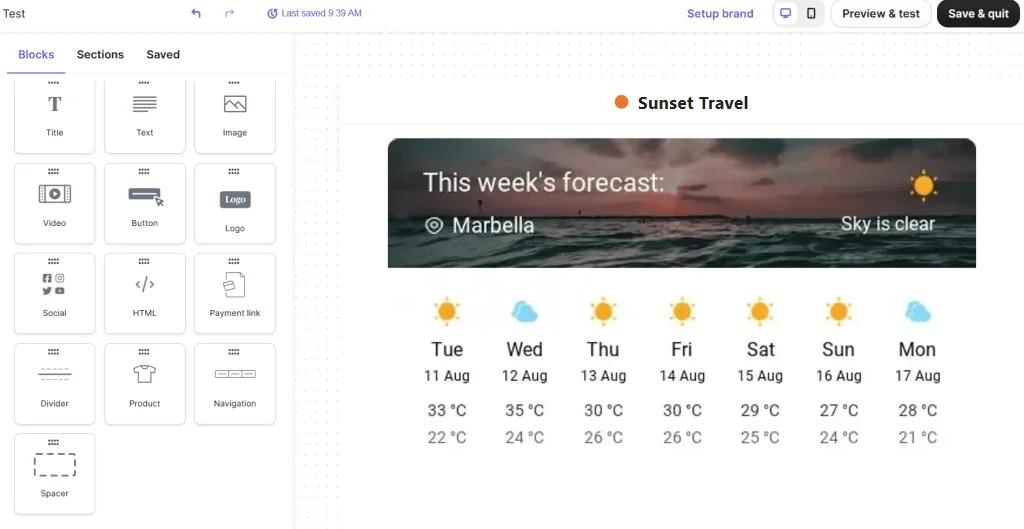
The Sendtric weather widget is an image that fetches the forecast at the moment your email is opened. Point it at one place, like your event venue, or let a Brevo attribute decide the city for each contact.
Brevo doesn't have a weather block, and the forecast in a Sendtric widget is never based on the reader's IP address. For a per-contact forecast, the location has to come from data you hold in Brevo, such as a city attribute.
What you can do with dynamic weather in Brevo
- Event reminders: the forecast for your venue in the reminder your Brevo automation sends a few days before.
- Retail by region: rain gear or garden furniture promoted next to the local forecast for each contact's city.
- Hotels and travel: the forecast for the guest's destination in a pre-arrival email.
- Outdoor classes and tours: a heads-up about the weather on the day of a booking.
A fixed location and a full-week forecast work on every Sendtric plan. A city from a Brevo attribute needs Micro or above, a postcode needs Standard, and starting the forecast from the day the email is opened needs Power. See pricing.
How to add dynamic weather to Brevo
Step 1: Create the widget
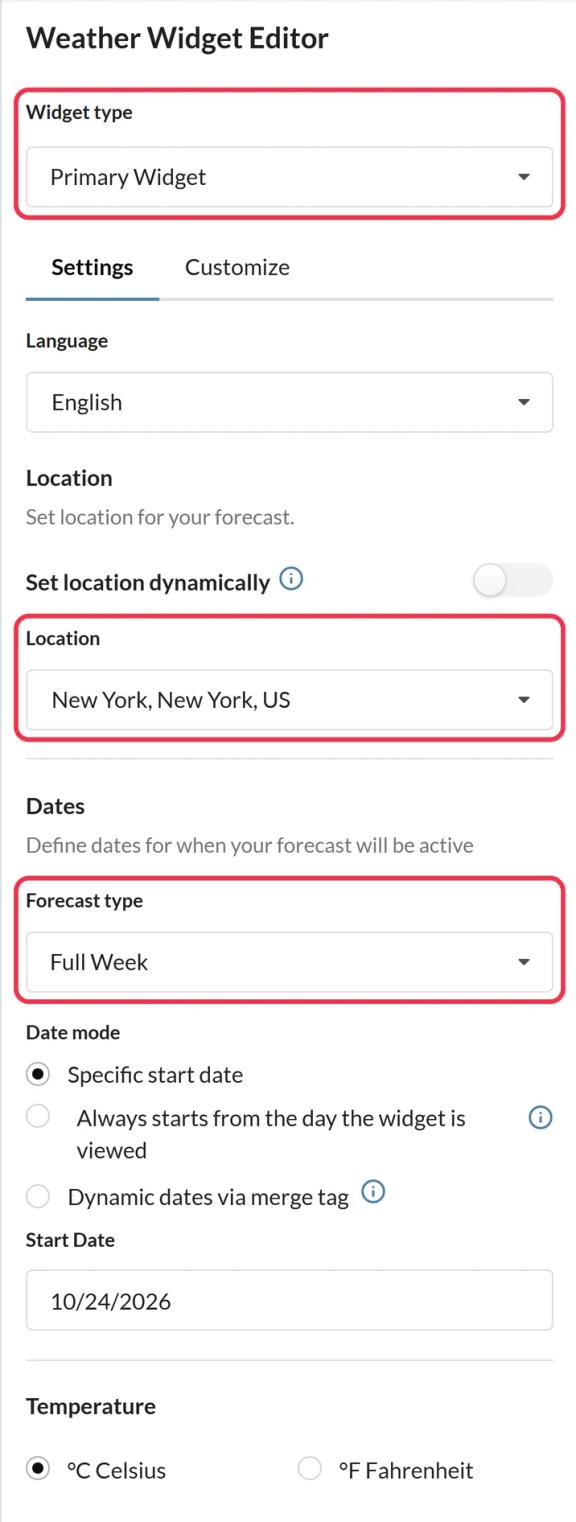
In Sendtric, open Weather widget and click Create New. Choose the Primary Widget card or the slimmer Inline Widget, then the forecast length and Celsius or Fahrenheit.
Step 2: Choose a fixed or a dynamic location
For one place, search for it in Location. For a forecast per contact, turn on Set location dynamically and choose the format: city with a two-letter country code, or postcode with a country code.
Brevo has a default COUNTRY attribute but no city attribute, so most accounts create a custom one. Keep the values in the format Sendtric expects, for example a CITY attribute with "Lyon" and a COUNTRY_CODE attribute with "FR".
Step 3: Set a fallback
Choose what to show when a location can't be found: hide the widget, or upload a fallback image (Micro and above). Contacts with an empty or misspelled city then see your fallback instead of an empty space.
Step 4: Copy the code and add the Brevo placeholders
Save and copy the code. With a dynamic location, the image address ends in a placeholder like location=city,countryCode. Replace it with your Brevo attributes, for example:
location={{ contact.CITY }},{{ contact.COUNTRY_CODE }}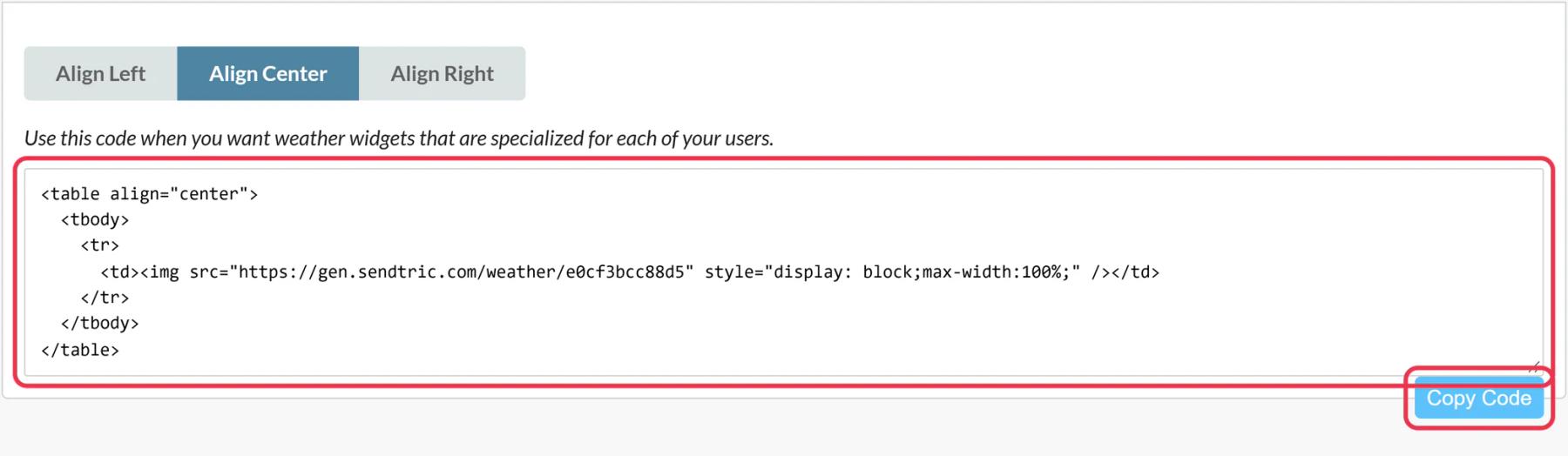
Step 5: Paste it into an HTML block
In Brevo's drag and drop editor, drag the HTML block from Content > Blocks into your email, click it, replace the placeholder text with the code and save. Then send a test to contacts in two or three different cities.
Names here are examples
CITY and COUNTRY_CODE are only example attribute names. Use the exact names from your own Brevo contacts list, in capitals if that's how they appear there.
Scheduling a campaign well in advance
Forecasts are only available about ten days ahead, and days without data show a dash. If you build a Brevo campaign weeks before it goes out, set the start date when you schedule it, or on Power turn on Always starts from the day the widget is viewed, so the forecast follows the day each contact opens the email.
Brevo Weather Widget FAQ
Does the widget detect the contact's location?
No. A dynamic location comes only from the Brevo attributes you put in the code. Contacts without a city see your fallback, or nothing if you chose to hide the widget.
How fresh is the forecast?
It's fetched when the email is opened and cached for up to an hour, so a contact who opens the email days later sees the latest forecast, not the one from send day.
Can I show the forecast for a different date, like a booking date?
Yes, on Standard and above you can pass a date in the format YYYY-MM-DD through the code. The date has to be within the next ten days to have a forecast.
Can I use the weather widget in a Brevo automation?
Yes. Save the design as an email template and use it in the automation's Send an email action. Each contact sees the forecast for their own city when they open it.
Which languages can the forecast use?
Day names and the header can be shown in 47 languages, which helps if you send Brevo campaigns in several languages.
Read more about dynamic weather and how it all fits into a wider email personalization strategy.
More Brevo guides
- Countdown Timers - How to Add Countdown Timers to Brevo
- Live Polls - How to Add Live Polls to Brevo
- Personalized Images - How to Add Personalized Images to Brevo
- Rule-Based Images - How to Add Rule-Based Images to Brevo
- Critical Alerts - How to Add Critical Alerts to Brevo
- Social Proof Counters - How to Add Social Proof Counters to Brevo
Using a different platform? See all Sendtric integrations.