
How to Use Sendtric's Email Personalization Widgets to Create a Wrapped Email in Minutes
Email has come a long way since the days of “You’ve Got Mail”, and it’s not done evolving yet. In email marketing, personalization used to just mean adding the recipient’s name into the subject and body text – but in 2026, the best email personalization tools aren’t even doing that anymore. Instead, they’re going deeper into the wants and needs of their recipients than ever before.
 First Publish Date: .Last Updated:
 With the right tools and a little bit of forward planning, you can build a personalized year-in-review email that genuinely delights your customers – and drives real results. Let’s show you how to use Sendtric's email personalization widgets to create a wrapped-style email in minutes. We’ll cover the data you need, the Sendtric widgets that do all the heavy lifting, and the step-by-step process for bringing it all together.
Key Takeaways
- Wrapped emails generate massive engagement but don’t need much infrastructure. In fact, your first-party data and current tech stack is enough to get started
- Sendtric's personalized image widgets allow you to create unique, data-driven visuals for each subscriber, without complex coding
- The most effective wrapped campaigns combine behavioral data (what users did), comparative data (how they rank), and celebratory framing (turning stats into stories)
- A successful wrapped email doesn't need millions of data points. Even simple metrics can be powerful drivers with the right story
- The story is everything. Users don’t care about raw stats – but they do care about what it says about them
On this page
- What is a Wrapped Style Email?
- Sendtric Widgets for Wrapped Style Emails
- What Data Do You Need to Create the Perfect Wrapped Email?
- How Do You Get the Data for Wrapped Campaigns?
- Building Your Tech Stack for Wrapped Campaigns
- Designing Your Wrapped Email: Best Practices
- Step-by-Step: Creating Your Wrapped Email with Sendtric
- Create Personalized Annual Recap Emails Easily, with Sendtric

What is a Wrapped Style Email?
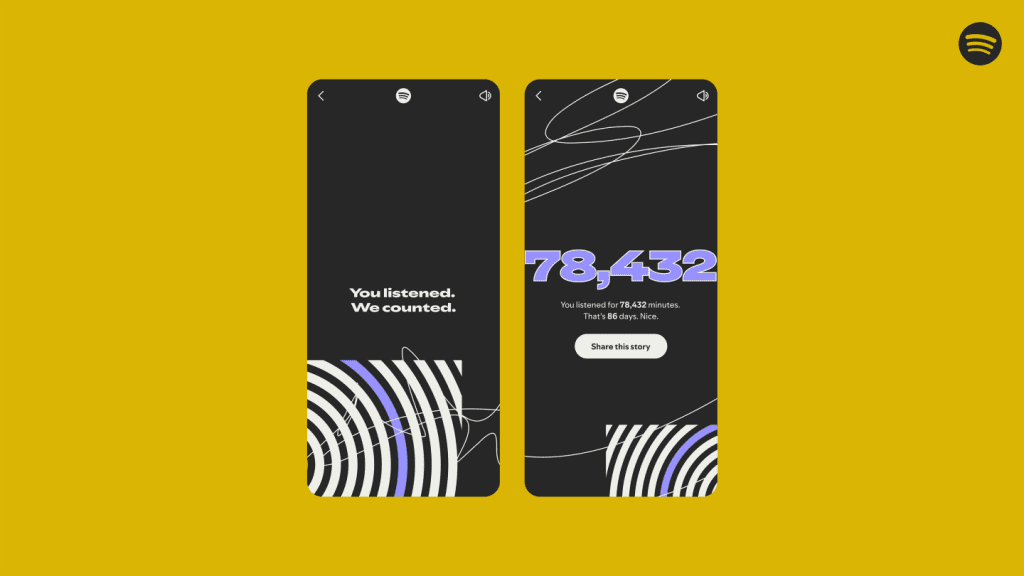
A wrapped email is a year-in-review summary that uses behavioral data to create a personalized recap for each user [1]. The name comes from Spotify's annual "Wrapped" campaign, which has run since 2016 and has become the gold standard for personalized storytelling with data.
Read more about The Best Wrapped Campaigns of 2025
But you don’t need to be a streaming giant to create your own Wrapped campaigns – just your first-party data, your ESP, and Sendtric. Let's look at the Sendtric email personalization widgets that make it possible…
Sendtric Widgets for Wrapped Style Emails
Sendtric has two primary widgets that are perfect for wrapped-style campaigns. Both are no-code, and will integrate seamlessly with your existing email service provider.
Personalized Images for Email
The Personalized Images for Email widget allows you to show different images to different recipients, within the same email campaign. The image changes based on any data point you have about the subscriber – their name, location, purchase history, browsing behavior, or anything else you want to connect it to.
For a wrapped email, this means you can create a single email template for all users that displays a unique "summary card" for each person.
The image could be of their top purchase category, or their most viewed pages, or of their favourite single item – anything you have the data for. And you can do it all from the same campaign.
The widget works by generating a unique image URL for each recipient.
When the email is opened, Sendtric's servers dynamically render the image based on the data you've provided. The result is a deeply personalized visual experience that feels custom-made for each subscriber.
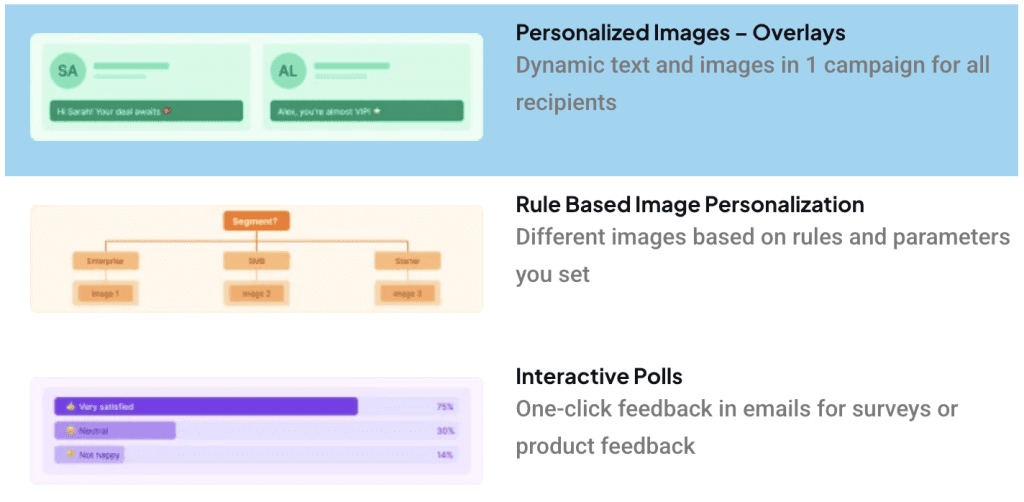
Personalized Text Overlay on Images
The Text Overlay widget takes personalization one step further. It allows you to dynamically display different text on top of images to different users, based on their profile data.
This is perfect for wrapped emails because it lets you create a single background image design, then overlay personalized statistics, names, or achievements on top. You don't need to design dozens of different images. You just design one image, and Sendtric handles the text placement automatically.
For example, you could create a "Year in Review" background template with placeholder areas. Sendtric then fills in each user's specific numbers in real time. The result looks like it was designed individually for each subscriber, with minimal design actually required!
The Text Overlay widget supports unlimited text variables, fallback values for missing data, and works across all major email clients. You can see the full feature set on the Personalized Text Overlay on Images for Email Campaigns page – but it will get you really close to a Spotify Wrapped experience.
That is, if you have the right data…
What Data Do You Need to Create the Perfect Wrapped Email?
The quality of your wrapped email depends entirely on the quality of your data. If you're not tracking the right metrics, you won't have anything interesting to show – and your campaign won’t hit the spot.
Here's a table breaking down the user behaviors you could track, what patterns would be genuinely interesting to your subscribers, and which metrics they would actually care about.
| Data Category | User Behaviors to Track | Interesting Patterns | Metrics Users Care About |
|---|---|---|---|
| Purchase Behavior | Order frequency, average order value, product categories purchased, first purchase date, last purchase date, total annual spend | Seasonal purchasing patterns, repeat purchase cycles, category shifts over time, post-purchase review behavior | Total money saved with your brand, number of purchases, most purchased category, anniversary of first purchase, reorder timing predictions |
| Platform Usage | Login frequency, features used, time spent in app/website, documents created, projects completed, milestones achieved | Feature adoption patterns, usage spikes after specific events, drop-off points in user journey, power user behaviors | Total hours saved, tasks completed, milestones achieved, streak count, fastest completion time, comparison to average user |
| Content Engagement | Emails opened, links clicked, articles read, videos watched, podcasts listened to, social shares | Content type preferences (video vs text, long vs short), optimal send times, topic clusters, share patterns | Top read article, total reading time, most engaged topic, comparison to other subscribers, missed content recommendations |
| Fitness & Activity | Workouts logged, distance covered, time active, personal bests, routes taken, achievements unlocked | Consistency patterns (daily vs weekly), improvement over time, preferred activity types, seasonal variations, goal completion rates | Total distance or time, personal bests achieved, longest streak, comparison to last year, rank among friends, favorite activity |
| Financial | Transactions made, money saved, points earned, rewards redeemed, categories spent, bill payments | Saving patterns, spending categories, recurring payment optimization, rewards earned but not used, fee avoidance | Total cash back or points earned, money saved, top spending category, fees avoided, rank among similar users, retirement fund trajectory |
| Learning & Education | Courses started, lessons completed, quiz scores, time spent learning, certificates earned, skill progression | Learning pace, subject preferences, knowledge retention patterns, completion rates, time-of-day learning habits | Courses completed, skills gained, total learning time, improvement over time, comparison to peers, next recommended course |
| Social & Community | Comments posted, likes given, shares made, groups joined, events attended, friends connected | Peak engagement times, content that drives comments, community role (leader, responder, lurker), network growth | Most liked contribution, number of connections made, community rank, total interactions, friends also on platform |
This isn’t an exhaustive list by any means – but the more you look, the more you see. Take inspiration from things that you log in your own everyday life: your Google Maps timeline, your daily fitness goals and macros, your to-do lists. These metrics matter to you, so they’ll matter to other people. Don’t discount your intuition and experience, rather let it work with the data you have to make an informed decision about what to track and present.
The most important insight to take away from all this is that users don't care about raw data. They care about what the data says about them.
"You made 47 purchases" is just a boring “so what?” statistic. People already know how much stuff they buy, even if they don’t have the specifics.
But "You were in our top 10% of customers" is a score.
Reframe your metrics as achievements, comparisons, and stories – not numbers.
How Do You Get the Data for Wrapped Campaigns?
Chances are, you already have it in the tools and platforms you currently use [6]. Below, we’ve laid out where you need to look based on your business type.
For Ecommerce Brands
For purchase history and transactional data, your ecommerce platform is the obvious answer here. All the big players like Shopify, WooCommerce, BigCommerce, Magento, and Salesforce Commerce Cloud store every transaction a customer makes [7] [8] [9] [10].
These platforms have built-in analytics dashboards and APIs that allow you to extract order history, average order value, total spend, and product category preferences [10].
For SaaS Companies
Your billing platform (Stripe etc.) tracks subscription start dates, payment history, and plan changes [11] – useful for B2B marketing emails.
But for actual product usage and behavior data? This is where things get more interesting.
Your website analytics tool (Google Analytics, Adobe, Amplitude etc.) tracks page views, feature usage, time on site, and conversion funnels [12]. For apps, tools like Firebase, Appsflyer, and Branch provide similar event tracking.
If your software is proprietary, then it’s likely that your dev team has access to user and usage data, probably all the way back to product inception.
The trick is connecting anonymous behavior data to known user email addresses. Most of these platforms allow you to send user IDs or email hashes alongside events, which can then link back to your ESP.
For Newsletters and Subscribers
For email engagement data, your email service provider already has the tools you need. Klaviyo, Mailchimp, Omnisend, ActiveCampaign, and HubSpot all track which emails each subscriber opens, which links they click, and which campaigns they ignore [13] [14] [15].
Stated Preferences and Zero-party Data
This comes from tools that let customers tell you what they want. Preference centers (built into most ESPs) allow subscribers to select content topics, frequency preferences, and channel choices.
Survey and poll tools (like Sendtric's own email polls widget) let you ask direct questions – another rich source of preference data that can feed into your email personalization.
How Do You Unify All This Data?
Here's where it gets tricky… Your purchase data lives in Shopify, and our behavior data lives in Google Analytics. Your email data lives in Klaviyo, and your preferences live in a survey tool.
How do you bring it all together?
For most small to medium businesses, your ESP is the best central repository. Tools like Klaviyo, HubSpot, and Omnisend are designed to ingest data from multiple sources. They integrate directly with Shopify, Google Analytics, and survey tools [16] [17] [18].
You push everything into your ESP, and then your ESP makes that data available for segmentation and personalization.
For larger enterprises, a Customer Data Platform (CDP) like Bloomreach, Salesforce Marketing Cloud, or Adobe Real-Time CDP serves as the central data hub [19].
These tools collect events from every touchpoint (web, mobile, email, point of sale, call center), unify them into individual customer profiles, and then sync those profiles to your ESP and other marketing tools.
Remember: You Need a Full Year of Data to Make This Work
You need a year's worth of behavioral data – what users did, how often they did it, and any relevant comparative metrics (rankings, percentages, trends) to make your wrapped emails work. If you haven’t been tracking and logging the metrics you need, then start now – and plan for the following year.
Building Your Tech Stack for Wrapped Campaigns
Creating a wrapped email with Sendtric requires a few key pieces of technology. Here's what you'll need:
Your email service provider (ESP)
This is where your subscriber list lives – and where you'll build and send the email. Klaviyo, Mailchimp, Omnisend, ActiveCampaign, and HubSpot all work perfectly with Sendtric.
A data source
You need somewhere to store and retrieve the behavioral data you're personalizing with. This could be your ecommerce platform (Shopify, WooCommerce, BigCommerce), or a CDP engine like Bloomreach, SALESManago, or Splio [2] [19]. You can also use a CRM (Salesforce, HubSpot), or your analytics tool (Google Analytics, Amplitude).
Sendtric's personalized image and text overlay widgets
These generate the unique images for each subscriber. You create one template in Sendtric, copy the generated code, and paste it into your ESP – easy!
A way to connect data to Sendtric
Sendtric pulls data directly from your ESP's merge tags or from your CRM via API. Most users use merge tags – it's the simplest approach. You just insert your ESP's variable (like {{ first_name }} or {{ total_purchases }}) into the Sendtric widget configuration.
A fallback strategy
Not every user will have complete data. New subscribers might not have a full year of history. Make sure your Sendtric widgets have fallback values for missing data – a generic image or a friendly message. You might want to create a rule that excludes any users with less than 10 months of data from your campaign.
The beauty of this stack is that you likely already have most of it. If you're already sending email campaigns, you have an ESP – and if you're tracking customer behavior, you have a data source.
Sendtric plugs into both without requiring any migration or major changes to your existing workflow.
Designing Your Wrapped Email: Best Practices
Once you have your data and your Sendtric widgets ready, it's time to design the email. Here's what the most successful wrapped campaigns do well – and what you should avoid:
Start With a Strong Narrative Hook – Don't Dump Statistics
Open with a line that frames the year as a journey. "Here's what your year looked like" or "You accomplished more than you think" or "The numbers don't lie. You crushed it this year."
Set the tone before you show the data.
Use a Consistent Visual Language
Your wrapped email should look like a cohesive product, not a random collection of facts. Use your brand colors, a consistent typography system, and a repeating design element (like a year marker or a progress bar) that ties everything together. It doesn’t have to be strictly on-brand (every Spotify Wrapped has a unique look and feel), but it should tie into a cohesive theme.
Highlight One Hero Statistic – Don't Try To Show Everything
Pick one impressive number and make it huge.
You saved $500 with us in 2026
A hero stat becomes the shareable moment users post on social media.
Add Surprises
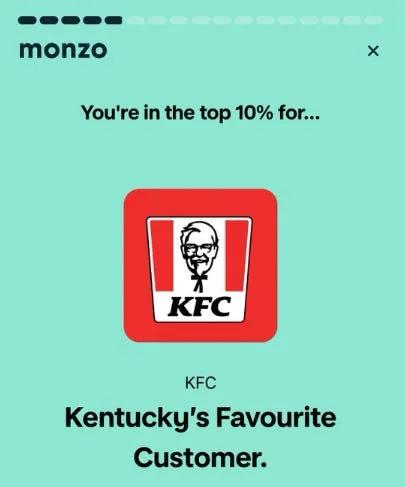
The best wrapped emails include something the user didn't expect. UK banking app, Monzo, creates fun caricatures and personas based on people’s spending patterns [1]. It's a new insight about every user, generated from their data.
End With a Call to Action – Don't Just Celebrate The Past
Point toward the future. "Here's what's coming in 2026", "Set your goal for next year", "Continue your streak", etc. Give users a reason to stay engaged after they've finished feeling good about themselves. Spotify lets you create a Wrapped playlist – so why not let users create a wishlist for their most viewed products, or a “read it again” list for their favorite articles?
Design for Sharing – Don’t Assume Screenshots
Don’t assume every user will take a screenshot of your email and post it on social media – create sharable cards that export the dynamically generated images, which can then go out to connected social apps.
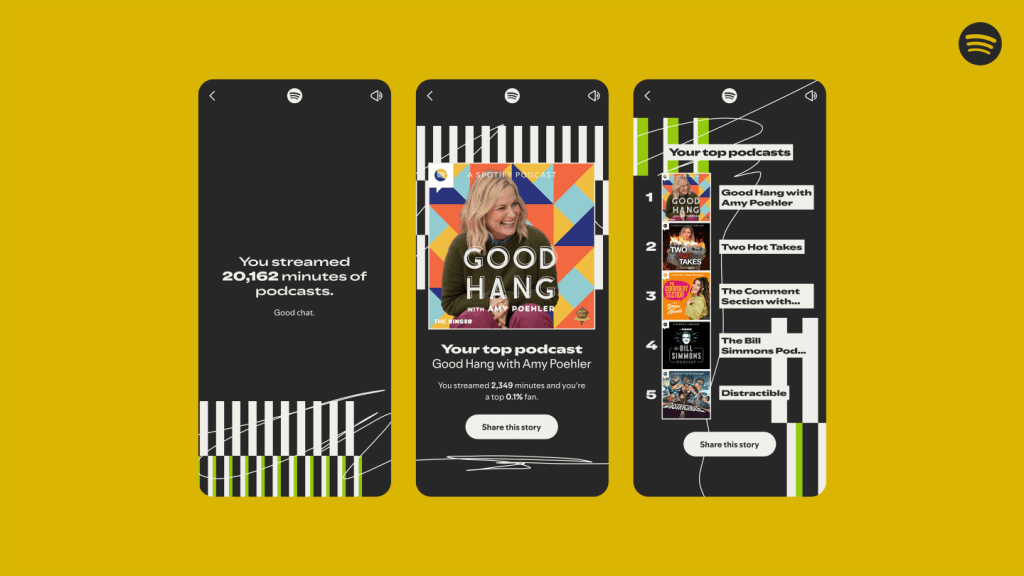
But you also need to account for screenshots, too – so make your key statistics clear and readable at a glance. Your design needs to look good cropped to a square, and your brand should be visible somewhere.
Step-by-Step: Creating Your Wrapped Email with Sendtric
Step 1: Audit your data
Before you do anything else, know what data you have and what you can personalize with. Make a list of every user-specific metric you've tracked over the past year, and start thinking of ways to create topline narratives.
Step 2: Choose your hero metrics
Select 3 to 5 stats that tell a compelling story. Focus on metrics that are positive (what they achieved), surprising (what they might not know), or comparative (how they stack up).
Step 3: Design your image background
Create a background image that will serve as the canvas for your personalized stats. Leave blank areas where text overlays will go. Keep the design clean and on-brand – and personalize where possible based on user segmentation.
Step 4: Set up your Sendtric text overlay variables
This takes minutes. In your Sendtric dashboard, create a text overlay variable for each personalized statistic. Name them clearly – and set fallback values for subscribers with missing data.
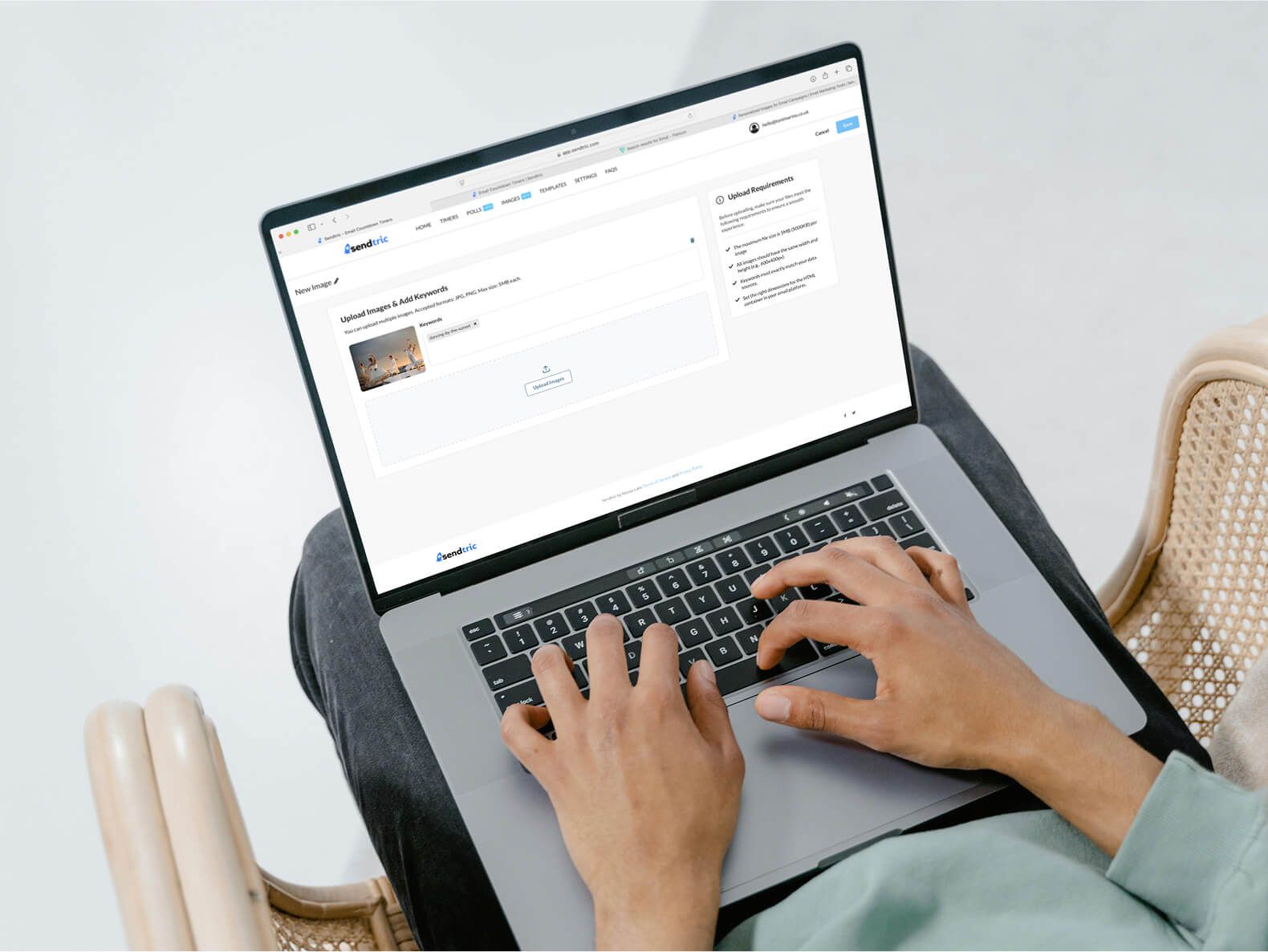
Step 5: Connect your data
In your ESP, put the dynamic variables from your data sources into the text overlay variable fields.
Step 6: Generate your widget code
Click generate in Sendtric. Copy the custom widget code, ready to paste into your email.
Step 7: Build your email in your ESP
Create your email template as usual, and paste the Sendtric code wherever you want the personalized image to appear. Write copy that frames the statistics and tells the year's story.
Step 8: Testing, testing, 1, 2, 3…
Send test emails to yourself and your team. Verify that different test users see different personalized content. Check that fallback values work correctly. Test across email clients (Gmail, Outlook, Apple Mail etc.).
Step 9: Schedule – and send!
Send your wrapped email in early December for B2C, or January if you’re B2B. Monitor open rates, click rates, and social shares. Save your best-performing design elements for next year!
Create Personalized Annual Recap Emails Easily, with Sendtric
Sendtric gives you the power to supercharge your email marketing. You get a suite of tools to deploy email personalization tactics, without complex coding or development resources.
With Sendtric, you can easily integrate personalized images that dynamically change based on subscriber data – or countdown timers that display the exact remaining time for a personalized offer. You can generate interactive polls, and weather widgets that pull real-time conditions for localized campaigns.
These widgets are designed to work seamlessly across all major email clients, across desktop, mobile, or tablet, integrating effortlessly with your email campaign platform. Best of all? They’re all included in every pricing tier – even our free plan!

Create your free email countdown timer
- Fill out the form with your desired countdown options
- Click Generate
- Confirm your email address
- Copy and paste the provided HTML code into your email template
- Enjoy your free email countdown timer from Sendtric with 10,000 free monthly views.*
No watermark – Up to 10,000 monthly views* on our FREE Plan
*If you exceed 10,000 free views in a month, a watermark will appear until the limit resets. Upgrade to remove it at any time. Paid plans never show a watermark, even if the limit is exceeded.
Frequently Asked Questions
What is a wrapped style email?
A wrapped email is a year-in-review summary that uses a user's own behavioral data to create a highly personalized recap of their activity over the preceding twelve months. The term comes from Spotify's annual Wrapped campaign.
Do I need a developer to create personalized images for email?
No. Sendtric's widgets are designed for marketers, not developers. You create your image and set up your text variables in the Sendtric dashboard. Just copy the generated code, and paste it into your email template. No coding required!
What data do I need for a wrapped campaign?
You need a year's worth of behavioral data – what users did, how often they did it, and any relevant comparative metrics (rankings, percentages, trends). Start collecting data now for next year's campaign.
Can I create a wrapped email if I don't have millions of data points?
Absolutely. Even simple metrics like number of purchases, total money saved, or longest streak can be powerful when presented thoughtfully. A small coffee shop with a loyalty scheme could send a wrapped email showing customers how many visits they made, their favorite drink, and a reward for their loyalty.
How do I make my wrapped email shareable?
Design for sharing. Add share buttons for all major platforms, and make screenshotting easy. Use bold, distinctive visuals. Keep statistics easy to read at a glance. Create one hero statistic that users will want to show off. Include a clear, short hashtag or brand mention that users can copy when they share.
When should I send my wrapped email?
Most wrapped emails arrive in the first week of December. This gives users time to engage and share before the holidays, while avoiding competition with last-minute shopping campaigns. B2B brands may find January more effective.
Will personalized images work in all email clients?
Most modern email clients (Gmail, Outlook.com, Apple Mail, Yahoo Mail) support dynamic personalized images generated via URL parameters. Sendtric includes fallback options to ensure that even in problematic email clients, recipients see a default image rather than a broken placeholder.
Can I use Sendtric with my existing ESP?
Yes. Sendtric is designed to work alongside any ESP – Klaviyo, Mailchimp, Omnisend, ActiveCampaign, HubSpot, and dozens more. The integration is simple: you create your widget in Sendtric, copy the HTML code, and paste it into your email template within your ESP.
Sources
[2] https://www.sendtric.com/best-email-personalization-tools/
[3] https://www.dyspatch.io/blog/creating-your-year-end-wrapped-email-with-examples/
[4] https://customer.io/learn/personalization/create-spotify-wrapped-campaign
[5] https://econsultancy.com/year-in-review-data-storytelling-campaign/
[6] https://www.actionrocket.co/blog/the-joy-of-wrapped-emails
[8] https://woocommerce.com/document/woocommerce-customer-history/
[9] https://experienceleague.adobe.com/en/docs/commerce-admin/stores-sales/order-management/transactions
[10] https://www.chargeflow.io/blog/choosing-the-right-ecommerce-platform-for-dropshipping
[11] https://stripe.com/gb/billing/features
[12] https://amplitude.com/compare/best-digital-experience-analytics-tools
[13] https://www.klaviyo.com/blog/self-serve-dedicated-click-tracking-take-control-of-your-email-links
[14] https://knowledge.hubspot.com/connected-email/understand-hubspot-sales-email-open-and-click-tracking
[15] https://mailchimp.com/help/about-open-tracking/
[16] https://support.omnisend.com/en/articles/9582786-set-up-a-headless-store-with-omnisend
[17] https://knowledge.hubspot.com/integrations/connect-hubspot-and-shopify-via-data-sync
[18] https://www.klaviyo.com/uk/ecommerce-integrations/shopify