


Key Takeaways
● “Best” is subjective. The right email countdown timer provider depends on needs
● Pricing varies widely. PAYG looks good, but can rack up bigger bills than subscription
● Timer complexity isn’t standardized. Some have a steep learning curve
● Performance and reliability aren’t guaranteed by all email countdown timer providers
● Many ESPs bundle in email countdown timers, but they’re not always a good fit
● Some providers give you extra widgets to work with, for more engaging emails
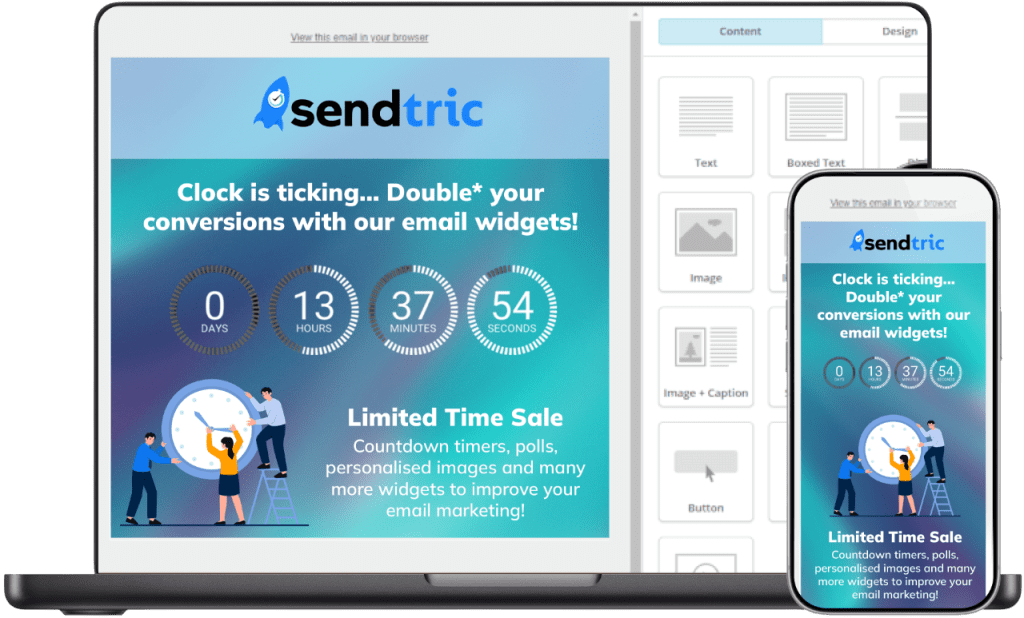
First – What is an Email Countdown Timer?
An email countdown timer is a live timer that counts down to a specific time or event which
can be used directly within emails. j Email marketers use them to send to potential
customers, to build a sense of urgency to improve conversions and engagement. abandoned carts.
Read more: How to Use FOMO in Email Marketing
They could be counting down the days or hours left on a flash sale, the time left to redeem a
coupon, or the end of a limited offer. Whatever they’re promoting, the idea is to encourage
action based on limited time. So, who’s doing the best email countdown timers right now?
Best Email Countdown Timer Providers 2026
Here’s a non-exhaustive, but pretty complete list of the best email countdown timer providers
in 2026. We’ve researched pricing information, features, and other key things to know – with
more details on each email countdown timer provider below this comparison chart.
| Features ↓ | Sendtric | MailTimers | CountdownMail | NiftyImages | MailerLite | MotionMail | Alterable | CountingDownTo |
| 99.99% uptime guarantee* | ✔ | ✘ | ✔ | ✘ | ✘ | ✘ | ✘ | ✘ |
| No watermark on free plan | ✔ | ✘ | ✘ | ✘ | ✘ | ✘ | ✘ | ✘ |
| Built-in evergreen & event-based timers | ✔ | ✔ | ✔ | ✘ | ✘ | ✘ | ✔ | ✘ |
| Mobile-friendly | ✔ | ✔ | ✔ | ✔ | ✔ | ✔ | ✔ | ✔ |
| Professional templates & styles | ✔ | ✔ | ✔ | ✔ | ✔ | ✔ | ✔ | ✘ |
| Runs on secure SSL | ✔ | ✔ | ✔ | ✔ | ✔ | ✔ | ✔ | ✔ |
| No code | ✔ | ✔ | ✔ | ✔ | ✔ | ✔ | ✔ | ✔ |
| Multi-language timers | ✔ | ✔ | ✔ | ✔ | ✔ | ✔ | ✔ | ✔ |
| Custom colours and branding | ✔ | ✔ | ✔ | ✔ | ✔ | ✔ | ✔ | ✔ |
| Widgets: polls, personalized images, etc. | ✔ | ✘ | ✘ | ✔ | ✔ | ✘ | ✔ | ✘ |
| Add images & backgrounds | ✔ | ✔ | ✔ | ✔ | ✔ | ✔ | ✔ | ✔ |
| Unlimited views option | ✔ | ✘ | ✔ | ✘ | ✔ | ✘ | ✘ | ✔ |
| Unlimited timers | ✔ | ✔ | ✔ | ✘ | ✔ | ✔ | ✘ | ✔ |
| Free trial | ✔ | ✔ | ✔ | ✔ | ✔ | ✔ | ✘ | ✔ |
| Free tier | ✔ | ✔ | ✔ | ✘ | ✔ | ✔ | ✘ | ✔ |
| Perpetual license | ✘ | ✘ | ✘ | ✘ | ✘ | ✘ | ✘ | ✔ |
| Subscription tiers | ✔ | ✔ | ✔ | ✔ | ✘ | ✔ | ✘ | ✔ |
| Premium support | ✔ | ✘ | ✔ | ✔ | ✔ | ✘ | ✘ | ✔ |
1. Sendtric 👋 – Overall Best Email Countdown Timer Provider


That’s us! We built our platform around the principle of simplicity and ease of use. You can
create a great looking countdown timer in just a few clicks – without any technical or design
skills.
Sendtric is used by over 200,000 businesses, including some of the largest enterprises in the world, like Google, HP and Walmart. But our accessibility means that even small businesses and individual marketers can join in, because we have a plan to suit everyone – and the capacity to show billions of views!
Pros
Sendtric has a 99.99% uptime record, which few others are able to match. In fact, of all the email countdown providers listed here, only one other has this service level, and most don’t explicitly state their uptime or SLA at all. Sendtric also offers unlimited free views, the first 10,000 of which per month have zero watermarks. Sendtric was built by two PHD students, who cracked the code for the best email optimization and loading speed – giving users the fastest and most stable platform possible. Sendtric offers the most comprehensive Apple Mail fallback options. if we detect that Apple Mail won’t display the timer correctly, you can choose from hiding the timer, or showing a fallback image or a fallback GIF instead. Timers are just one part of Sendtric’s suite of email widgets. You also get interactive polls
and image personalization, as well as weather widgets – to make your emails more engaging, relevant, and timely than ever. And, at the time of writing, we believe we have the most styles and customization options available. Sendtric can fit every brand, every time. That’s why over 200,000 businesses choose Sendtric as the best email countdown timer provider for them.
Cons
We know we’re not perfect, but we’re working on it! Our users love how simple and intuitive the platform is, but more advanced scenarios can be less straightforward or obvious to use. We’re working on adding more guides and use cases to explain these advanced scenarios and are adding new features all the time, so watch this space…
2. MailTimers

MailTimers is a focused, single-purpose tool designed specifically to add countdown timers
to email campaigns.
Pros
MailTimers’ primary strength is its simplicity and generous free tier, which offers up to 100,000 views per month with a watermark [6]. The platform provides a high degree of customization, including full color options, custom fonts, and evergreen timers that reset for each recipient. It also offers Adobe Photoshop integration.
Cons
As a single-feature tool, it lacks other dynamic content types like personalized images or maps. The monthly subscription model can feel inefficient during months with lower email volume, and the free plan, although generous, has some offputting restrictions (like including a watermark and a 30-day timer limit).
3. CountdownMail
CountdownMail styles itself as the expert resource for email marketers who want to use timers effectively, with some great blog resources.
Pros
The Dynamic Links feature, which allows email marketers to control where users land after clicking an expired timer, can redirect to a general offers page instead of a dead coupon code. They also offer some visually engaging timer animations.
Cons
Some users report increased technical complexity, which can lead to setup errors or an reliance on support – which thankfully is solid. CountdownMail doesn’t offer as many timer types, has no other widgets, and its pricing is confusing [8]. Also their free plan has a watermark, which they don’t reveal in their awkward comparison table.
4. NiftyImages

NiftyImages is a comprehensive dynamic content platform that includes countdown timers. It offers personalized images, interactive polls, dynamic maps, and real-time data charts, for sophisticated and tailored email campaigns.
Pros
NiftyImages has deep integration with Adobe Photoshop, which enables design teams to create timers to fit their style. The service is ESP-agnostic, working with any email provider by simply generating an image URL to paste into templates. It boasts a client list that includes major brands like HBO, Dell, and Shopify.
Cons
Platform complexity means that NiftyImages is best suited for organizations with dedicated design and development resources. Other drawbacks include the lack of individual team logins, requiring shared credentials, and a pricing model that’s significantly higher than alternatives. It also adds watermarks to free plan emails, and requires a Zapier integration to show evergreen timers – adding more to your technical resources.
5. MailerLite

MailerLite is an all-in-one email service provider (ESP), not just a timer tool. It offers a comprehensive marketing suite, including a drag-and-drop email editor, landing pages, signup forms, marketing automation, and a website builder – all within a clean, user-friendly interface. It’s got a great uptime record [5], but still shy of our own!
Pros
MailerLite’s generous free plan has made it a popular alternative to platforms like Mailchimp, and it consistently receives high marks for email deliverability. While it does offer countdown timer functionality, it is just one small feature within a much larger ecosystem and is notably a feature of their landing page builder rather than a core email component.
Cons
For users needing a full marketing platform with basic timer capabilities, MailerLite is excellent – but it lacks the specialized timer logic and the broader dynamic content options of dedicated tools. It also has a rather unusual pricing model that does away with tiers and operates on a sliding scale. This might not work for everyone, especially if you’re not planning on switching your ESP. MailerLite also adds watermarks to timers on the free plan, and doesn’t natively support true evergreen or personalized dynamic timers, meaning you’ll need more integrations and subscriptions for advanced solutions.
6. MotionMail

MotionMail provides a straightforward solution for sending timed reminders and creating
countdown-based campaigns, with a particular emphasis on ease of use and accessibility.
Pros
The intuitive dashboard requires virtually no training to navigate, and it’s available as a mobile application for both Android and iOS devices – allowing users to manage campaigns on the go. It also offers practical integrations, such as with G Suite and Google Mail settings. This makes it a good fit for sending appointment reminders or event based emails.
Cons
Compared to other tools, it has a more limited feature set and fewer integrations – and can’t natively support true evergreen timers. There’s also less independent review data available to benchmark its performance against competitors, and watermarks in the free plan might put new users off.
7. Alterable

Alterable functions as a dynamic content layer for entire email campaigns, offering a sophisticated suite of tools that includes countdown timers, personalized product recommendations, localized maps, and dynamic images.
Pros
Alterable’s most distinctive feature is its pay-as-you-go pricing model, charging $0.50 per 1,000 impressions with no monthly commitments, which can be highly cost-effective for businesses with fluctuating email volumes. It places no limits on how long a countdown can run and adds no forced branding to the content.
Cons
The platform comes with a steeper learning curve than most – and that pay-as-you-go model
can be a blessing or a curse. There’s no free plan, and no free trial. For high-volume
senders, the impression-based pricing could potentially be more expensive than a flat-rate
subscription service. There is an enterprise option, but there’s no word on how much this
costs [3].
8. CountingDownTo

CountingDownTo is a dedicated countdown clock generator focused on creating animated timers for websites and social sharing. It’s not a specialized tool for embedding timers directly into email campaigns, but this is one of its use cases.
Pros
CountingDownTo pre-renders its countdown clocks using a team of servers to ensure pixel-perfect, consistent display across all operating systems and browsers. The content is then cached globally for fast loading. For website integration, they prioritize security by serving all countdowns over an encrypted connection and isolating their code within an iframe, preventing any interference with the host site’s code or visitor data. It also offers a perpetual, lifetime license for just $195 [4], with no limits, which looks like a great deal. However…
Cons
CountingDownTo is starting to look a bit dated. Worst of all though, it’s not an email-first platform, and while integration with websites is simple, its email features are far more limited. It does work with major ESPs and public platforms, but reliability might not be on par with others. CountingDownTo does not support evergreen timers, and adds watermarks to timers made on its free tier.
How do Email Countdown Timers Work?
While it seems super simple, a countdown timer in an email is deceptively challenging to pull off. It can’t just be a simple GIF attachment, otherwise the timer will go back to the start when the email is opened again. And imagine the file size for a vacation countdown, two years away!
Also, different users and use cases need different timers.
So instead of being an attachment, it has to be dynamically generated – an animation that shows the correct time whenever the email is opened.
How’s that possible in an email?
For email countdown timers to work, a GIF is generated in real-time by the email countdown timer provider [2]. The provider then gives you a line of code that you can copy and paste into your email, which tells the email app where to find the image. And boom, the timer opens up in the email, counting down with animated numbers and graphics.
Because the GIF is dynamically generated on request, a new GIF is created every time the email is opened – with the correct time, every time.
If that all still sounds like magic to you, don’t worry. All you really need to know is that when you copy and paste a line of code into your email marketing platform, you’ll get a working countdown timer.
What to Look For in a Good Email Countdown Timer Provider
Does it offer all the features and customisation I need?
Check that your email countdown timer provider offers all the different timer types for your use cases. Sendtric can create evergreen timers and dynamic timers natively, without the need for integrations from Zapier or other platforms. Sendtric offers other email widgets and analytics for views, and also has the most robust Apple Mail fallback options of any platform – so check what your provider can offer.
Does the free plan add a watermark?
All free plans are watermarked – except for Sendtric. Sendtric is the only email countdown timer provider that does not watermark emails on its free tier. There is a generous 10,000 views per month limit on this, after which a watermark will appear.
Is the email countdown timer provider affordable and good value for money?
Sliding scale and pay-per-view pricing models look great at first glance, and they’re great for testing – but costs can quickly rack up when you scale. For consistent workloads, it’s much better to know your expenditure so you can plan for it. Sendtric offers one of the most competitive pricing structures of any email countdown timer provider, with a generously featured free tier.
Is the email countdown timer platform easy to use?
Email countdown timer platforms that are highly customizable are usually complicated, often relying on integrations with multiple services. Sendtric is super simple – you create your widget in the editor in just a few clicks, then copy and paste the code. Even advanced tools are easy to use, with simple integration guides for every email platform.
Will the countdown timers show correctly and reliably?
Reliability and fallback are key indicators to look for. Sendtric has the most robust Apple Mail fallback options of any email countdown timer platform, as well as a 99.99% operational uptime record. This means that users will not be shown a broken widget, regardless of their email app.
Are the countdown timers optimised for deliverability and loading speed?
Timers use GIFs, which can be large and slow-loading. Some mail countdown timer providers use local content delivery networks to speed this up – but Sendtric was developed by two PHD students to be the fastest, most optimized platform possible. Sendtric uses CDNs as well as optimized GIFs to run as fast as possible, with optimal deliverability.
Will the countdown timer platform scale with my business?
You need to know if your chosen email countdown timer provider will grow with your business, so that you don’t have to adopt a new platform when you scale up. Sendtric is used by over 200,000 businesses – some small, and some the size of Walmart and Google. Scaling up is simple, with the same great performance.
How good is customer support if things go wrong?
Too many email countdown timer providers seem to have only basic chat-style or ticketed support systems. This can become frustrating when you have an urgent issue. Sendtric offers priority and premium support from the Standard plan and up, giving you rapid access to our expert team when you need it most.
Why Choose Sendtric Email Countdown Timers?
● The best free plan. Unlimited free views, of which 10,000/month have no watermark
● The best value for money based on features and price per view
● The longest history of any email countdown provider (founded in 2015)
● Created by 2 PhD students, optimised for loading speed and deliverability
● Includes other email widgets: polls, powerful image personalization, weather – and more coming soon!
Sendtric has the best reliability for enterprises, with 99.99% uptime and 10s of billions of views each year – so your email campaign won’t be ruined by a timer that doesn’t load and shows a broken image. We’ve already got a lot of support out there [1], and we only plan to get better with time. Try Sendtric now, for free.
Create your free email countdown timer
- Fill out the form with your desired countdown options
- Click Generate
- Confirm your email address
- Copy and paste the provided HTML code into your email template
- Enjoy your free email countdown timer from Sendtric with 10,000 free monthly views.*
No watermark – Up to 10,000 monthly views* on our FREE Plan
*If you exceed 10,000 free views in a month, a watermark will appear until the limit resets. Upgrade to remove it at any time. Paid plans never show a watermark, even if the limit is exceeded.
Your timer is ready!
Check your email to get access to the timer's code so you can integrate it in your email campaign and make edits if you wish.
Frequently Asked Questions
What is an email countdown timer?
An email countdown timer is just like the timer on your phone – only it in an email. Email marketers send them to customers, to build a sense of urgency to take action.
How do email countdown timers work?
A GIF is generated in real-time by the email countdown timer provider. You just paste a simple line of code into your ESP, which shows it in the recipient’s email app.
How do I put a countdown timer in my emails?
Adding a Sendtric countdown timer to your emails is easy. Simply create your timer, copy & paste the code, and hit send! Follow our simple integration guides for each email platform.
Do countdown timers work in every email app?
No, but the exclusions are thankfully very limited. Legacy Outlook accounts are the only major email clients that don’t support timers – but these were phased out in 2025.
Who uses Sendtric?
More than 200,000 companies trust Sendtric for email widgets – including Google, HP, Walmart, and Hilton Hotels. Ecommerce brands, creators, marketers, event organizers, and agencies all use Sendtric to boost email engagement and sales.